
Brand Voice
อัปเดตล่าสุด:6/14/2026
Brand Voice helps AI write the way your brand communicates.
Instead of repeating writing instructions every time you create content, you can save your preferred style, messaging priorities, and tone as a Brand Voice and reuse it across blogs, landing pages, and marketing campaigns.
Create different Brand Voices for different goals—such as SEO, conversions, or brand authority—and switch between them whenever needed.
一、Getting Started
Navigate to Brand Voice from the left sidebar.
Click Create New Brand Voice and follow the setup wizard to build a voice tailored to your business.
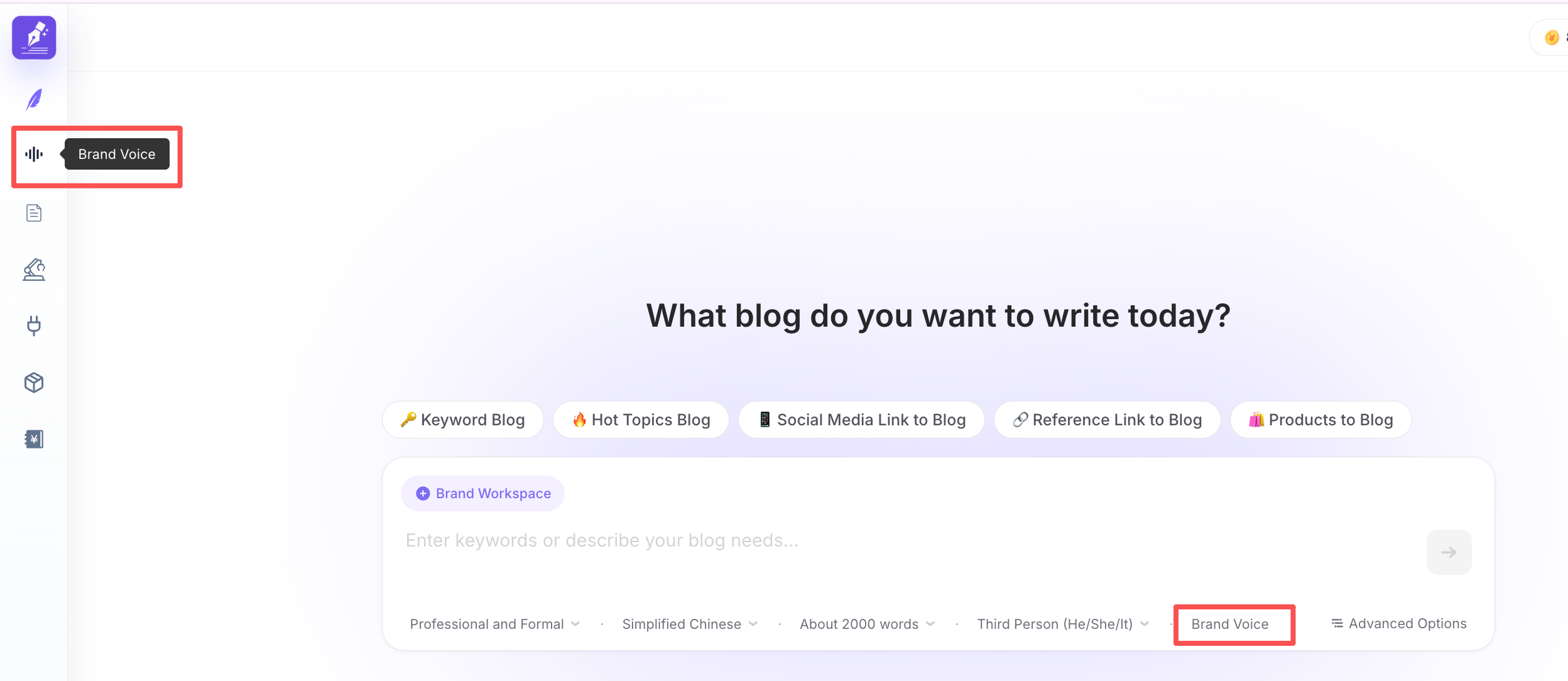
The setup process includes four steps:
- Goal
- Brand
- Voice Settings
- Preview
Once saved, the Brand Voice becomes available for all AI writing tasks.
二、Why Use Brand Voice?
A Brand Voice allows AI to consistently write in the style that best represents your business.
It helps you:
- Keep a consistent tone across all content
- Adapt writing for different marketing goals
- Reduce repetitive prompt writing
- Generate content that better reflects your brand identity
Whether you're creating SEO articles or product pages, the right Brand Voice ensures AI writes with the appropriate focus.
Step 1: Choose Your Goal
Start by selecting the primary objective for this Brand Voice.
Available goals include:
- Drive SEO Traffic
- Increase Conversions
- Build Brand Authority
- Boost Engagement
- Scale Content Production
- Highlight Product Value
Your selection influences how AI structures and prioritizes the generated content.
Step 2: Brand Information
Provide your brand name and website.
After clicking Start Analysis, SEONIB analyzes your website and generates a Brand Summary that serves as the foundation for your Brand Voice.
Step 3: Configure Your Voice
Brand Summary
The Brand Summary is automatically generated from your website and helps AI understand your business, positioning, and value proposition.
If your website changes significantly, you can rerun the analysis to refresh the summary.
Industry
Industry is selected by choosing one of the recommended tags.
No manual input is required.
Only one industry can be selected for each Brand Voice.
Choosing the correct industry helps AI use more relevant terminology and writing patterns.
Target Audience
Select the audience you want this Brand Voice to communicate with.
Examples include:
- Ecommerce Sellers
- Independent Store Owners
- Content Creators
- SEO Specialists
- Business Owners
Only one target audience can be selected.
AI adjusts its language and messaging based on the selected audience.
Information Priorities
Information Priorities tell AI what should receive the most emphasis.
Available categories include:
- Results
- Efficiency
- Cost
- Ease of Use
- Trust
- Differentiation
You can also add custom priorities.
The priorities you select—and their order—will influence the final output.
Brand Personality
Choose the personality that best represents your brand.
Common styles include:
- Direct
- Persuasive
- Analytical
- Friendly
- Bold
You can also define your own personality traits for a more customized writing style.
Writing Preferences
Enable or disable writing behaviors based on your needs.
Options include:
- Prefer shorter sentences
- Use metaphors
- Include statistics and data
- Add stronger calls to action
These settings help AI better match your preferred writing style.
Scenario Tone
Different content formats require different communication styles.
You can configure separate tone settings for:
- Blog Posts
- Landing Pages
- Advertisements
Each scenario supports additional tone controls, CTA intensity, and writing characteristics, allowing AI to adapt its style automatically.
Step 4: Preview
Before saving, test your Brand Voice by entering a sample topic.
Click Generate Preview to see how AI writes using the current configuration.
The preview generates a short sample paragraph for evaluation, not a complete article.
If you're happy with the result, click Finish to save your Brand Voice.
三、Using a Brand Voice
Once created, a Brand Voice can be selected directly while generating content.
On the content creation page, choose your preferred Brand Voice from the Brand Voice dropdown menu.
AI will automatically apply the selected voice to all newly generated content.
Switching Brand Voices is an easy way to adapt your writing style for different campaigns without changing your workflow.
四、What Does Brand Voice Control?
A Brand Voice influences how AI writes by applying your configured preferences, including:
- Content objective
- Brand positioning
- Information priorities
- Brand personality
- Writing preferences
- Scenario-specific tone
Different Brand Voices can produce noticeably different outputs, even when using the same prompt.
五、Brand Voice Limits
The number of Brand Voices you can create depends on your subscription plan.
| Plan | Brand Voices |
|---|---|
| Free | Not available |
| Starter | 1 |
| Growth | 5 |
| Agency | 10 |
Once you reach your limit, you'll need to delete an existing Brand Voice or upgrade your plan before creating another.
六、Best Practices
Instead of using a single Brand Voice for every situation, create dedicated voices for different business goals.
For example:
| Brand Voice | Best For |
|---|---|
| SEO Voice | Blog articles and educational content |
| Conversion Voice | Landing pages and sales copy |
| Authority Voice | Thought leadership and industry insights |
| Product Voice | Product pages and feature announcements |
| Engagement Voice | Social media and campaign content |
Using the right Brand Voice for the right task helps AI generate content that feels more natural, consistent, and aligned with your marketing objectives.
七、Frequently Asked Questions
Where do I select a Brand Voice when creating content?
You can select a Brand Voice from the Brand Voice dropdown menu at the bottom of the content editor.
The selected voice will be applied automatically to all newly generated content.
Does the Preview generate a full article?
No.
The Preview generates only a short sample paragraph so you can quickly evaluate the writing style before saving.
Is Brand Voice available on the Free plan?
No.
Brand Voice is available starting with the Starter plan.
- Starter: 1 Brand Voice
- Growth: 5 Brand Voices
- Agency: 10 Brand Voices
For the best experience, create multiple Brand Voices for different objectives and switch between them as your content strategy evolves.