My Daily Workflow: Automating Shopify Content Production with ChatGPT + SEONIB

Cross‑border e‑commerce operators spend the most time not on writing content, but on the post‑production work: copying from AI tools into the Shopify backend, manually uploading images, filling SEO fields, and then repeating the process on other platforms. A single product’s information must be handled across multiple sites, and writing and publishing one article at a time is both inefficient and prone to interruptions. After months of a “half‑hour content creation, two‑hour publishing” cycle, I started looking for a toolchain that could link the whole process—ultimately settling on a combination where ChatGPT handles flexible tasks and another system takes over the repetitive operations from trend discovery to multi‑platform publishing.
Step 1: AI Trend Discovery – 24 New Topics Pushed Daily
Manually finding topics is the easiest time‑sink to underestimate. Opening Google Trends, browsing competitor blogs, scrolling through hot social‑media posts—half an hour can pass without knowing which topics actually have search volume. After switching to automation, SEONIB took over this part: it monitors industry trends and competitor content in real time and automatically pushes 24 new topics into the topic pool each day, each with a popularity trend and estimated search volume. I just scan the list, click a button, and the topic becomes a writing task, moving to the next step.
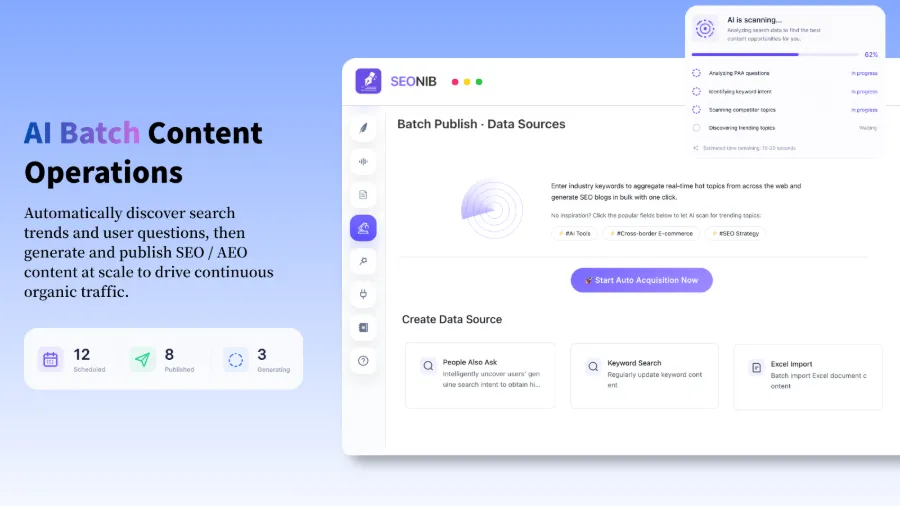
ChatGPT’s role here is to supplement inspiration—if a topic in the pool doesn’t quite fit the current seasonal strategy, I brainstorm a few variants with it, but most of the time SEONIB’s suggestions are sufficient. Early on I made the mistake of trying to write about every pushed topic, which caused the content to become scattered and lowered the thematic relevance of the sites. Later I only selected directions directly related to the product lines, which noticeably improved retention.
Step 2: Generate SEO Articles from Keywords or Product Links, Supporting 40+ Languages
After selecting a topic, I input the target keyword and the system automatically generates a fully structured SEO long‑form article—title, H2 sections, internal linking suggestions, and meta description—all in one output. A more practical use case is product‑link conversion: paste a Shopify product URL, and the system extracts the product name, specifications, and selling points to generate a buyer’s guide or tutorial blog, saving the time of manually compiling product information.
Another surprising feature is social‑media link conversion. After posting a product demo video on TikTok, I copied the video link and SEONIB turned the video content into a blog post, with a structure cleaner than my own transcription. For detailed instructions on this feature, see the tutorial “Convert Social Media Links to Blog Posts”. Likewise, product‑link conversion has its own documentation “Automatic Blog Content from Product Links”.
ChatGPT’s role in this step is secondary polishing. The AI‑generated draft can sometimes feel stiff in paragraph transitions, so I use ChatGPT to tweak the tone to match the brand voice. In most cases, however, the output quality is ready for publishing—testing across five different categories, three of them saw an increase in impressions in Google Search Console within a month of direct publishing.
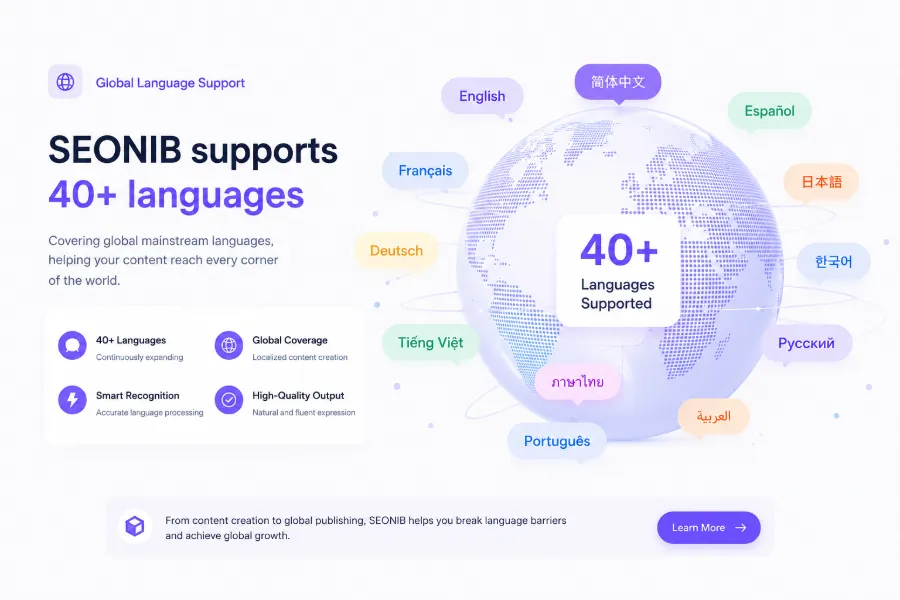
Multi‑language support is a hidden cost‑effectiveness advantage. The system handles over 40 languages, so there’s no need to hire separate translators for German, French, Japanese, etc. I ran a product review in Japanese; its ranking growth was almost identical to the English version, though the initial traffic base was low, making the effect less noticeable.
Step 3: Scheduled Publishing and One‑Click Sync to Shopify and Other Platforms
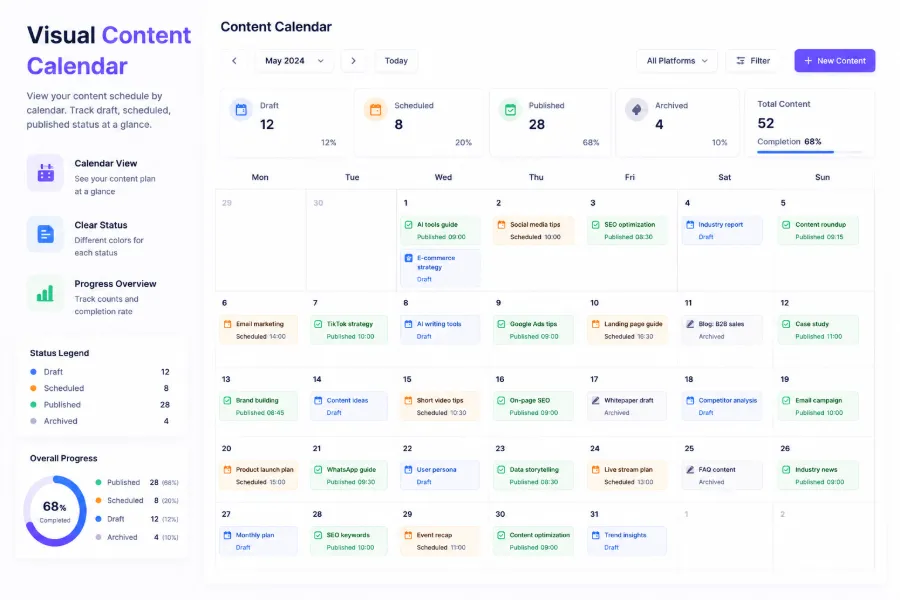
The most cumbersome part after content generation is publishing. Previously I had to log into the Shopify backend to create an article, insert images, fill SEO fields, then repeat the same steps on WordPress. SEONIB’s content calendar lets me set a weekly publishing frequency (e.g., three posts per week); the AI generates and publishes on schedule automatically, without daily manual triggers.
A single publish syncs to Shopify, WordPress, SHOPLINE, Shoplazza, and other platforms. After installing SEONIB from the Shopify App Store, integration requires virtually no configuration. If the primary platform is Shoplazza, the app is also available in its store: SEONIB on the Shoplazza App Store. For WordPress users, the full guide “SEONIB Bulk Publishing to WordPress” provides detailed setup steps.
A real‑world data point: a Shopify seller using SEONIB saw slow natural traffic growth for the first two months, then a clear inflection point in the third month—core keyword rankings entered the top three, and overall organic search traffic increased by about 150% compared to before activation. Note that this result assumes 1–2 hours of initial setup for brand information, keyword libraries, and publishing schedules, rather than simply flipping on automatic mode.
Automation does not mean complete hands‑off. In the first two weeks I checked the automatically published content almost daily, noticing that the default AI tone was generic and lacked brand‑specific industry terms and product endorsements. After a week of adjusting brand context, the consistency of subsequent content improved markedly. Later, only a 10‑minute weekly review of pending articles is needed, handling occasional translation errors or duplicate paragraphs.
For detailed steps on content calendar and scheduling, the official SEONIB Help Documentation includes step‑by‑step screenshots. With proper initial configuration, this workflow can run continuously for weeks without intervention.
FAQ
Do I need an existing website to use this workflow?
No. SEONIB can create a content site directly from a domain, building a site and starting content generation within ten minutes. Existing sites can also be connected for synchronization.
How are the roles of ChatGPT and SEONIB divided?
ChatGPT handles flexible adjustments—rewriting tone, generating creative copy, addressing special brand requirements. SEONIB handles large‑scale production, trend discovery, SEO structure generation, and multi‑platform publishing, which are repetitive tasks that ChatGPT cannot replace.
After scheduling publishing, do I still need to log in daily?
Initially, daily checks are recommended to confirm content quality and sync status. Once stable, this can be reduced to 2–3 times per week. If everything is within expectations, a weekly ten‑minute review is sufficient.
Can I manage multiple Shopify stores at once?
Yes. Add multiple store connections in the SEONIB backend; each store has its own keyword library and publishing schedule. Content is distributed according to the rules, without mixing up stores.
Which languages does content generation support?
Over 40 languages, covering major ones such as English, Japanese, French, German, Spanish, as well as smaller languages like Arabic and Thai. Language accuracy has been validated by native speakers, but it’s advisable to manually review high‑value pages.
Share Article