After I “laid off” the content team, content output increased tenfold

Before, I spent three days each week on topic selection, writing, layout, and publishing, and my hair fell out faster than the content grew. Every morning I opened the backend and saw the empty “write something” field, and I didn’t feel like going to work at all. Then I tried handing the whole process over to an automated system— from hotspot discovery and article generation to SEO optimization and multi‑platform publishing—letting it run by itself, with only a human approval step at critical points. Now I sip tea each morning, glance at the schedule, and see the content factory already humming away.
Step 1: Feed brand information and rules to the AI so it can think
At first I thought I could just fill in a few words and it would work, but the AI didn’t recognize my brand and produced content that sounded like another company’s official press release. Later I sat down and fed it the company description, brand tone, target industry, and core keywords. I configured a helper node in SEONIB once, and all subsequent generation nodes automatically inherited this background, so I didn’t have to repeat it for every article.

The setup is simple—just one Enduser Config node where you fill in the company name, brand voice, and industry, and every downstream AI agent knows how to speak. This configuration is one‑time; each generation later automatically uses this information as a base, so you don’t have to teach it repeatedly. If you’re not familiar with basic SEO tools, you can skim the Best SEO Tools Guide for Beginners to understand the whole chain faster.
For deeper configuration details, see the SEONIB Help Documentation, which clearly explains how brand context, internal linking rules, and asset libraries work together.
Step 2: AI brainstorming + automatic topic discovery, never run out of ideas
Finding topics used to involve scrolling through news, reading competitors’ articles, and digging into comments on my own old posts, which only yielded two or three angles in a morning. Now the system includes a brainstorming assistant; I can simply ask it, “What new trends are emerging in the cross‑border e‑commerce community?” It pulls from the brand information I previously set and suggests several high‑potential topics, complete with search volume and competition data.
What surprised me most was the automatic topic discovery feature. The AI monitors industry trends and competitors’ content gaps daily, pushing new directions into my topic pool. According to the product page data, an average of 24 new topics are added each day, ranging from social‑media hotspots to long‑tail keywords. I find this capability more valuable than writing a few extra articles—it eliminates the decision fatigue of “what to write today.”

A Medium article shares a case where a content creator used AI to capture hotspots ahead of time: Experience of a Content Creator Using AI to Capture Hotspots First. It discusses similar automated discovery strategies and is very insightful. Additionally, for a comparison of topic‑generation capabilities across other AI SEO tools, see the comparative review 7 AI SEO Tools to Help You Rank Faster.
Step 3: Content generation and SEO optimization, AI does it all
Once a topic is selected, the generation stage is the most reassuring. Whether I input a keyword, paste a product link, drop a social‑post URL, or provide a reference article, the AI can produce a fully structured, SEO‑optimized article within minutes. It supports 40 languages; I’ve tried generating Chinese articles from English keywords, and the result was smoother than my own translation.
The video demo shows how a product link can be turned into a blog with a single click, automatically assembling the title, paragraphs, internal links, and cards. The built‑in SEO optimizer analyzes the content, suggests which keywords to insert, and recommends title tweaks to boost click‑through rates. I found that its keyword suggestions are often more niche yet truly traffic‑driving than my intuition, because the AI pulls real‑time long‑tail search data, such as “Shopify independent store product description generation,” which I would never have thought of before.
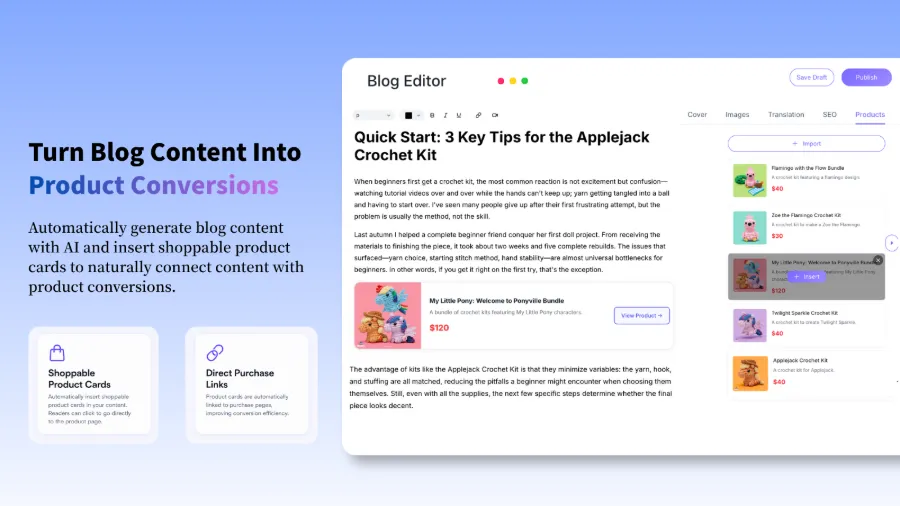
If you’re in e‑commerce, check out this hands‑on guide Turning a Product Page into a Blog with SEONIB in One Click. It demonstrates how to convert a product page into a buyer’s guide or review article. The product cards inside the article are automatically inserted and link directly to the purchase page, shortening the conversion path.
After generation, the next step is publishing. SEONIB supports bulk publishing to WordPress; this guide SEONIB Bulk Publishing to WordPress: Turning Your Blog into an Automated Content Factory explains how to automate the entire publishing pipeline.
Step 4: Set a schedule, AI auto‑schedules + multi‑platform sync
Writing an article is only the first step; continuous updates create accumulation. I set a schedule of three posts per week in the system, and the AI automatically queues them according to the content calendar, generating and publishing on time. At first I still checked the backend daily, but then I realized it never missed or mis‑posted anything, so I completely let go.
The schedule supports multi‑platform sync—WordPress, Shopify, Shopline are all directly integrated, so one publish pushes to all sites. If you want to see the impact of this automated scheduling on marketing ROI, read this article Can SEONIB Help With Marketing?, which analyzes the long‑term value of automated publishing for traffic accumulation.
Human Review: Automation is not neglect
The biggest fear with automation isn’t speed, it’s going off‑track. In the first week of testing, I let it generate ten articles automatically; three of them about “independent store marketing” turned into “how to maintain a car” because the AI confused a trending topic with my preset industry keywords. Since then, I enabled a Human‑in‑the‑Loop node: generated articles first go into a “pending review” queue, where I spend a couple of minutes previewing the content and format before clicking publish.
This step didn’t slow things down; it actually gave me peace of mind. When article structure drifts, or product/brand descriptions are inaccurate, I can fine‑tune directly in the preview interface. The human review node can be set only at critical steps—e.g., reviewing only before publishing while topic discovery and generation remain fully automated. This ensures quality without having to monitor the process daily.
FAQ
Q1: Can this system only generate English content?
No, it supports 40 languages. I’ve tested Chinese, English, and Japanese, and the article structure stays intact. Language selection is made directly when creating a generation task, and translation quality depends on the underlying model, which is sufficient for most common business domains.
Q2: How to ensure the quality of generated articles? Will they be all fluff?
After enabling the human review node, each generated article first appears in a preview where you can check the title, paragraph logic, keyword density, and product cards for correctness. The built‑in SEO optimizer also provides a quality score; articles below a certain threshold are automatically flagged. Initially, spend about five minutes a day previewing; once you understand the AI’s generation preferences, you can gradually grant more autonomy.
Q3: Can I connect directly to my Shopify/WooCommerce site?
Yes, SEONIB natively supports WordPress, Shopify, Shopline, Webflow, and other common platforms. You only need to authorize the connection once in the system, and subsequent published articles will automatically sync to the corresponding site’s backend, eliminating manual copy‑pasting. If your site isn’t listed, you can use Webhooks or the API for custom integration.
Share Article