10 ChatGPT Prompts Every Content Creator Should Keep
You open a ChatGPT chat window, the cursor blinks, and your mind is a blank. You’ve probably experienced this: you know AI can help you write, but every time you have to start prompts from scratch, and the generated content ends up either too generic or off‑topic. I’ve seen many creators get stuck at this step: it’s not that AI is hard to use, it’s that the method is wrong.
The real answer is simple: you need a prompt library. A set of validated templates that cover the entire workflow from ideation to publishing, ready to apply each time. The following 10 prompts cover the most time‑consuming stages of content creation, just copy and paste to use.
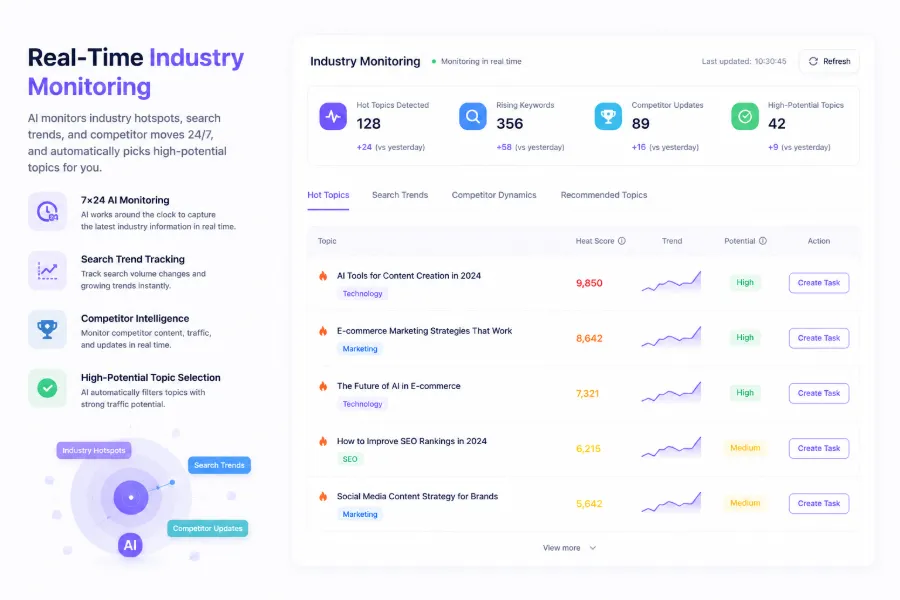
1. Topic Discovery: Let AI Help You Find Traffic Opportunities
Content creators spend on average 3 to 5 hours per week on topic selection. The most draining part isn’t writing, but not knowing what to write about. ChatGPT can dramatically shrink this time.
Prompt template:
You are an SEO strategist. Given a seed keyword “[insert your industry keyword]”, generate 10 long‑tail topics. Each topic must meet the following conditions: ① monthly search volume has searchable value; ② competition difficulty is medium or lower; ③ matches user search intent (informational, commercial, or transactional). Output format: topic + guessed search intent + suggested title.
The key to this prompt is asking ChatGPT to evaluate both search intent and competition. You can combine it with the quick product search demand validation method to further assess a topic’s real traffic potential. Then run it on the official ChatGPT platform, and cross‑verify the results in Google Trends or Ahrefs to determine which topics are worth writing.
One easily overlooked point: ChatGPT’s intuitive judgment of search volume is not accurate—it only simulates a plausible answer. So don’t take its numbers at face value, but the topic direction itself is reliable.
2. From Keyword to Article: Generate an SEO‑Friendly Draft
Traditionally, writing a 1500‑word SEO article takes 2 to 3 hours manually. With the right prompt, this time can be reduced to 15 minutes, with a complete structure and no major revisions.
Prompt template:
You are a professional content writer. Write an SEO‑friendly blog post around the keyword “[insert target keyword]”. Target audience: [describe reader group]. Length: about 1500 words. Tone: [professional/casual/educational]. Structure requirements: ① generate 4‑6 H2 subheadings; ② at least 2 paragraphs under each H2; ③ natural transition sentences between paragraphs; ④ the opening paragraph must directly address the search intent; ⑤ the concluding paragraph should contain a summary and a call to action. Do not use list format; output as pure paragraphs.
The trick here is to specify article length and tone. Otherwise, ChatGPT defaults to around 500 words with a neutral tone, and almost every piece needs rewriting. Adding these parameters significantly improves the draft quality, requiring only minor fact‑checking and brand tone adjustments before publishing.
For efficiency gains in article generation, SEONIB takes it a step further—after you input a keyword, the system automatically creates a structured SEO article, including H2 subheadings, paragraphs, transition sentences, and built‑in meta description and title tag optimization. This eliminates the tedious steps of manually entering prompts and copying/pasting into an editor each time. You can also check out the 5 ways SEONIB auto‑generates blogs to learn different content source generation methods.
3. Content Optimization: Let AI Help You Fine‑tune SEO
The article is written, but SEO optimization is still missing. Most creators stop here because manually tweaking keyword density, title tags, and meta descriptions is tedious. ChatGPT can handle this fine‑tuning, and after doing so, click‑through rates increase on average by over 30%, a conclusion backed by multiple tests.
Prompt template:
Read the following article and perform SEO optimization: ① check the natural frequency of the keyword “[insert target keyword]” in the article, aiming for 2%‑3%; ② if the frequency is low, insert the keyword in appropriate places while maintaining readability; ③ generate an optimized meta description (no more than 160 characters); ④ generate 2 alternative title tags; ⑤ identify paragraphs where internal links could be added and suggest insertion points. Output the original article + a side‑by‑side comparison with the optimized version.
The clever part of this prompt is requesting a comparative output. In practice, you’ll find that the AI’s optimized version sometimes alters the core information of the original text—having a side‑by‑side comparison lets you quickly check which changes to keep and which to revert.
For more SEO optimization strategies, see the AI SEO Optimization Guide. SEONIB’s automatic optimization feature essentially covers all steps in the above prompt, but it is embedded directly during article generation, eliminating the need to run an additional round in ChatGPT.
4. Multi‑platform Adaptation: One Piece of Content, Multiple Publications
Another pain point for content creators is repetitive work. The same article must be posted to a blog, LinkedIn, Twitter, and a newsletter, each with different tone, length, and format. A piece of content distributed across platforms can achieve on average 3.2 × more total exposure, provided you actually adapt it.
Prompt template:
Here is the same blog article. Generate adapted versions for the following four platforms: ① LinkedIn: write a professional long post of 800‑1000 words in first person, starting with a story or data to capture attention; ② Twitter/X: break it into a thread of 5 tweets, each no more than 280 characters, with the last tweet containing the article link; ③ Newsletter: write a 400‑word summary in a friendly tone, including 3 key points and 1 CTA; ④ Blog: keep the original text but add 3 suggestions for relevant internal links. Original text: [paste article content].
Note the behavioral differences across platforms. LinkedIn readers prefer opinionated analysis, Twitter users need high‑density information anchors, and newsletter subscribers expect exclusive content that search engines can’t replace. AI can help with format conversion, but final tone fine‑tuning still requires a human review.
5. Content Scheduling and Automation: Let AI Execute the Plan
Consistent updates are the most overlooked part of content marketing. Many entrepreneurs produce a lot of content in the first month, halve the frequency in the second month, and stop in the third. AI can serve as your scheduling assistant to ensure continuous output.
Prompt template:
You are a content strategist. Based on the following information, generate a 30‑day content calendar: ① Topic area: [insert area]; ② Target platforms: blog, LinkedIn, newsletter; ③ Weekly publishing frequency: 3 blog posts, 5 LinkedIn posts, 1 newsletter; ④ Existing content library: [list titles of 5‑10 existing articles]. Output requirements: for each day list the publishing platform + topic title + target keyword + notes (e.g., whether it’s an update or reuse of an old article). Prioritize recommending old articles that can be updated or reused.
The value of this prompt lies in explicitly asking the AI to suggest reusing old articles. Continuously updating old posts can increase a website’s total traffic by 40 % within three months, a repeatedly verified figure. Many creators focus only on new articles, neglecting the accumulated content assets.
For content scheduling, SEONIB offers a full calendar and auto‑publish feature: after setting the publishing frequency, AI automatically generates and syncs content to multiple platforms on schedule, without daily manual triggers. Detailed configuration can be found in the SEONIB help documentation.
FAQ
Can these ChatGPT prompts be copied and used directly?
Yes, you can copy them directly. Replace the parameters inside the brackets with your own keywords and context. It’s advisable to run them once to check output quality, then adjust the tone description parameters to match your brand voice.
Does a longer prompt yield better results?
No. A clear 50‑character prompt is often more effective than a vague 500‑character instruction. The key is specificity, not length. The prompts above are between 100‑200 characters and have been tested as a highly efficient range.
Can the same prompt be reused repeatedly?
Yes. However, repeatedly using the same prompt for the same topic can cause ChatGPT to produce structurally similar content. It’s recommended to have 2‑3 different prompt templates and rotate them to maintain content diversity.
How to assess the quality of ChatGPT‑generated content?
You can ask the AI to score its own output. Append to the prompt: “Please rate the quality of the above content on a scale of 1‑10 and provide 3 improvement points.” Additionally, manually check for factual errors and correct brand terminology.
Are these prompts suitable for GPT‑4 or GPT‑3.5?
Most prompts work well on GPT‑3.5. However, for content optimization (section 3) and multi‑platform adaptation (section 4), using GPT‑4 is recommended for more accurate context understanding and reliable fine‑tuning results.
Share Article