
How I Take Over Shopify Content Pipeline with SEONIB, Boosting Efficiency 10‑Fold

For a whole year I spent every night manually pasting pages, adjusting formatting, and inserting images in the Shopify admin. SEO optimization? No time at all. When a new product launched I had to write a product blog, create a promotional landing page, chase industry trends—each piece from idea to publishing took at least two hours. I tried outsourcing, I tried generating with ChatGPT and then tweaking manually, and I discovered the bottleneck wasn’t “can’t write,” but “the mountain of chores after writing.”
Then I threw away all manual steps and built an automated pipeline that turned the whole process into a “press a button and go to sleep” workflow. This post is not hype; it only details my exact steps and the pitfalls I hit.
Step 1: Let AI “Find” Topics for You, Stop Scouring Little Red Book
Before, I spent 3‑4 hours each week browsing Little Red Book, competitor blogs, and Google Trends just to find a “potentially writable” topic. After that I had to estimate search volume, check competition, and compile a list—only to discover that half of the topics weren’t being searched at all.
After handing this stage to AI, the only thing I do now is glance at the daily topic list it pushes to me each morning.
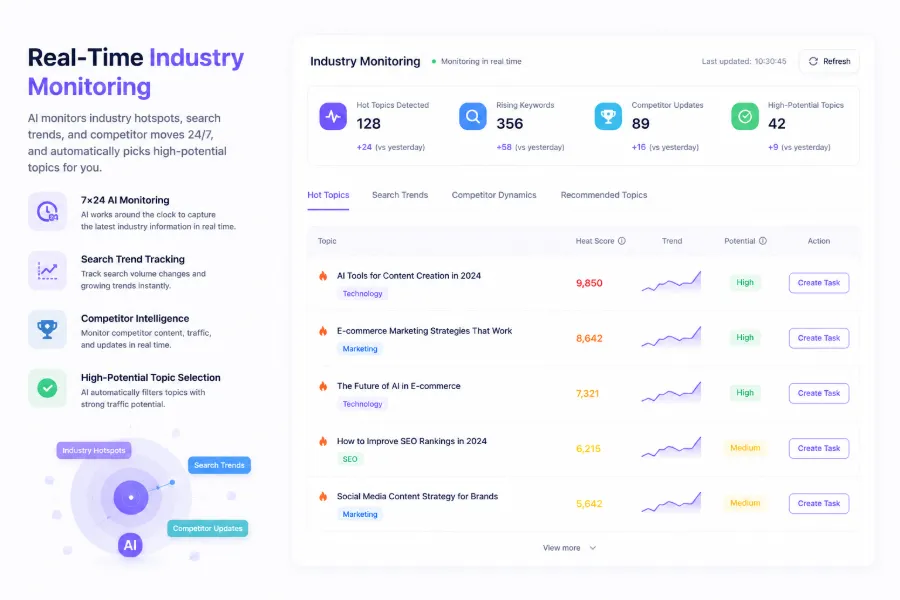
The dashboard automatically pushes more than 20 new topics per day, each tagged with search‑volume estimates and trend heat. I used to manually judge “Can I write about this keyword?” now AI tells me directly “This topic is trending, competitors haven’t covered it yet.” When a suitable topic appears, a single click turns it into a writing task—no extra tab for notes.
I was skeptical at first: would AI’s suggestions be too generic? After two weeks of testing I found it uncovered many topics I would never have seen on Little Red Book—e.g., a long‑tail keyword suddenly surfacing on a niche forum, which AI detected as a shift in search trends. This “competitor content gap” detection is impossible to do manually. I discuss the AI search indexing strategy in another guide, 7 Proven Methods for Getting Your Content Cited by AI Answer Engines; here I’ll just note that AI’s early‑trend spotting itself creates a traffic window.
Step 2: Throw the Product Link In, Let AI Spit Out an Article
If topic selection is the starting point, the writing workflow used to be the biggest pain. Each product blog took me 1.5 hours: scrape product info, find images, design structure, write SEO meta description, insert internal links. The truly “human” part was maybe 20 % of the work.
Now it takes less than three minutes from past the link to a draft.
SEONIB can generate content from several sources. The most common is dropping a product link in; AI automatically extracts the product name, specs, usage scenarios, and creates a buyer’s guide or tutorial blog. Keywords can also be a starting point—enter a core term, AI expands it with related long‑tails and writes a full SEO article. Social‑media posts are useful too; when I see a high‑potential discussion on Twitter, I paste the link and AI expands it into a structured blog.
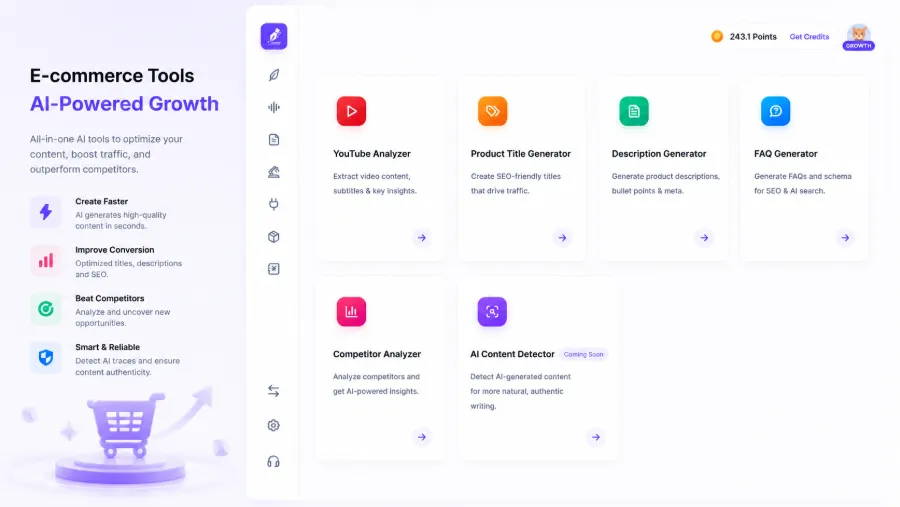
I especially want to highlight how AI handles brand context and SEO meta data. At first I only fed the product link and didn’t set any brand rules, so the generated titles and content didn’t match my site’s existing articles. After configuring brand context, keyword rules, and internal‑link strategy in the backend, the subsequent articles aligned in style and terminology. For the implementation details, see the guide One Platform, Three AI Growth Modes, which explains how AI processes brand information in different modes. Supporting 40 languages isn’t something I use often, but if your Shopify store serves multiple countries this feature saves far more than just writing articles—you can even skip a translation team.
Step 3: Set a Alarm, Let Time Do the Rest
After the automated content line was up, the most counter‑intuitive thing happened: I still had to make decisions—how many posts per week, which days to publish, how to distribute topics.
My schedule is automatic publishing on Wednesdays, Fridays, and Sundays, with at least two days between posts. After a month the site’s indexed pages grew from 30 to 120—not because I wrote more, but because search engines saw a “consistently updated” site. Google’s crawler doesn’t crawl all pages at once; it evaluates how often you update to decide how frequently to crawl. Maintaining a publishing rhythm is far more important than a single viral post, a lesson I only truly grasped after three months.
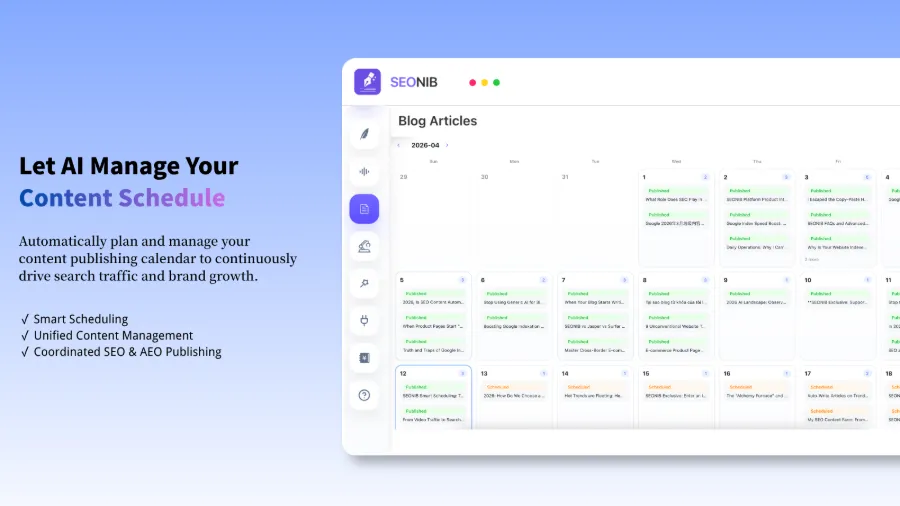
I fell into a stupid trap at this stage. In the first week I trusted automation too much and let AI publish without preview—resulting in two identical titles: “Shopify SEO Optimization Guide” and “Shopify SEO Optimization Guide (2).”. By the time I noticed, they’d been live for three days, and Google Search Console showed the two duplicate pages competing for rankings. Index volume rose, but effective traffic dropped. I then added a preview step to the content calendar, checking title and excerpt before each publish. Details on scheduling are clearly written in the document Batch Publishing Data Sources.
Initially I worried about content quality. Honestly, the first two weeks felt hollow—structure was fine, sentences were smooth, but something was missing. After a week of configuring brand context, industry term glossaries, and a product knowledge base, the issue improved by about 70 %. For deeper configuration tweaks, see the SEONIB Help Center, especially the detailed sections on context settings.
Step 4: One‑Click Sync to Your Shopify, No More Backend Logins
Manually syncing a piece of content to Shopify takes eight minutes—login, create page, paste body, adjust formatting, upload images, set SEO fields, choose category, schedule publishing. Syncing to multiple platforms doubles the time.
Now a single publish pushes the content to all connected platforms automatically. No need to log into WordPress, Shopify, or SHOPLINE backends separately. The once‑painful “publishing workflow” is now a status badge: “Synced to 4 platforms”.
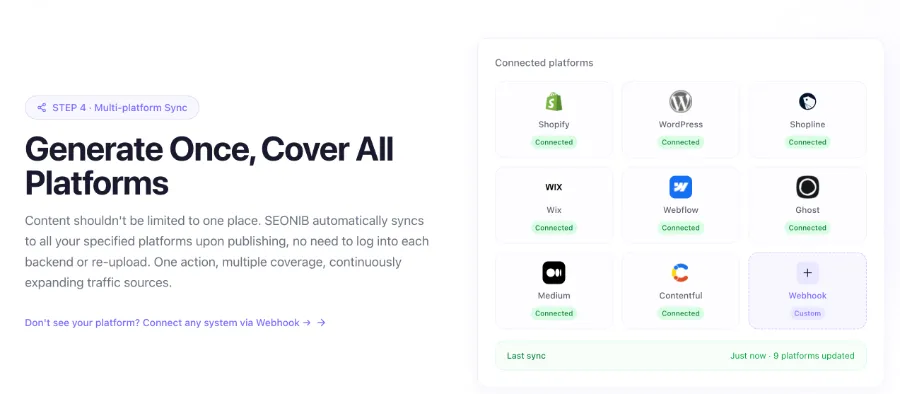
The most striking moment for me was one night at 11 p.m. I saw a breaking industry news item on my phone, grabbed a related topic from the list, clicked “Generate & Publish”. The next morning the article was already live on Shopify and automatically synced to my blog site—all without ever opening a computer.
If you use SHOPLINE, you can find the integration directly in the App Store; I’ve tested it—SEONIB is now on SHOPLINE’s App Store, setup takes under two minutes. The same experience applies to Shoplazza—see SEONIB on Shoplazza’s App Store.
Looking back after the whole pipeline runs smoothly, a ten‑fold efficiency boost isn’t an exaggeration. What used to take a month now takes a week. The core change isn’t speed; it’s the shift of my mental effort from “execution” to “decision‑making”—choosing which topics are worth writing, aligning content with brand tone, and deciding when to pause automation for urgent tasks. The overall design logic of this automation flow is explained more systematically in What Is SEONIB? Full Guide to AI SEO Automation in 2026.
If I have to point out the most surprising discovery: the more automation you implement, the stronger your control over content becomes, not weaker.
FAQ
Do I need an SEO background to use SEONIB?
No formal SEO training is required, but understanding basic concepts helps. AI handles title optimization, meta‑description writing, and internal linking, but you still decide topic direction and quality. A half‑hour familiarization with keyword intent and content authority is enough.
How many Shopify stores can I connect?
There’s no official limit. I currently have three stores connected (one test site and two live sites) with no conflicts. If you have more than five stores, I recommend a week‑long pilot before full rollout.
Will automatically generated content be flagged as spam by search engines?
It depends on how you use it. If you publish with no configuration, no brand context, and no review, the output can be noisy. After two months of usage, my conclusion is: as long as you set brand rules and spend 30 seconds previewing before publishing, the content passes Google’s standard quality checks. The key isn’t whether it’s AI‑generated, but whether it provides real value to users.
What publishing frequency is safe?
From my three‑month test, 3‑4 posts per week is a safe rhythm. I tried daily posts; after two weeks the indexed pages jumped from 120 to nearly 400, but many non‑core pages had their authority diluted. Consistency beats sheer volume.
How accurate is multilingual content?
I’ve tested English‑to‑French and Chinese‑to‑English; accuracy lands around 85‑90 %, with terminology handling better than I expected. For high‑precision fields like medical or legal content, a human review is still advisable. For typical product blogs and tutorials, publishing directly is fine.
Share Article


