
Don't Just Look at Feature Lists: How to Choose an AI SEO Tool—First See How Much Work It Does for You

Last year I spent an entire day turning more than 40 page‑optimization suggestions from a certain “scoring” tool into individual tasks. Rewrite the title, add internal links, trim the meta description, add missing Alt text on images—each suggestion seemed reasonable. A month later, when I logged back into the dashboard, another 30‑plus new suggestions had piled up. Three months passed, the suggestions kept accumulating, and organic traffic stayed flat. The problem wasn’t the suggestions themselves; it was that I had no manpower to implement them.
Later I did a comparison and realized that almost every tool claims “AI helps you do SEO,” but the difference is hidden in the verbs: some write for you, some edit for you, some publish for you; others just hand you the suggestions and call it a day. Instead of comparing the length of feature lists, break SEO into a few stages and see at which step the AI actually finishes the execution for you.
AI SEO Tools Have Split: One Type Gives Advice, the Other Does the Work
The definition of an AI SEO tool is actually very broad: from keyword research, content writing, and page optimization to publishing, post‑publish monitoring, and performance on AI search engines—all squeezed into this category. The typical first‑generation tool was a language model wrapped around a keyword report—you enter a term, it spits out an article with a certain keyword density, then tells you “go publish it.”
By 2026 the market has split. The more useful distinction isn’t “has AI or not,” but whether it’s an assistant or an executor. Assistant‑type tools recommend: they tell you which page to tweak, which topic to write, which piece of content underperforms, and leave the execution to you. Executor‑type tools act for you: research, then write; write, then optimize; optimize, then push to your CMS; and keep watching the page’s performance after publishing.
The bottleneck for most SEO teams has never been insight—it’s the lack of time to digest recommendations. I fall into that category: insights are plentiful, but I lack the hands to turn them into live pages. The idea of “letting AI run first” is becoming a new work culture. The rhythm described in a practical record of letting AI run first is very similar to my current daily routine: trends appear, AI moves first, I decide whether to hit the brakes.
Break SEO into Five Stages and See Where It Drops the Ball
The quickest way to judge how much work a tool does for you is to split SEO into five tasks: research what can win, draft the first version, optimize the page, publish, and monitor after publishing. For each step the tool doesn’t handle, more “homework” falls back to you.
Most tools I’ve seen stop after the first one or two stages. The most common pattern is “score then leave the edits to you”—it gives you a page score, tells you what’s wrong, and waits for you to manually fix it. Executor‑type tools run the whole pipeline: research, then generate a draft, automatically perform on‑page optimization, schedule publishing, and continue monitoring data changes after launch.
| SEO Stage | Advisory Tool (How Much AI Does) | Executor Tool (How Much AI Does) |
|---|---|---|
| Topic Research | Provides keyword suggestions | Automatically discovers trends and pushes topics |
| Content Writing | Supplies a writing outline | Directly generates a finished article |
| Page Optimization | Scores and lists changes | Automatically fixes and optimizes the page |
| Publishing | Provides a draft, manual publishing | Schedules and automatically publishes to CMS |
| Post‑Publish Monitoring | Periodic reports | Continuous monitoring and automatic adjustments |
You can use this table to compare the tool you’re using and see at which stage it drops the ball. The source of content generation is another observation point—some tools only accept keyword input, while others can generate content directly from a product link. The workflow shown in turning a product page into a blog in one click essentially transforms an existing “product page” asset into indexable blog content, eliminating the zero‑idea brainstorming step.
Different Execution Focuses Suit Different People
The distribution of execution points varies widely across tools. Some concentrate automation on technical fixes and on‑page optimization—you point them at a site, and they automatically add canonical tags, structured data, and handle duplicate content. Others handle content research, writing, scoring, and publishing, outputting a finished draft that still requires manual publishing. A third group places execution on the content pipeline, running from topic selection all the way to multi‑platform synchronization.
As a solo site owner with limited manpower, I value the latter more. What truly makes content production stable is scheduling plus automatic publishing plus cross‑platform sync, not occasional bursts of inspiration. The time difference in manual workflows is stark: I used to write an article, then copy‑paste it into WordPress, fill in SEO fields, upload images, set the publish time, and then log into Medium to repost it. Now I generate once and it syncs automatically to all platforms. Manual copy‑pasting and logging into each backend can take half an hour; one‑click generation and sync takes virtually no extra time.
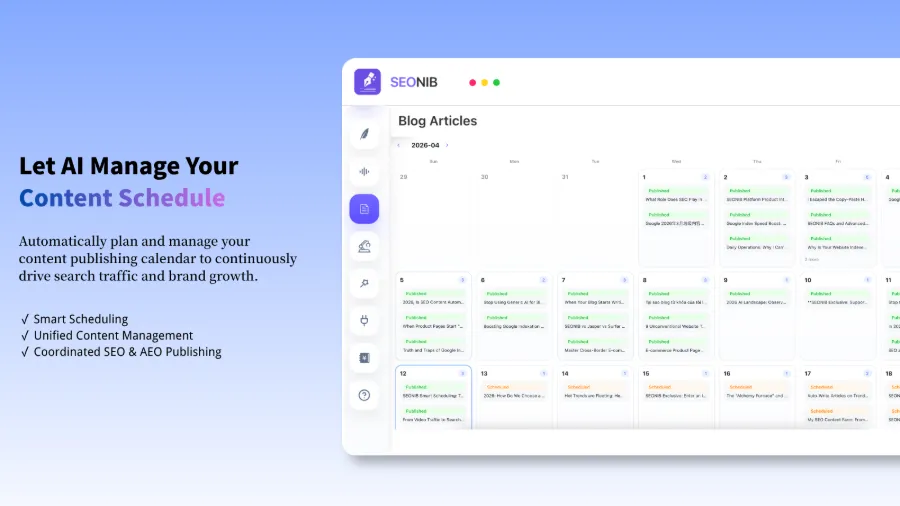
I ran this scheduled‑publishing workflow on SEONIB for a while. After setting the publishing frequency, it automatically discovers trends, generates content, schedules it on a calendar, and syncs to multiple platforms. It supports 40 languages, and a single publish can push to more than ten platforms. For someone without a dedicated content team, this pipeline solves not “I can’t write,” but “I don’t have time to write continuously.”
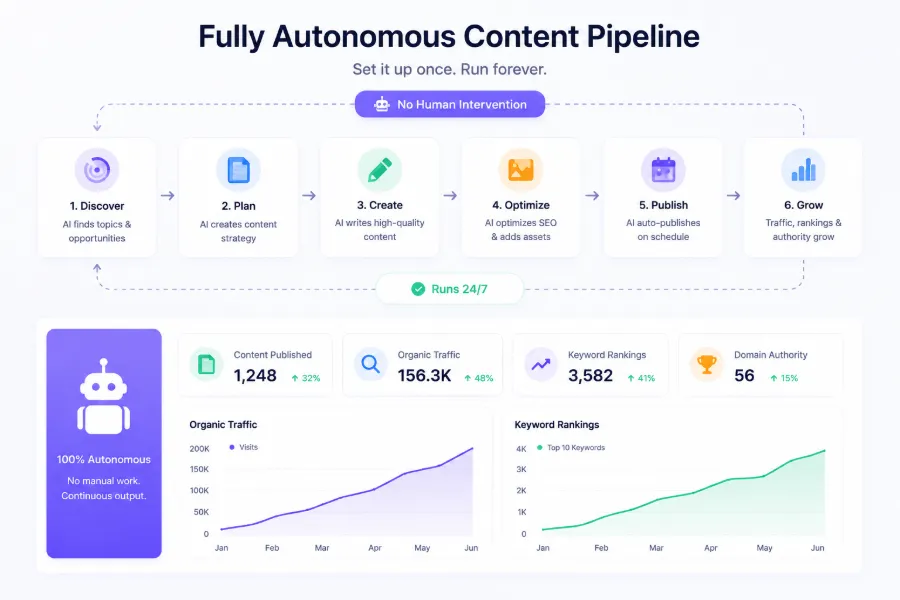
Even after the automatic publishing feature went live, I kept a manual review step before publishing—an essential compromise. Executor tools are not zero‑supervision; at least initially I preview a few items in the content calendar before releasing them. The detailed configuration for automatic publishing is described in the AI Agent Auto‑Publish Complete Guide, which includes trigger conditions and platform integration methods.
In 2026 You Should Ask Two More Questions: AI Search and Billing Model
Optimizing only for Google is no longer sufficient in 2026. More buyers now look for answers directly in ChatGPT, Perplexity, Gemini, etc., instead of opening a search engine first. These AI answers cite source pages; if your content isn’t cited, you lose an entire traffic channel. So when choosing a tool, check whether it optimizes for AI‑answer citations—some tools specifically score content for AI engines, while others ignore this dimension entirely.
The second variable is the purchase model. Many suites package AI capabilities as separate subscriptions or add‑ons, or charge per document or per token. The base price often doesn’t reflect the true cost of AI—what you see as a starting price may only include basic features, while the execution capabilities you need require extra fees. In SEONIB’s pricing structure, the difference between free and paid tiers isn’t just usage limits; it’s the depth of execution. So evaluate based on tier differences, not just the headline price. The exact boundaries between tiers are listed clearly in SEONIB’s tier‑by‑tier differences.
Billing models are a common pitfall; when digging into details, refer to the official help docs, which explain which capabilities are metered and which are included in the subscription. My advice: don’t just count features—first ask “how far does the AI execute for me?” and “what does that step actually cost?”
FAQ
What’s the quickest way to tell if an AI SEO tool is “executor” or “advisor”?
Look at its output. If it gives you a list of suggestions, scores, or change prompts, it’s advisory. If it delivers a published page, fixed technical issues, or content already synced across platforms, it’s an executor. The fastest test: give it a real topic and see whether it can publish an article to your site without any human intervention.
Is a fully automated AI SEO tool always better? Which human steps should still be kept?
No. Full automation saves effort in content generation and publishing, but you should still retain manual review, brand‑tone control, and any pages involving account security or paid conversion. My practice is: let routine blog posts run fully automatically, but manually review product pages and core landing pages before publishing.
If a tool doesn’t support AI‑search‑engine optimization, can I still use it in 2026?
You can, but you’ll miss a growth channel. Traditional SEO and AI‑search optimization aren’t mutually exclusive; they’re additive. If a tool only optimizes Google, you’ll still get traditional search traffic, but if budget allows, prioritize tools that also cover AI‑answer citations, because that competition is still low and early entry costs are lower.
Why are executor tools generally more expensive than advisory ones, and is it worth it?
The extra cost is for the execution itself—saving you manual labor time, which is shifted into the subscription fee. To gauge value, calculate the weekly time you spend “implementing recommendations,” multiply by your hourly rate, and compare that to the tool’s price differential. If you’d spend 5 hours a week manually and the price gap is only a few hundred dollars, it’s usually worth it.
Share Article


