
Continuously Publishing Content in Your Sleep: Automated Content Workflow for Cross‑Border Independent Sites

Manual Publishing Loop: The Hidden Time Black Hole for Cross‑Border Sellers
Operating an independent site, the most demotivating part of the day isn’t the inability to write content, but the need to manually log into each platform after writing to edit, adjust formatting, add images, set SEO information, and then publish one by one. I’ve gone through this cycle: half an hour for topic selection, two hours for writing, half an hour for publishing, only to discover the next day that I forgot to add a link and had to log in again. After a few weeks, the update frequency plummets—not because there’s no content, but because publishing itself becomes a burden. Later I discovered a system that can automatically run the entire process from topic selection to multi‑platform sync, and publishing finally stopped being a drag.
Manual Publishing Loop: The Hidden Time Black Hole for Cross‑Border Sellers
Most independent‑site sellers switch between different back‑ends three to four times a day. In the morning they update a blog on Shopify, in the afternoon they tweak an old article’s SEO description on WordPress, and in the evening they add product descriptions on SHOPLINE or Shoplazza. A common scenario: after writing a product review, they log into Shopify to publish, then copy the content to WordPress to create a new draft, manually re‑add images, adjust H2 heading formats, fill in meta descriptions, and then log into SHOPLINE to repeat the same steps. Just the formatting adaptation and SEO field settings add 15‑30 minutes per additional platform.
This repetitive work’s most direct impact isn’t the time per instance but the long‑term willingness to update. When every publish requires a repetitive mechanical operation, enthusiasm quickly wanes. After a few weeks, the content update frequency drops from five pieces a week to two, then to “want to write but don’t want to publish.”
Below is a comparison of average time spent on each manual step, citing the cross‑border e‑commerce product‑selection tool Cross‑Border E‑Commerce Product Selection Tool Accio as one of the everyday ecosystem tools operators use. This multi‑platform switching hassle is actually common in toolchains:
| Workflow Step | Manual Publishing (Average Time) | Automated Publishing (Time) |
|---|---|---|
| Topic Collection | 15‑30 minutes/day | Automated |
| Content Generation & Editing | 60‑90 minutes/piece | AI‑generated + adjustments |
| Formatting & SEO Optimization | 10‑20 minutes/piece | Automated |
| Multi‑Platform Publishing | 15‑30 minutes/platform | One‑click sync |
The bottleneck of manual publishing isn’t a single step but the cumulative load: producing three pieces of content a week requires 4‑5 hours of publishing time. Automation doesn’t replace creative writing; it replaces those repetitive back‑end operations. By handing formatting adjustments and cross‑platform sync to the system, humans only need to confirm topics and review content.
Building an Automated Topic Pipeline: Bye‑Bye Content Gaps
The benefit of an automated topic system is not just time saving; it solves the most tormenting problem: “What should I write today?” Operators no longer need to scan news, translate competitor articles, or search keywords for inspiration each morning. The system, based on industry trend data and keyword search volume, instantly identifies topics with traffic potential and pushes them into a topic pool. A batch of selectable topics is automatically added each day; operators glance, click if it looks good, and the topic becomes a writing task.
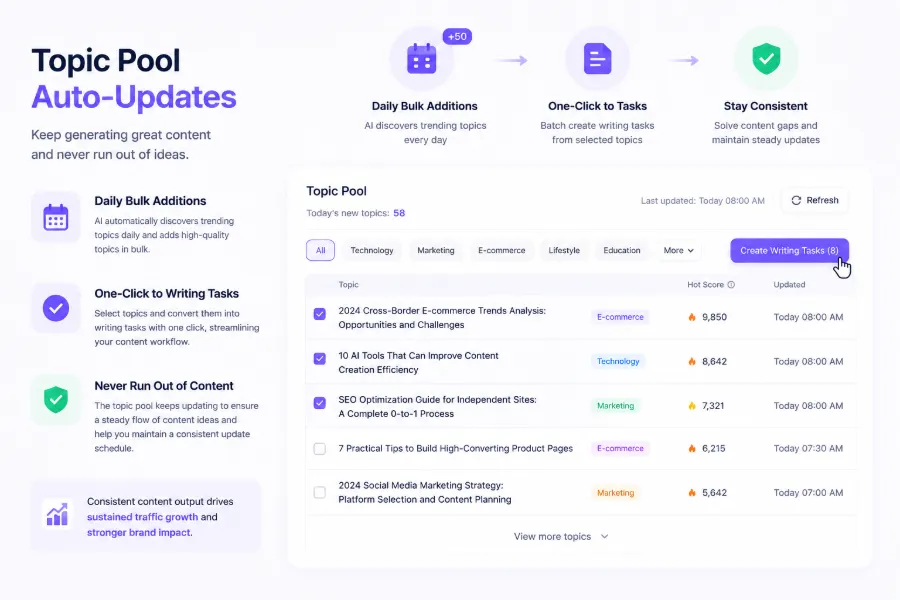
This stable topic pipeline guarantees that content never stops. Search ranking algorithms favor regular updates—sites that remain unchanged for a long time see their indexing priority drop. Conversely, a site that adds new content weekly is crawled more frequently. Automated topics make continuous output a running pipeline rather than a will‑power effort. The produced content can go straight to the generation stage; for more entry points, see SEONIB’s Five Ways to Auto‑Generate Blog Articles.
Content Generation Workflow: From Topic to Deployment Ready
After topic confirmation, the content generation stage begins. AI automatically creates a fully structured SEO article based on various input sources—keywords, trending topics, social posts, product links. During generation it performs: determining appropriate H2/H3 structure from the input, automatically adding internal and external links (based on preset rules), generating meta descriptions and Open Graph tags, aligning the target keyword’s TF‑IDF density, and inserting suitable images and cards.
The core of this process is saving time on formatting decisions. Previously, each article required manual consideration of heading hierarchy, paragraph length, and click‑bait meta descriptions. AI does all of this in one pass, leaving only a simple review for the operator. It’s worth noting that automatically generated articles have limits in factual accuracy—if a topic requires precise data citations or deep industry analysis, AI‑generated content cannot replace human research. In 2017 many companies tried fully automated content farms and were penalized by Google’s algorithm; post‑2020 updates require human review for safe adoption. For most SEO‑driven informational content, AI generation plus light human tweaking is sufficient.
SEONIB turns topics into ready‑to‑publish articles at this stage, supporting output in 40 languages and automatically adjusting tone and terminology based on brand context. The generated blogs can further integrate into a content authority framework; see How Content Builds Brand Authority for analysis on how continuous output builds topical expertise. Some creators have found that adding light human tweaks to AI‑generated pieces boosts weekly output from 2 to 12 articles—documented in the AI‑Assisted Publishing Record of Content Creators.
One‑Time Publishing, Cover All Platforms: Practical Multi‑Platform Synchronization
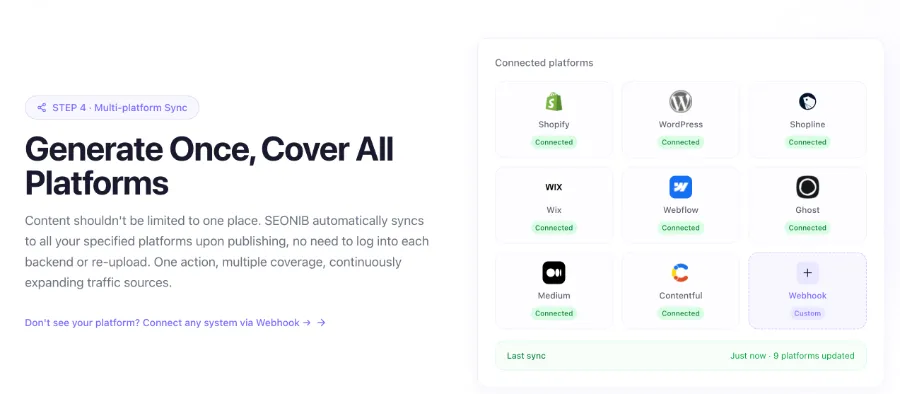
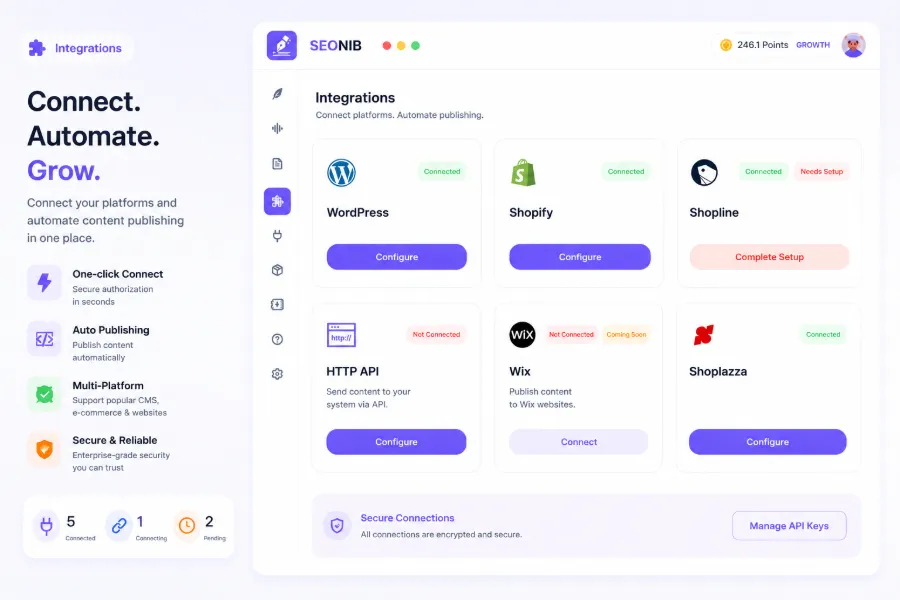
Once a piece of content is generated, the next question is how to distribute it across sites. The core value of auto‑sync is eliminating the “log in one by one” step—publish once and the system pushes to all bound platforms. Currently supported platforms include Shopify, WordPress, SHOPLINE, Shopline, Shoplazza, Webflow, Medium, Ghost, Bolt, etc.; a single configuration suffices, and each subsequent publish only requires selecting target platforms.
In practice there’s a trade‑off: different platforms have varying compatibility with content templates. For example, Shopify’s blog template is usually simple, so formatting stays consistent after sync; however, custom‑built sites or highly customized Webflow sites may need extra stylesheet adjustments. Overall, the SEO exposure gain from covering multiple platforms far outweighs the maintenance cost. The same article appears as separate copies on Shopify Blog, Medium, WordPress, etc.; when each is indexed, the information density around the brand’s main site increases, which in turn boosts the main site’s entity coverage. This cumulative effect is hard to achieve manually because operators typically focus on a single primary site and overlook other platforms’ search entry points. For AEO (AI Engine Optimization) content strategy, see the multi‑platform content matching method in How Content Supports the AEO Framework.
Detailed steps for multi‑platform configuration are described in SEONIB’s Help Documentation, including API key settings and authorization flows for each platform. The first setup takes about 20 minutes; thereafter each publish only requires checking the desired platforms in the dashboard.
FAQ
Q1: Will automated publishing cause content quality to decline?
It depends on the topic type and supervision mechanism. If you publish without any review, quality can indeed be unstable—AI‑generated content may lack factual accuracy and depth compared to human‑crafted pieces. However, for informational or summary‑type content, an AI‑generated draft followed by a quick human review yields quality far more stable than arbitrary manual writing. The key is to set an initial review checkpoint and treat AI as a draft engine, not the final output.
Q2: Does automated publishing support custom publishing times and frequencies?
Yes. You can set daily, weekly, or custom interval publishing schedules. The system executes at the designated times automatically, without manual triggering. You can also preview upcoming content and adjust or cancel it beforehand.
Q3: Can automated publishing support synchronization of multilingual content?
Yes. It can generate content in 40 languages and sync each version to the corresponding language site or subdomain. Each language’s content can have independent publishing targets and schedules, or be managed collectively.
Q4: What specific benefits does automated publishing provide for SEO rankings?
The main benefits are threefold: a continuous update signal—search engines crawl active sites more frequently; multi‑platform indexing—identical content indexed across platforms boosts brand information density; and reduced publishing latency—time from publishing to indexing can be kept within a few hours. Sustained automated output for three months or more can lead to noticeable ranking improvements.
Share Article


