
Writing E‑commerce Content in the Terminal? I Turned Claude Code into an Ops Assistant with SEONIB Skill

As a developer who has been working in the terminal for almost a decade, I’m long accustomed to solving everything with the command line. Writing code, deploying, checking logs—there’s nothing a few commands can’t handle. But publishing e‑commerce content always feels like my hands are tied.
My usual workflow looks like this: I draft a blog post in Claude Code, then switch to a browser to open the Shopify admin, create a new article, and paste the copy from the terminal. Next I open an Excel sheet to find the recommended product name, price, and link, and manually insert them into the body. Internal links? I have to search the backend for related articles and copy the URLs. Images? I have to upload them. Certificates? I maintain a local script that stores an Access Token and handles API permissions. The most absurd case was when I spent three hours writing a publishing script, only for the API to change its parameters the next day and the script to explode—so that blog took a whole week to be posted manually.
I have tried to optimize before. I experimented with several so‑called “AI content generation tools”; they can indeed write articles, but after generation I still have to manually insert product cards, internal links, and videos one by one. From another angle, the bottleneck in content creation is never “can’t write”, but “how to make it seen in the right places” — and that second half is the real manual labor.
Why Tolerate This Fragmentation?
I spend roughly four hours each week on manual publishing, not counting script debugging time. If you add the time spent searching for and pasting internal links, product info, and videos, it easily exceeds six hours. Even more absurd is that I write code in the terminal but have to assemble copy in a browser—this split feels like writing code in Vim and being suddenly pulled to format in Word.
I once dreamed of full automation, tried using cURL to call the Shopify Admin API, created three Access Tokens, wrote a 200‑line Python script, but because the endpoint permissions were misconfigured I was stuck for a whole day with a 403 error and gave up. I went back to the old manual copy‑paste method—at least it didn’t throw errors.
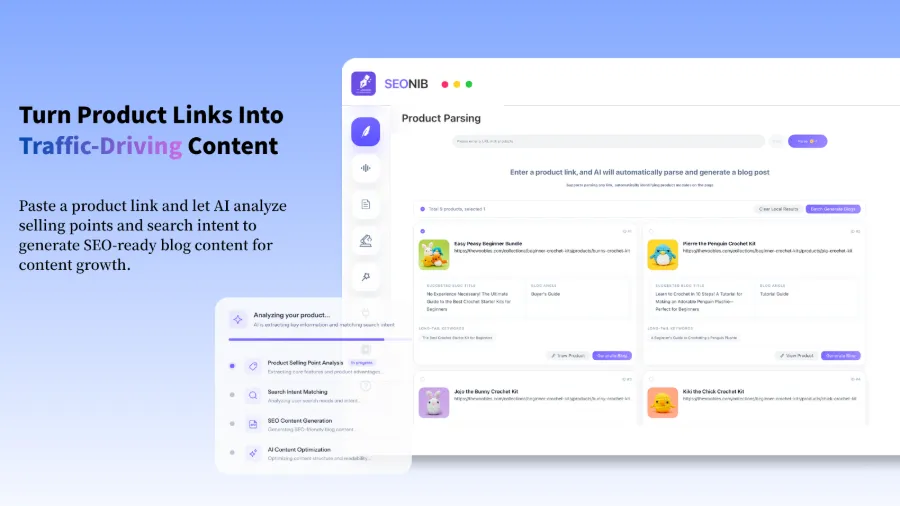
It wasn’t until I read the article “Turning a Product Link into an SEO Blog That Continuously Generates Natural Traffic” that I realized someone had already solved the old problem of “how to publish after content conversion,” not just “how to write an article.”
How a Skill Makes an Agent Learn “Operations”
After reading that article, I followed the link to the SEONIB website. To be honest, I was skeptical that there could be an “install‑and‑use” publishing solution—after being burned by various MCP tools and local scripts. But I followed the documentation, and the result surprised me: the whole process took less than ten minutes, with no script written and no API credentials configured.
Specifically, I performed four steps:
- Downloaded the skill package (a zip file) from the SEONIB console.
- Extracted it into Claude Code’s skill directory (
~/.codex/skills). - Completed a one‑time OAuth authorization for Shopify on the SEONIB web portal and copied the returned token.
- Wrote the token into a local environment variable.
That’s it. Then, in Claude Code, I typed “Write a 2026 guide to buying the latest outdoor tents,” and the terminal output a line:
SEONIB is fetching your brand space assets in real time...
Successfully identified related product: Waterproof Tent Pro (automatically extracted latest price and main image)
Automatically matched and inserted high‑authority internal link: blogs/camping-guide-2026
At that moment I was a little stunned—it actually inserted the product card, internal link, and video by itself. I never opened Excel or switched to a browser. Moreover, it pulled the latest data from the brand space, with price and images fetched in real time. The three‑hour script I once wrote was meant to do exactly this.
If you also use SHOPLINE for a standalone store, check out the SHOPLINE Store Best SEO Tools Comparison, which discusses automation ideas similar to SEONIB.
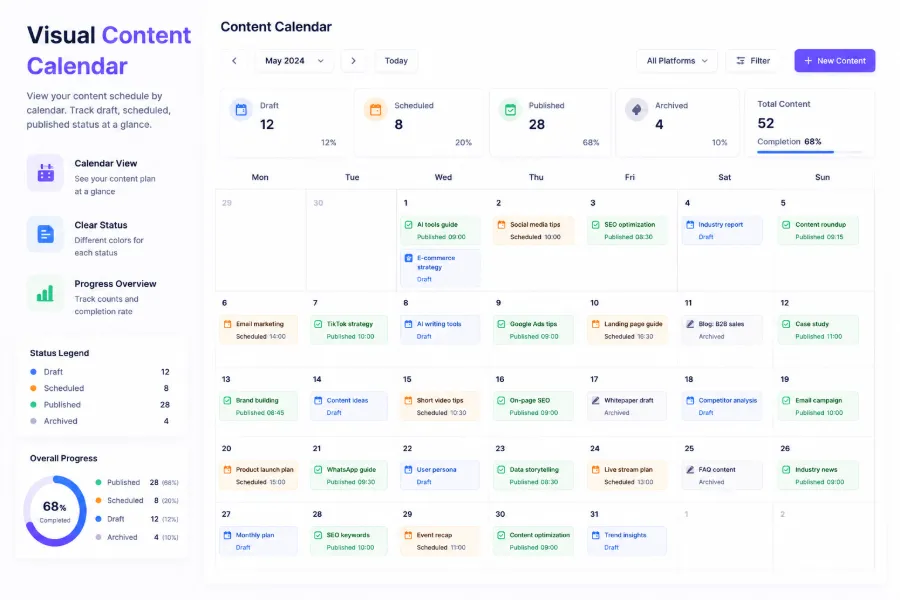
Finally, when you see the status in the content calendar change to “Live,” it feels like you’ve gained an ops assistant who never sleeps.
Writing and Publishing: One Command for the Whole Pipeline
After a week of personal testing, I basically threw away the old publishing workflow. My current workflow is two sentences: write the content in Claude Code, then push it with a single command. No browser needed, no copy‑pasting product info, no maintenance of any publishing script.
The contrast between the traditional path and SEONIB Skill is clear:
| Stage | Traditional Manual Setup | SEONIB Skill |
|---|---|---|
| Product info retrieval | Manual copy‑paste from Excel | AI automatically injects from brand space |
| Internal link management | Manual search and URL entry | AI intelligently matches by weight |
| Publishing credentials | Local Access Token + script | Cloud OAuth authorization + secure token |
The most crucial point is that I no longer need to store any sensitive API credentials locally. SEONIB uses cloud‑based OAuth standards and token mechanisms to fully manage the connection layer. After a one‑time web authorization, the local terminal only needs a non‑privileged SEONIB token to safely call the publishing API. I used to worry about “having to grant a bunch of app permissions,” but it turns out that isn’t necessary.
Once I noticed that a product price in a blog post was outdated, I checked and found that the brand space’s product information hadn’t been refreshed. After updating it, all subsequently generated blogs automatically used the new price—no code changes required. This experience is far superior to the hard‑coded scripts I wrote before.
If you’re interested in AI content marketing tools, see the 2026 Top 10 AI Content Marketing Tools Recommendations. The full usage details for SEONIB are in the help documentation.
FAQ
After installing the SEONIB Skill, can I still use my original workflow?
Yes. It doesn’t replace any of your existing tools. The skill simply expands the context retrieval scope of Claude Code, Cursor, and other agents. If you don’t want to use it, just ignore it; your original operations remain unaffected.
I I use other AI tools (like Cursor or Gemini CLI), is it compatible?
Yes. SEONIB Skill’s standard skill‑package architecture is compatible with Codex, Claude Code, Cursor, GitHub Copilot, and Gemini CLI. Installation is identical, and the token is universal.
Will my Shopify admin get new apps or plugins?
No. After you complete OAuth on the SEONIB web portal, the Shopify admin only shows an authorized app record—no extra plugins or code injections. The publishing process runs through a managed channel, not via a store‑app plugin.
If product prices and images in the brand space are updated, will the AI use the latest data?
Yes. Each time you write, SEONIB fetches the latest asset data from the brand space, including price, main image, and internal‑link weight. If a product is updated, the next generated blog will automatically use the new data.
Is this publishing process secure? Are my credentials stored locally?
The insecure parts have been removed. Locally you only keep a non‑sensitive SEONIB token; the real authentication happens in the cloud via OAuth. Even if the token is leaked, it cannot directly operate your Shopify store.
The Geek’s Pride: Not About Configuration, About Content
After two weeks with SEONIB Skill, I realized I had been doing something foolish: I treated “pure terminal publishing” as a badge of technical honor, forgetting that the time spent writing scripts, debugging APIs, and maintaining certificates could have been spent creating better content. I spent a lot of effort proving “I can avoid the GUI,” yet my content was always a week late.
Looking back, that night I spent an entire day debugging a 403 error—if I’d just clicked a few times in a web authorisation, that blog might have already been getting natural traffic. The value of the tool isn’t in how “pure” it is, but in letting you focus on what you’re good at.
I no longer have to write articles in a browser. If you’re still hopping between terminal and browser, give this approach a try—keep the terminal you love, hand the dirty operational work to a skill, and you’ll finally have time to produce truly deep content.
Share Article


