
Cursor and SEONIB: Dual Productivity Engines for Cross‑Border Independent Site Operators

After four years of running an independent site, the thing that exhausted me the most wasn’t competition—it was the repetitive back‑and‑forth between code and content every day. On one hand I was tweaking Shopify page structures and writing bulk URL‑checking scripts; on the other, I had to update blog posts and AI‑optimized SEO articles daily. These two tasks seemed to belong to different domains, yet they both drained the same amount of energy. It wasn’t until I discovered that Cursor could quickly handle code‑level automation while SEONIB could take over the entire content‑production workflow that a truly practical automated workflow began to take shape. This article is not a tool recommendation; it’s the combination method I arrived at through real‑world operation.
Content‑Production Dilemma: From Manual Transfer to Automated Pipeline
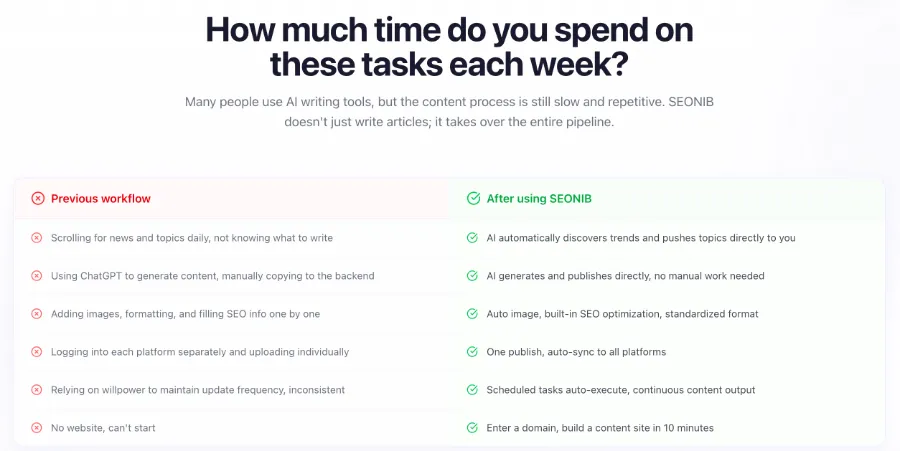
For cross‑border independent‑site operators, the daily content‑production process is essentially a repetitive manual labor. First, spend half an hour scouting topics across platforms, then open ChatGPT to generate an article, copy‑paste it into an editor, manually adjust formatting and add images, fill in SEO titles and descriptions, and finally log into Shopify, WordPress, and Shopline to publish. These steps sound simple, but they add up to two or three hours each day.
I did a quick tally: about 2.5 hours are spent on the content‑production process each day. The truly value‑adding part—brainstorming topics and tweaking article strategy—takes less than 20 minutes; the rest is just moving and formatting.
I lived in this “semi‑automated” state for three months. Generating content with AI is one thing, but after the AI finishes, a human still has to manually perform every intermediate step, and that middle stage is the real efficiency killer. Many sellers fall into the same trap—thinking that using an AI tool means the whole content workflow is automated, when in reality it only replaces typing with copy‑pasting.
Cursor‑Driven Code‑Level Automation: Data Scraping and Site Maintenance
Back to the code side. I’m not a professional developer, but I encounter many technical issues in daily operations: regularly checking page status codes, bulk‑scraping competitors’ product prices, monitoring whether structured data on the site is correct. Before Cursor, I either paid freelancers or left these tasks undone.
I wrote a bulk‑link‑checking script for a Shopify site with Cursor; from concept to code to local testing, the whole process took less than ten minutes. The script runs automatically once a day, compiling all page response statuses into a spreadsheet and flagging problematic URLs. Previously, I either checked each page manually or spent a few hundred dollars on a simple Python script from an outsource.
For a WooCommerce site, I also used Cursor to build a lightweight SEO‑data monitoring dashboard that pulls each article’s index status, click‑through rate, and average ranking. This data lives scattered across Google Search Console and Google Analytics, but a simple internal tool aggregates it so a quick glance each morning tells me which pages have issues. This “self‑sufficient” technical capability lets independent‑site operators avoid relying on others for everything.
If you face similar site‑maintenance challenges, you can refer to the guide on daily automated SEO content publishing for independent sites, which details a complete automation path from technical ops to content publishing.
SEONIB Takes Over the Content Layer: A Fully Automated End‑to‑End Process from Trend Discovery to Multi‑Platform Publishing

The shift from semi‑automation to full‑process automation truly changes efficiency, and SEONIB is the catalyst. It doesn’t just solve “writing articles”; it automates the entire chain from discovering topics to publishing them.
The practical workflow consists of four steps. First, automatic hot‑trend discovery. SEONIB monitors industry news and competitors’ content gaps in real time, pushing topics with search volume directly to the backend; operators only need to confirm which topics are worth writing. Second, content generation. It supports multiple input sources—keywords, product links, social‑media posts, reference links—to generate a fully structured SEO‑optimized article. In my experience, the most used feature is the product‑link‑to‑blog conversion; a product description page can instantly become a buyer’s guide, boosting efficiency by at least threefold compared with manual rewriting. See the detailed guide on turning product pages into blogs with SEONIB.
Third, scheduled publishing. Once you set a weekly publishing frequency, the AI executes the plan automatically without daily logins. Fourth, multi‑platform sync. After a piece of content is generated, a single action synchronizes it to Shopify, WordPress, Shopline, and other platforms. For Shopify users, SEONIB is available in the Shopify App Store and can be installed directly from there.
A simple table illustrates the time saved:
| Traditional Manual Steps | SEONIB Automated Action | Time Saved |
|---|---|---|
| Daily news browsing for topics | AI auto‑pushes trending topics | 30 minutes per day |
| Manually writing and formatting articles | AI generates and auto‑formats | 1 hour per day |
| Logging into each platform separately | One‑click sync to all platforms | 20 minutes per day |
SEONIB also supports content generation in 40 languages, so sellers with multilingual sites don’t need separate writers or tools for each language version. From trend discovery to generation to publishing, the entire pipeline runs without human intervention.
The Combined Workflow of Cursor + SEONIB: A Complete Content‑Automation Closed Loop
When Cursor and SEONIB are used together, you truly realize that they complement rather than replace each other. Cursor handles “technical‑level” automation—data collection, site monitoring, bulk‑operation scripts; SEONIB handles “content‑level” automation—trend discovery, article generation, multi‑platform distribution. Combined, they form a complete independent‑site operation loop.
A typical daily routine: in the morning, open the computer, check the monitoring dashboard built with Cursor for last night’s site logs—looking for 404 errors or sudden index‑status changes. Then open SEONIB’s dashboard, review today’s recommended topics, and confirm that the automatically generated articles have been published on schedule across platforms. The whole inspection takes no more than 15 minutes. Before adopting this combo, the same tasks had to be split between morning and afternoon, and often a single bottleneck would halt the day’s content publishing.
The operational impact is clear. Previously I could output only 2–3 articles per week, with inconsistent quality. After switching to this combined workflow, content updates occur daily, with zero manual intervention.
It’s worth noting that SEONIB’s automatic content output isn’t perfect. Occasionally you’ll hit page‑structure issues—such as a Shopify theme’s blog page not rendering correctly, or structured data not displaying. That’s when Cursor shines: quickly analyze the HTML, locate the problematic code, fix it, and resume the workflow. This “exception handling” step between content automation and code automation is precisely where the combo delivers its most practical value.
If your site runs on WordPress, see the detailed setup guide for connecting a WordPress site with SEONIB.
The ultimate result of this dual‑engine workflow is that operators shift from “doers” to “strategists.” No longer do you spend each day wrestling with “what to write today, how to format it, which platforms to log into”; instead, you focus on macro strategy: analyzing which topics drive actual conversions, which content categories outperform expectations, and how to adjust next week’s publishing cadence. For a full view of SEONIB’s capabilities, consult the official help documentation.
FAQ
Q1: Do Cursor and SEONIB have to be used together?
Not necessarily. If you don’t need to handle code‑level tasks, SEONIB alone can cover content automation. But if you regularly perform site analysis, monitoring, or bulk‑operation scripting, adding Cursor makes the workflow more complete.
Q2: I have no programming background—can I still use Cursor effectively?
Yes. Cursor’s interaction model leans toward natural‑language descriptions, so non‑developers can write simple scripts and automation tools. Complex technical problems still require some technical understanding.
Q3: Can SEONIB‑generated content be published directly, or does it need human review?
The generated articles are fully structured with SEO metadata and can be published as is. I personally recommend a quick skim of key paragraphs before publishing to ensure data accuracy and tone; this usually takes less than two minutes.
Q4: Is this combo more suitable for solo operators or teams?
It’s especially beneficial for solo operators. In a team setting, you can split content and technical responsibilities, but solo operators have limited time, making the automation combo even more valuable.
Q5: Why mention Cursor before SEONIB—does the order matter?
Technically, the need for content automation comes first, leading to SEONIB. I place Cursor first because technical automation is the infrastructure for content automation—if code‑level problems aren’t solved, frequent content publishing will still get stuck.
Share Article


