Why I Let Accio Choose Products and SEONIB Acquire Customers

Doing cross‑border e‑commerce is scary for two reasons: picking the wrong product and getting no eyes on it. I used to spend a ton of time researching products, and after picking one I had to start from scratch learning how to create content and do SEO—both half‑baked. Later I split the work—product selection to Accio and customer acquisition & content production to SEONIB. Both sides became professional, and I finally had some free time.
You might think this sounds like laziness. In reality, product selection and customer acquisition are fundamentally two different mindsets. Forcing the same person to do both will never make either excel. Product selection needs data analysis, supply‑chain intuition, and cost sensitivity; content‑driven acquisition needs topic judgment, writing skill, and long‑term SEO knowledge. Expecting one person to master both is like asking an accountant to write jokes at night—possible, but you know the quality won’t be great.
No More Worrying About Topics: Seamless Transition from Product Picking to Topic Selection
In the past, after I chose a product I would stare at an Excel sheet. Okay, I now know this headphone has a price gap, that power bank has a cluster of negative reviews—so what next? What should I write? I kept looping through the same few “new product recommendations” and “user experience” templates until I was sick of them.
Then I realized that the product data itself tells you what content to create. Accio pushes trending categories, high‑frequency negative reviews from search results, and hot complaint points from competitor reviews—these are ready‑made topic ideas. Previously I had to translate each line, summarize each point, and painstakingly list them in Excel for sorting. Now the system automatically pulls trend monitoring results and keyword search volume data, adding 24 new recommended topics each day and pushing them straight into the task queue.
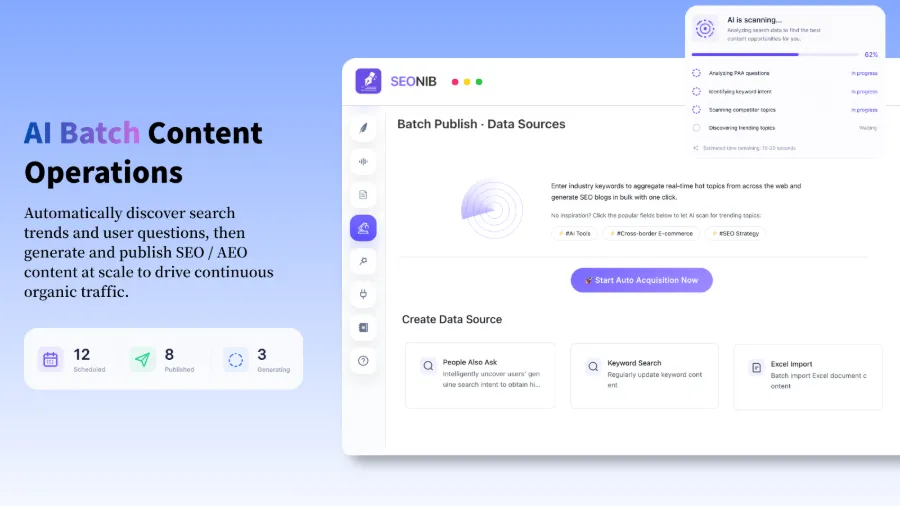
When I first opened that “hotspot” panel and saw 24 new topics listed, I felt: before I needed three months of Excel to generate topics and I was going bald; now the system tells me what to publish tomorrow, the day after, and the day after that. The difference is that huge.
Content Runs Itself: Fully Automated Content Factory
Once the topics are set, the real grunt work begins. I used to write, format, find images, write meta descriptions, and add internal links—all by hand. A single article from outline to publish routinely took three to four hours. The most painful part was re‑formatting each platform after publishing.
Now the whole workflow is compressed to the extreme: just input a product link, and SEONIB automatically generates a complete review article and a buyer’s guide. AEO Q&A page, SEO blog, multilingual versions—all generated in one go. I don’t worry about layout, internal link distribution, or even what to write next—just set the publishing frequency in the task panel and the system runs itself.
The video above demonstrates the entire action chain I’m describing: input a product link, AI automatically outputs AEO Q&A content and an SEO blog, images are matched, SEO fields are filled, and internal link rules are applied. All the work you need to do is finished in under three minutes. After watching this, I tossed my manual article‑writing workflow into the trash.
If you still have questions about the specific steps, check out this product‑to‑blog guide, which shows the complete conversion from a product page to an SEO article.
Pain‑Free Synchronization: One Publish, All Platforms Covered
When the content is written, don’t celebrate yet—there’s the most annoying step left: publishing.
I used to manually post to three platforms: WordPress, Shopify, and a SHOPLINE app. Copy‑pasting and adjusting formats took over an hour each day. Over time you realize that the publishing stage slashes the actual output of your content creation by more than half. I tried third‑party sync tools, but formatting broke, images lost links, and each fix cost another half hour.
Now none of that exists. After content generation, a single publish syncs automatically to more than 11 site‑building platforms. WordPress needs only one push, Shopify requires no separate login, and SHOPLINE syncs automatically as well. I was most surprised that even Medium can be pushed directly with the same system.
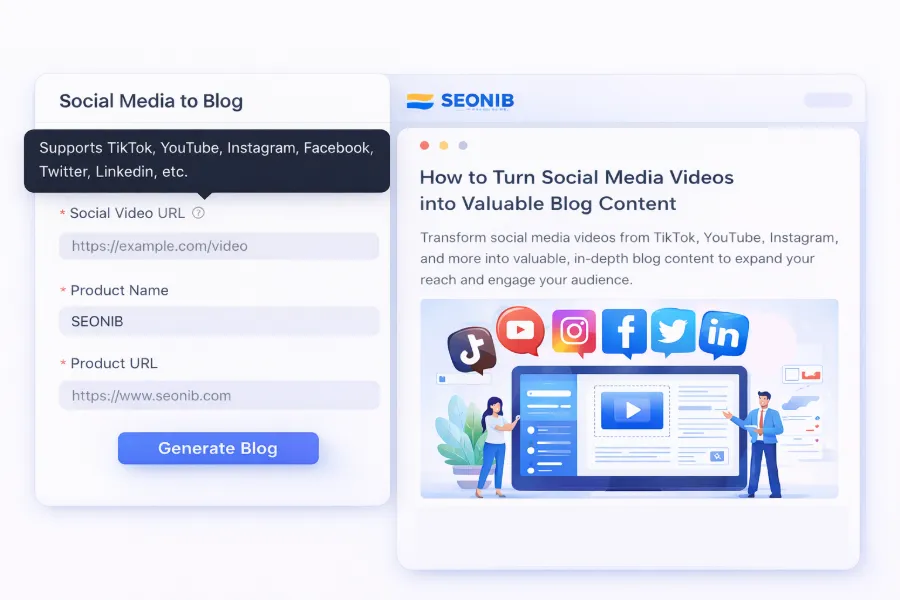
This diagram shows the complete chain that turns social content (e.g., a YouTube or TikTok video) into a blog post and syncs it to an independent site with one click. When I used to do this manually, each video required its own blog post and separate SEO work, leaving me too exhausted to even think about creating more videos. Now I just drop a screenshot after publishing the video, and it’s ready—one publish, all‑platform sync, turning a single piece of content into exposure on seven or eight sites.
For real‑world results of this workflow, see a detailed tutorial that uses SEONIB to turn a product page into a blog post.
From 0 to 1: You Can Start Without a Website
Another real pain point: many small sellers or indie developers think the first thing they need is a website. Then they register a domain, pick a theme, install plugins, and after half a month the site still isn’t live, and there’s no content to talk about.
My first independent site took three days to get running. Choosing a domain, a theme, and which plugins to install weren’t wrong decisions; the mistake was prioritizing site building over acquiring traffic. In fact, you don’t need a full website to start content marketing. Enter a domain and you can launch a minimal content site in ten minutes. Once all functions work, you can gradually tweak the design and layout.
This means you can get the content pipeline running before worrying about aesthetics, validate traffic with an MVP before committing more resources. For a solo founder or a brand‑new team, this logic is a game‑changer: your risk becomes something you can measure in two weeks instead of three months.
If you’re still debating whether to write blogs manually, read an article on manual blogging guides first—you’ll understand why I handed the whole thing over to the machine.
Finally, if you want to evaluate the cost of this solution, just check SEONIB’s pricing page and see how much investment is required after the technology selection.
FAQ
Q1: After Accio selects products, do I need to manually import the data into SEONIB?
No. The two systems don’t talk directly, but you can use Accio’s export feature to pull product data (keywords, trending categories, competitor analysis) and then feed it as reference into SEONIB’s hotspot tracking and topic queue. The whole process takes about five minutes, no scripting or API knowledge required.
Q2: Can blogs generated by SEONIB actually rank on Google?
Yes, but not overnight. SEO’s cumulative effect builds on content volume and consistency. In my first week of testing I only saw scattered indexing; after three months of continuous automatic updates, Google Search Console showed a clear rise in topic authority, and eventually dozens of posts entered the top 20 pages of search results. The key is maintaining a publishing frequency that manual effort can’t sustain but automation can.
Q3: I only have a Shopify store—can I use SEONIB directly?
Absolutely. SEONIB supports direct Shopify integration; after content generation it pushes automatically to the store’s blog area via a built‑in plugin, no manual download/upload needed. If you use SHOPLINE or other major site‑building tools, native integration options are also available.
Q4: What if I don’t have a website yet—can I start the content pipeline first?
Yes, and this is the recommended low‑cost, fast‑fail path. Enter a domain into SEONIB, and within ten minutes you have a live content site. Test for traffic feedback first, then decide whether to invest more time and budget into a full‑featured website.
Share Article