Building an Automated SEO Blog with Claude Code: One Command for Keyword Selection, Writing, and Publishing
Open the Shopify admin, go to the blog management page, and see that the last update was three weeks ago. The organic traffic curve in Google Search Console is sloping downward, and new visitors are entirely supported by paid ads. After running an independent site for a while, everyone knows that an SEO blog is that “should‑do but can’t keep up with” task—daily keyword scraping, reading competitor articles, spending at least two hours to write a post, another half hour for formatting and filling in SEO metadata, and finally clicking publish. From topic selection to going live, a complete update takes at least two and a half hours.
I only realized, after automating the workflow with Claude Code, that those manual steps could be compressed into a single command. Run the batch script once, and the whole process—from keyword selection to publishing—completes; you just need to confirm a keyword. This article will break down the pitfalls I’ve encountered and the specific configuration ideas, focusing on how to free people from this repetitive labor rather than teaching SEO theory.
Why Independent‑Site Sellers Must Do SEO Blogs, Yet Most People Can’t Keep Up
The traffic cost for independent sites has risen sharply in recent years—Google Ads CPC has increased year over year, and Facebook interest traffic is getting more expensive. In contrast, the organic traffic generated by SEO blogs grows slowly but has almost no marginal cost. Independent sites that continuously update their blogs see average organic traffic increase by more than threefold after six months, a figure repeatedly validated in the industry.
The problem is that manually maintaining an update frequency is too hard. I’ve seen many people swear to fill their update schedule in the first week, only to stop after the third article. It’s not a lack of willingness; the execution cost is too high: daily Google Trends checks, competitor blog scans, topic hunting, intent assessment—this whole set consumes a lot of energy before even reaching the writing stage. If you’re just starting with independent‑site SEO, first check out this SEO Ultimate Guide (2026 Edition) for a strategic framework.
Automation isn’t a garnish; it’s the only solution that keeps a blog running continuously. Human‑driven updates based on willpower have only two outcomes—either the frequency is insufficient, or the effort is abandoned midway. System‑generated output is different: it doesn’t get tired, needs no motivation, and once configured, it can run forever.
Step 1 – Use Automation Tools to Accurately Find Keywords, Say Goodbye to Gut‑Feeling Topic Selection
My earliest keyword research involved opening Semrush or Ahrefs, entering a seed word, and manually reviewing each result. I’d click each keyword to see search volume and competition, then manually log it into a spreadsheet. After a couple of hours, I’d realize most of the terms had no real potential.
After configuring an automation script with Claude Code, a single command pulls 20 trending topics and calculates search volume in under two minutes. The underlying logic is simple: input a seed word, fetch suggested terms from Google Suggest and other keyword tools, then filter them—search volume above a threshold, competition at or below medium, and intent matching the target audience. A quick competitor analysis follows, surfacing both covered terms and uncovered traffic gaps.
This mirrors product direction validation—first confirm demand, then decide whether to invest resources. The same approach is useful for validating a project’s traffic direction: build a simple page to test search trends before deciding to write. I recommend this article: Quickly Validate a Project Idea with a Simple Website. Although it focuses on project validation, the traffic‑direction selection method can be applied directly.
If you don’t want to write the script yourself, you can use ready‑made tools that take over the keyword selection process. Below are several options for different stages:
Step 2 – From Keywords to High‑Quality Articles: Brand Voice and Pitfalls to Avoid
Once keywords are filtered, it’s time to write the body. The step where Claude Code generates the article caused me a major pitfall.
When I first set up automation, the prompt was simply “Write an SEO blog post for this keyword, 1500 words,” with no mention of brand voice. The five generated articles all had obvious AI fingerprints—uniform sentence structures, the same transition word at the start of every paragraph, and hollow, formulaic examples. After publishing to Shopify, Google indexed the pages, but rankings didn’t improve; after half a month, the highest‑ranking keyword was still outside the top 50.
I spent two days tweaking the CLAUDE.md configuration file. The core change was adding a brand‑tone instruction—e.g., “Write in first person, tone like an experienced practitioner, each paragraph must contain concrete actionable details, avoid vague statements like ‘very effective’; instead say ‘after two weeks of testing, the page’s dwell time increased by about 18%’.”
After adjusting the prompt, the results became noticeable. Now I can input a product URL and automatically generate a 1500‑word SEO blog post with images and internal links in 30 seconds. The generated articles no longer read like “AI boilerplate” but are finished pieces with specific steps and real data.
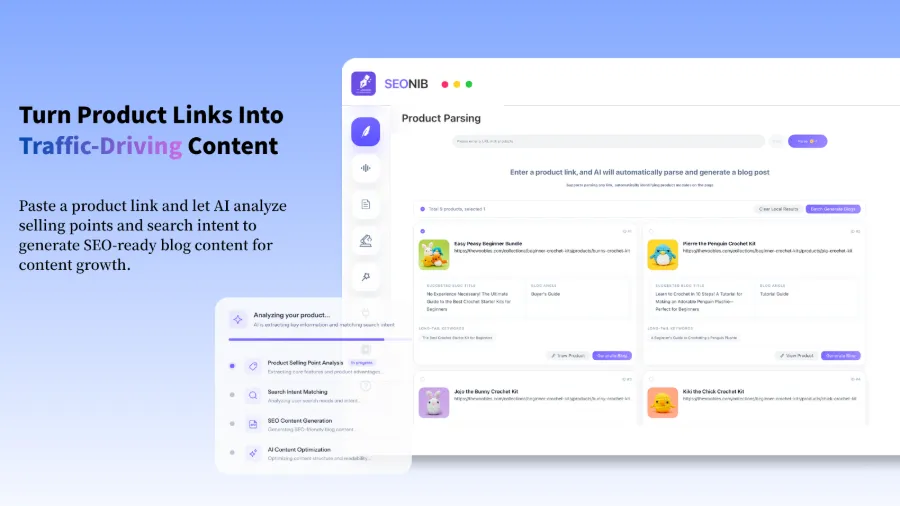
A key tool involved is SEONIB, which supports direct blog generation from product links, saving even the trial‑and‑error time of tweaking prompts. You input the product link, and the system identifies product features and automatically matches relevant long‑tail keywords, generating content such as buying guides, usage tutorials, and comparative reviews that have conversion potential. The process is detailed in this article about Turning Product Links into SEO Blogs that Sustainably Capture Organic Traffic, which includes more concrete implementation logic.
A small detail: if the generated article contains numbers, prices, or product specs, let the AI insert placeholders and then manually verify them. I’ve seen cases where a product page listed $39, but the article wrote $49. Another article explains the handling of Turning a Product Link into an SEO Blog that Continuously Generates Organic Traffic and can be referenced to improve your generation logic.
Step 3 – Automatic Publishing to Shopify, Bridging the Final Mile from Draft to Live
Content is generated; the next step is publishing. Manual operation requires logging into Shopify, creating a new article, pasting content, adding images, filling in SEO title and description, selecting tags and categories—this alone takes 10–15 minutes. If you sync across multiple platforms, the effort doubles.
After connecting Claude Code with Shopify MCP, the workflow becomes a single command. Setting up MCP isn’t complex: install the Shopify MCP server, complete OAuth authorization, then add the store domain and access token to Claude Code’s configuration file. Once configured, Claude Code can call the Shopify API directly, creating a full blog post in the draft folder with title, body, SEO metadata, featured image, and tags. From generation to publishing, everything is automatic; the traditional manual process takes 15 minutes, while automation requires only a one‑time rule setup.
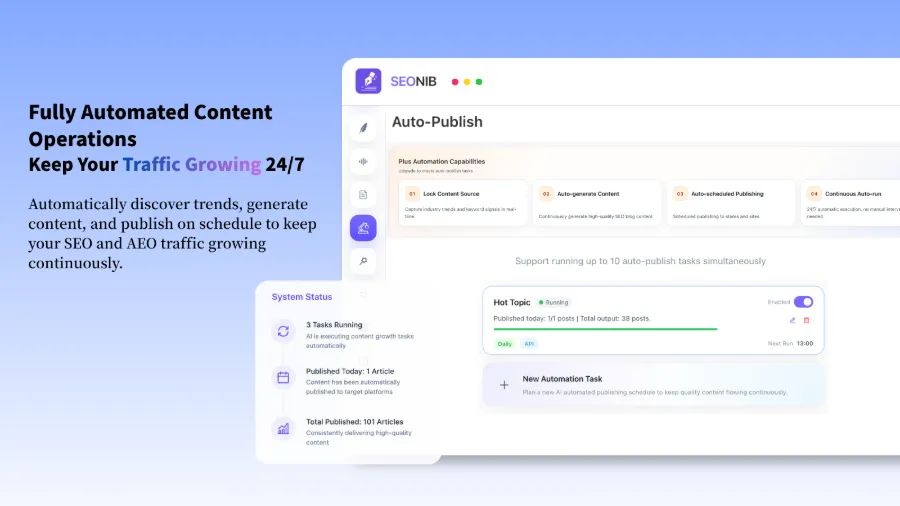
If you only use Shopify, a direct MCP connection suffices. But if you, like me, also run WordPress or SHOPLINE sites, you need multi‑platform synchronization. SEONIB also supports one‑click Shopify sync, eliminating duplicate configuration. It can push the generated content to the draft folders of various platforms without manual export/import.
Here’s a demo video that fully shows the blog‑to‑Shopify sync process and results:
Specific platform configuration steps are explained in this SEONIB Guide to Connecting Third‑Party Websites. SHOPLINE users can also install the SEONIB plugin directly from the SHOPLINE App Store to simplify integration.
Step 4 – One‑Click End‑to‑End Execution: CLAUDE.md Template and Automation Commands
After configuring each step, the final task is to stitch them together into a complete automation pipeline.
The core is the CLAUDE.md file—think of it as Claude Code’s “startup configuration file.” Inside, you define script paths and trigger conditions for each step, e.g., “8 AM: run keyword script, pull a topic from the pool → feed into article generator → push result to Shopify MCP for publishing.”
My month‑long configuration ran like this: automatically publish one article per day, covering product‑related keywords, industry trends, and competitor topics. After a month, the site’s topical authority began to rise—impressions in Google Search Console trended upward, and some keywords climbed from the 30s into the 10‑15 range. From configuration to seeing initial ranking gains took about 4–6 weeks.
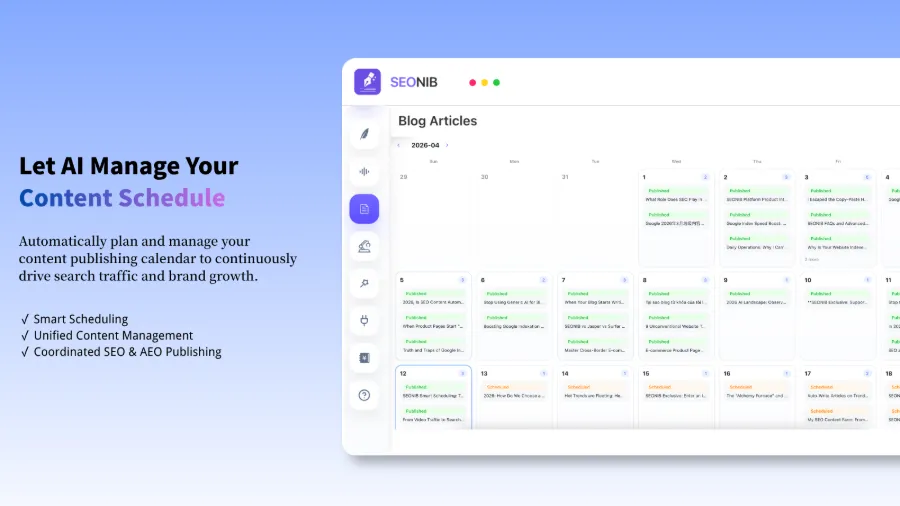
One often‑overlooked issue: many sellers focus only on generation and publishing, never checking post‑publish indexing. I wrote three articles in the second week of AI automation, only to discover six months later that Google never crawled them. Adding Indexing API submissions and automatic sitemap updates closed that gap. Automation shouldn’t stop at publishing; indexing monitoring must also be part of the pipeline. SEONIB’s content management includes such logic—see this article: Can SEONIB Help Marketing? for a more comprehensive marketing‑automation perspective.
If you want to build this workflow yourself, refer to the SEONIB Documentation for specific configuration templates and MCP integration guides; just follow the steps.
FAQ
Q1: Will automated blog tools generate duplicate content that gets penalized by Google?
It depends on implementation. Duplicate issues arise only when the same prompt is used repeatedly for the same topic. A good practice is to give the AI a different angle each time—e.g., “buying guide” this time, “usage comparison” next, then “common pitfalls.” Even with the same core keyword, article structure, arguments, and internal examples will differ.
Q2: Is the free version of Claude Code sufficient, or is a paid plan required?
The free tier limits API calls. For daily automated batch publishing, it’s advisable to at least upgrade to Pro. In my experience, one article per day consumes roughly 30–50 API calls per month, which exceeds the free quota quickly.
Q3: I have no coding experience—can I still configure this automation pipeline?
Setting up MCP and CLAUDE.md requires basic command‑line and JSON knowledge, but the templates provided in the video can be downloaded and used directly; just adjust the parameters. If you really don’t want to touch code, you can use ready‑made tools like SEONIB that require minimal customization.
Q4: Will converting product links to blogs make the content sound like ads?
It depends on the brand‑tone configuration. If you explicitly tell the prompt “don’t write promotional conclusions; focus on providing decision‑making information,” the output will read more like an objective review than a hard sell. Before publishing, have a couple of people read the drafts to confirm the tone.
Q5: After automation, is manual review and editing still needed?
Initially, yes. I recommend adding a “human review node” to the pipeline—publish to the draft folder instead of live, and spend 10 minutes each day scanning for factual errors or tone issues. After a couple of weeks of stable output quality, you can switch to fully automatic publishing.
Share Article