
When I Let AI Write My Blog, It Also Syncs Shopify

Every time I open the blog backend it feels like opening a fitness app—my last update was three months ago, and a wave of guilt hits me, but I just don’t want to move. Have you ever experienced this: spending half a day forcing out a post, only to turn around and see a competitor publishing five posts in a week; finally settling on a topic, then spending two more hours on layout and images. The secret to my transformation from a “manual blogger” to a “hands‑off manager” is actually letting AI take over the entire content pipeline—from topic selection to publishing, I no longer have to touch the editor.
Why Your Blog Updates Always End Up Half‑Done?
In the second half of 2024 I set a flag: update at least two blog posts per week. I kept it up for two weeks, then ran out of topics in the third week, got stuck on layout in the fourth week, and by the fifth week I had stopped updating. Three months later, when I opened the backend, the last published post was still that half‑written draft.
The typical obstacles to manual blog updates are just a few: not knowing what to write, spending three to four hours per post, layout and images being more annoying than writing, and having to log into each platform and copy‑paste to publish. 60% of independent‑site blogs stop updating after the third month; this isn’t a willpower issue—it’s the lack of a buffer between you and the editor. After work, you still have to think “what to write,” and inspiration is already depleted.
During that time I tried writing topics in my phone’s notes, and also tried writing three posts on weekends and scheduling them, but weekends turned into overtime, and the enthusiasm from Monday cooled off by Wednesday. The biggest enemy of content marketing isn’t the search engine algorithm; it’s yourself.
Later I realized that instead of battling willpower, I should break down the whole process and see which steps truly require my personal involvement. The answer: almost none. If you’re also stuck, check out this idea—How Multimodal Traffic Engine Wins Both Google and AI Search, which explains how to make content run on its own.
How I Let AI Manage My Blog Full‑Time
My current approach is actually simple: four steps, with AI handling each one.
Step 1: Discover trends. The system monitors industry hotspots and competitor content in real time, automatically pushing them to my topic pool. I don’t need to browse news every day; just open the dashboard and know what to write today.
Step 2: Generate content. Input a keyword, a product link, or even a social media post, and AI directly generates a fully structured SEO article. It supports 40 languages, even managing English sites.
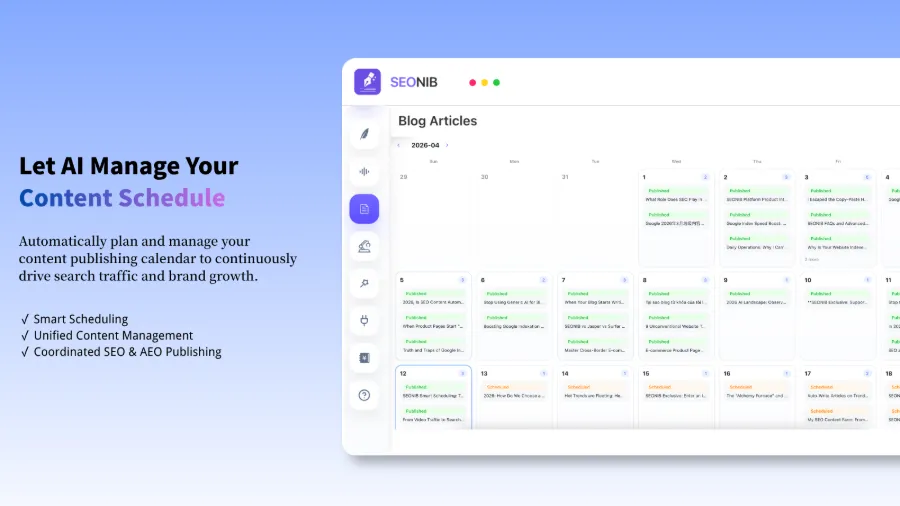
Step 3: Scheduled publishing. After setting a frequency of three posts per week, SEONIB automatically follows the schedule, so I don’t have to log in and click publish each day. Monthly drafts are generated in advance and automatically pushed live at the right time.
Step 4: Multi‑platform sync. Write one post, and it automatically syncs to all platforms, including Shopify, WordPress, and SHOPLINE. Once set up, AI produces three posts per week, saving about 10 hours of manual work each month.
That video shows how a blog post is automatically synced to Shopify—no copy‑pasting, no logging into the backend; the content appears simultaneously on the blog and the product page. During sync, SEONIB also automatically inserts product links and shopping cards, turning the blog content directly into a conversion point.
Want more detailed configuration parameters? See the Help Documentation.
Text and Images Aren’t Enough? Adding Video Is the Real Traffic Secret
The biggest weakness of pure‑text blogs is dwell time. Users glance and leave, and Google’s ranking signals suffer. Pages with video boost user dwell time by over 80% and significantly increase conversion rates—this isn’t made up; mainstream research supports it.
At first I thought I’d have to film, edit, upload, and then copy‑paste embed code, which made me give up. Later I discovered that SEONIB and VEONIB are already integrated: bind a VEONIB account in the editor, the system automatically recognizes the product’s video assets, and you can insert them into the blog with one click. No need to download and re‑upload, no copy‑pasting links.

Embedding video not only improves SEO performance but also turns the blog from an “information page” into an “experience page.” Users see real product footage instead of text descriptions, and purchase intent is noticeably higher. If you run a Shopify store, this is even more evident—Shopify’s official site itself encourages merchants to include multimedia in content.
Moreover, Google and the next‑gen AI search (AEO) heavily favor multimodal content. Pure‑text pages are increasingly compressed in search results, while mixed text‑image‑video content gets more exposure. Check out this analysis—Which Content Performs Best in ChatGPT Search, which notes that AI search engines have preferences that differ from traditional SEO.
See How Others Get Traffic With Zero Backlinks
A friend launched a new site early this year; the domain was registered less than six months ago and had almost no backlinks. According to traditional SEO, such a site would struggle to be indexed by Google, let alone attract organic traffic.
What did he do? He kept publishing blogs—2 to 3 per week, each centered on a long‑tail keyword. The content didn’t aim for depth but covered the actual questions users search for. Formats included how‑to guides, product comparisons, and FAQs. After a bit over three months, this zero‑backlink site received more than 50 daily organic clicks on Google.
When I first saw the share I Got Search Traffic by Writing a Blog, I wondered if it was a one‑off case, but then I read another case—How a Zero‑Backlink New Site Can Win the Starting Line—and the conclusion was the same: in the long‑tail niche where content is scarce, as long as you maintain frequency and relevance, backlinks aren’t required.
The takeaway is: content automation isn’t just about saving time, it’s about gaining time. AI can monitor trends, match keywords, and generate intent‑aligned content 24/7—something manual effort can’t achieve. While others are still manually churning out one post at a time, your content library is already accumulating three extra posts per week.
For more concrete methods, check out How Independent Sites Can Automatically Publish SEO Content Daily, which breaks down the entire workflow in detail.
FAQ
Q1: Will these automatically generated articles be flagged by Google as AI spam?
No. The key is the quality and uniqueness of the content, not whether AI was used. As long as the article addresses real user search intent, contains useful information, and has a clear structure, Google won’t demote it simply because it was AI‑written. The effectiveness of AI‑generated content depends on the quality of the input material—keyword popularity and accurate product information matter more than “hand‑written” text.
Q2: Can my content retain the brand voice, or will it sound uniformly robotic?
Yes. The system allows you to configure brand context, industry terminology, product information, and a media library. By pre‑setting writing style, common vocabulary, and brand background, the generated content follows those rules and won’t end up as generic “one‑size‑fits‑all” copy.
Q3: Do I need technical knowledge to set up automated publishing?
No coding required. The backend is visual; you bind your store account, set publishing frequency, choose sync platforms, and a few clicks complete the setup. The initial configuration takes about five minutes, and thereafter no further adjustments are needed.
Q4: If my Shopify store has multiple products, can I batch‑generate corresponding blogs?
Yes. Paste a list of product links, and the system automatically creates a buying guide, product description, or buyer’s guide for each product. After batch generation, you can schedule unified publishing.
Q5: I just want to try it— is there a free plan?
There is a free trial quota that lets you generate a few articles to experience the entire workflow.
Share Article


