
Operating Shopify SEO with Claude Code: Workflow from Ideation to Publication

Many Shopify store owners aren’t lacking products, backend permissions, or scattered keywords; what they lack is a continuously running content process. In practice, work often stalls at copy‑pasting: copying keywords from a tool into a spreadsheet, handing them to Claude Code to generate an article, then manually adding meta titles, meta descriptions, and image alt text, and finally logging into Shopify Admin to adjust formatting and publishing status.
Claude Code’s value isn’t just generating code or articles; it breaks Shopify SEO into four executable steps: topic selection, generation, optimization, and publishing. It can read product and brand data, organize tasks according to rules, check fields, and log results, but when it comes to product facts, compliance commitments, brand tone, and anomalous data, human review is still required.
Direct answer: Claude Code is suitable for chaining together repetitive, rule‑based, roll‑back‑able actions in Shopify SEO, such as organizing keywords, generating content drafts, checking meta information, and preparing publishing data. It cannot replace search intent determination, nor can “article published” be equated directly with “page indexed and driving conversions.”
The real time‑sink is often not writing a blog post, but the lack of synchronization among product pages, collection pages, blog pages, and backend status. The following workflow places automation in controllable spots rather than handing the entire store over to an unsupervised agent.
First break Shopify SEO into tasks Claude Code can execute
Shopify SEO targets at least product pages, collection pages, and Shopify blogs. Beyond writing articles, you need to organize keywords, maintain meta titles and descriptions, add image alt text, check internal links, and confirm whether a page is a draft, published, or needs modification. When organic traffic drops, the issue may stem from outdated product information or simply from a batch of pages whose canonical links or link structure have changed.
Therefore, Claude Code is better suited to act as a “task execution layer” rather than just returning a suggestion. It can read structured brand information, product specifications, target markets, and content rules, then invoke tools or perform actions in a fixed format. For example, the system first reads the product URL, extracts the name, specs, price, target audience, and restrictions, and only then proceeds to article generation and field mapping.

Generating content and completing operational actions are two different things. The former solves text production; the latter also handles data retrieval, Markdown or HTML conversion, image upload, permissions, publishing status, webhook return values, and result logging. A script that can generate a 2,000‑word article will still require rework if it writes the meta description into the body, loses image URLs, or mistakenly sets a Shopify blog to public publishing.
The minimal task chain can be compressed into four basic stages:
- Topic selection: Input product, keyword, or content gap, confirm search intent.
- Generation: Produce buying guides, product tutorials, or Q&A based on page type.
- Optimization: Check title hierarchy, meta information, internal links, alt text, and factual consistency.
- Publishing: Push to Shopify, save status, timestamp, target keyword, and associated products.
These four steps do not represent a fully automated ranking process that requires no review. Each step should have inputs and outputs, especially before publishing, where drafts and rollback records must be retained. For status mapping, see the Auto‑Publish Workflow Guide; the focus is not on copying tool settings but on first determining which actions can be automated.
Build an input pipeline from product links to SEO content with Claude Code
The input given to Claude Code should not be a single “write a Shopify SEO article” command. More useful inputs typically include Shopify product URLs, product selling points, target markets, keywords, existing pages, competitor content gaps, and product commitments that cannot be arbitrarily rewritten. Product URLs provide concrete data, keyword prompts indicate demand, and existing pages dictate where new content should fill gaps rather than repeat the same product description.
Content sources can be organized into five categories: product URLs, keywords, trends, social media content, and reference links. Different sources change the validation method. Product URLs require price, spec, and inventory checks; keywords need search intent judgment; trend content must be verified for timeliness and context; social media content often contains colloquial or unverified statements; reference links must avoid mechanical rewriting of the original text.

A prudent workflow is to let Claude Code first organize product entities, search intent, and article structure, then generate the body. For example, an outdoor lighting product may correspond to three different intents: “how to choose,” “installation method,” and “can it be used in rain.” They suit a buying guide, a product tutorial, and a Q&A respectively, and you should not simply repeat the same keyword across three articles.
Product pages, collection pages, and blog pages also need distinct internal link roles. A buying guide can link to relevant collection pages and a few specific products; a tutorial can link back to the corresponding product page; a Q&A can link to shipping policies or installation instructions. If every blog points to the same high‑margin product, short‑term traffic may concentrate, but long‑term the content structure becomes thin and reduces the chance of other pages being discovered.
For how product URLs become content tasks, see the Product URL Conversion Case Study. The real need isn’t “generate another article,” but to establish product entities and page relationships, avoiding a situation where after publishing the article still lacks a clear commercial path. When organizing keywords and page data, the Free SEO Tools Collection can serve as a data source, but tool output cannot replace human judgment.
Multilingual SEO issues tend to surface after publishing. English, German, and Japanese versions cannot rely solely on sentence‑by‑sentence translation; each must be checked for regional expressions, currency, logistics scope, return policies, and product commitments. A “next‑day delivery” promise for the US market, when placed on a European page, becomes a factual error; correct currency symbols do not guarantee correct tax explanations.
Post‑generation content checks should be an independent step, not just a model’s “SEO optimization completed” note at the end. Checklist items must include factual consistency, duplicate paragraphs, keyword stuffing, title hierarchy, link validity, product links, and image alt text. When AEO is involved, also verify that questions are directly answered and definitions are complete; simply adding a few questions does not claim coverage of AI search.
Connect generated results to Shopify publishing and maintenance workflow
The real friction usually appears before and after publishing. Claude Code’s output must be mapped to Shopify Admin fields: title, body, excerpt, author, tags, cover image, publish time, and draft status; HTML‑to‑Markdown conversion can also alter lists, links, or heading levels. An image may upload successfully but lack alt text; the page opens fine but still leaves an SEO gap that can be fixed.
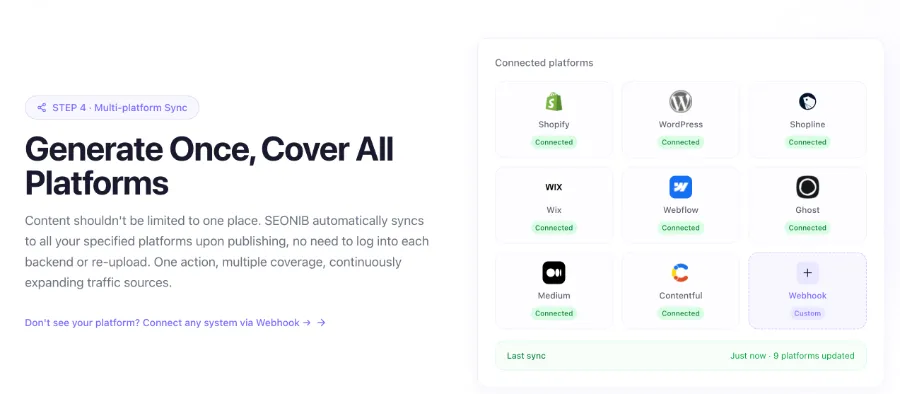
In such content‑pipeline connection scenarios, SEONIB can serve as a synchronization step outside Claude Code, placing AI generation, scheduled publishing, and Shopify sync into a continuous flow. The focus isn’t on logging into the backend a few times, but on whether each task leaves a record of input source, field mapping, and return status; otherwise automation merely replaces manual copy‑pasting with harder‑to‑track failures.
Pre‑publish checklists should be bound to page type. Product pages need checks for price, inventory, specs, product links, and commercial commitments; collection pages need checks for category names, navigation, and hierarchy between pages; blog pages need checks for search intent, internal links, meta information, image alt text, and mobile readability. If a canonical link points to an old URL, the article may publish successfully but still send search signals to the wrong page.
A content calendar is suitable for recording topic selection, generation, review, and live status. The publishing chain should retain at least three states: draft, published, and needs modification. A single “publish successful” response isn’t enough; you also need to know which product version, which target keyword, and whether it was later edited manually. When expanding to multiple languages or sites, webhook return codes, retry counts, and target platforms should also be logged.
For field permissions and backend operations, see the Help Center Operations Guide. If you want to cross‑check page titles, canonical links, and structural issues before publishing, you can use the Page SEO Analysis Tool, but analysis tools only detect the current page state and cannot guarantee that the next sync won’t overwrite manual edits.
Don’t mark a task as completed immediately after publishing. A Shopify page being public only means the server returned the page; Google Search Console’s indexing, impressions, and click data have their own collection delays, and search engines may recrawl canonical links. Some stores, after launching an automated publishing workflow, only verified that the blog appeared in the backend, ignoring product price and inventory fields. Old articles continued to show expired prices, and some internal links still pointed to discontinued products, resulting in higher publishing efficiency but increased customer‑service and content‑maintenance workload.
After automation, what still needs to be checked in Shopify SEO
Claude Code or any automation cannot replace search intent judgment, product fact verification, brand tone review, and high‑risk commitment checks. When inventory, price, shipping policy, or specs change, old blogs and product pages may not update simultaneously. When search traffic lands on a page, users see a concrete error price, broken link, or unfulfillable logistics promise—not the “automated process.”
Review should occur at three nodes: pre‑publish content and field verification, post‑publish page and link verification, and a performance observation period to confirm indexing, ranking, click‑through rate, and conversion rate. The observation period should not be written as a fixed indexing guarantee, because different sites have varying historical trust, crawl frequency, page quality, and technical states. Google Search Console’s impressions and clicks reports are not real‑time; when data is delayed, you cannot immediately deem an article worthless.
Another common misinterpretation is assuming higher click‑through rates always mean better commercial outcomes. An informational‑style headline may bring more impressions and clicks but direct users to a blog that doesn’t match any product; conversely, a collection page may have low clicks because it serves navigation and filtering functions. Different page types should be evaluated separately for search intent match, product clicks, add‑to‑cart, and final conversion rates.
Automation suits repetitive, rule‑based, roll‑back‑able operations such as format conversion, field checks, link scanning, and draft creation. When compliance, brand commitments, anomalous data, price changes, or product discontinuations are involved, human review is required. Upon discovering an error, stop subsequent scheduling, filter affected pages by publish time and associated products, correct copy and links, then re‑check indexing status—not continue publishing new content to mask the issue.
The bottleneck in Shopify SEO is often not the inability to write articles, but the inability to keep product data, content fields, and publishing status synchronized. Automation can shorten execution chains but cannot eliminate the time lag between indexing, search intent matching, and conversion verification. Operational responsibility still rests on those who can explain why a page went live, when it was modified, and based on which facts.
FAQ
Can Claude Code directly modify Shopify SEO settings?
Yes, but only if the appropriate Shopify permissions, field mappings, and operation interfaces are configured. The practical workflow should start in draft mode, undergo at least one round of title, meta information, and product fact checks, and then enable scheduled publishing.
What materials need to be prepared before using Claude Code to generate a Shopify blog?
At minimum, you need product URLs, product selling points, target markets, keywords, existing pages, and non‑editable policy information. The more structured the data, the easier subsequent checks become; providing only a keyword usually still requires manual supplementation of product facts and internal links.
After Shopify SEO auto‑publish, why still check indexing and page status?
Because a successful publish only means the page was submitted to Shopify; it does not guarantee that search engines have crawled, indexed, or ranked it. During a few‑day‑to‑weeks observation period, you should review Google Search Console’s indexing, impressions, and click data, and also confirm that price, inventory, and links haven’t been overwritten by old content.
Which Shopify SEO tasks is Claude Code suitable for handling in bulk?
It is suitable for bulk keyword organization, draft generation, title and meta description checks, broken link scanning, alt‑text addition, and publishing status logging. Tasks involving price, inventory, shipping policies, and compliance statements should not be fully unattended.
Can a multilingual Shopify store use the same SEO workflow?
The task structure can be shared, but content rules must be adjusted for each language. Each language requires separate verification of regional expressions, currency, logistics, taxes, return policies, and search intent, and post‑publish monitoring of indexing and conversion performance must be done per language.
Share Article


