While others are still manually writing articles, I've already let AI run my entire content site
Every day I open the backend and find a new article automatically published, automatically illustrated, and automatically synced to all platforms—and my only action was setting a frequency before the end of work last Friday. This sounds like sci‑fi, but I’ve been living like this for the past three months. If you still spend your morning with a coffee, your noon wrestling with an opening paragraph, and your afternoon revising images three times, you should read this article.
Content operation is something most people die on in the first three months of the grunt work. It took me two months to realize: the real effort should go into building a pipeline that makes the content move by itself, not writing a few thousand words.
From 0 to 1: Let AI help you set up a content site
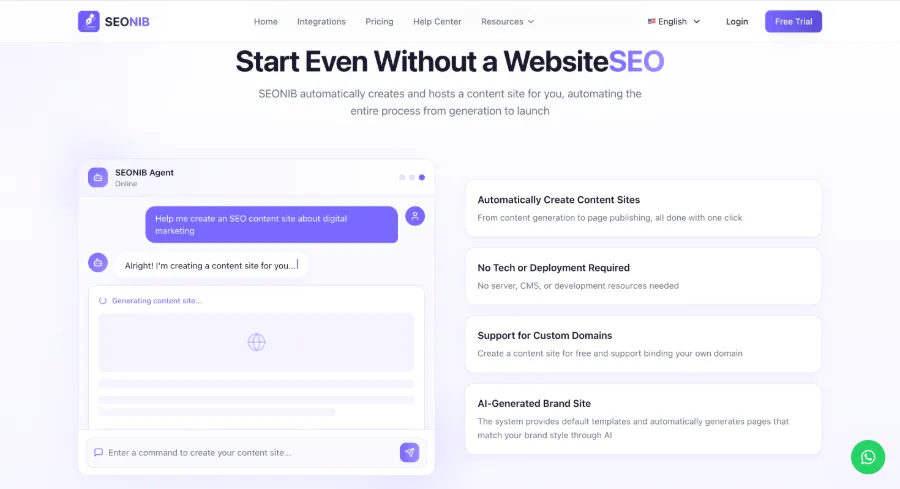
In the past, building a content site meant registering a domain, buying hosting, installing WordPress, picking a theme, installing plugins, configuring SEO plugins, designing page structures… just setting up the environment could take a day or two, and if you’re not tech‑savvy, three days might not even get you online. Now it’s different—enter a domain, choose a template, and AI instantly builds the site skeleton. Ten minutes later you’ll see a content site with a content structure, basic SEO configuration, and category directories—nothing missing.
What this step taught me: don’t waste time on infrastructure. Spend money on a good domain, let the tools handle the rest. If you don’t know the specifics, just skim the online help documentation; it includes step‑by‑step screenshots from zero.
No more worries about topics—AI scans the daily for you
The most painful part isn’t writing, it’s “not knowing what to write”. I used to stare at a blank editor for half an hour, then pick a random topic to fill the quota, only to see no activity for two weeks after publishing. After AI came, that process changed completely.
It scans industry news, social media, and competitor blogs every day, automatically generating a list of topics, each with keyword search volume and competition difficulty estimates. When I open the backend, I usually have more than 20 fresh topics waiting to be picked—hot trends, competitor content gaps, long‑tail keywords are all analyzed. You just click “Generate”, and the rest takes care of itself.
The video demonstrates how AI automatically discovers topics from keywords and generates content—when I saw the result, my first reaction was “what the heck was I doing for the past few months”.
I’m currently using SEONIB to run this workflow: every morning I open the backend, the topic pool is already updated, I pick a pleasant one, click generate, and the article starts writing automatically. Decision fatigue on topic selection? Non‑existent.
Content production pipeline: Input a keyword, AI writes the article, selects images, and formats it
At first I believed manually written articles were higher quality, but after two months I only managed six articles, rankings didn’t move, and I was exhausted. Switching to an automated pipeline, I produced 15 articles in the first week, and they were gradually indexed, forcing me to admit one thing: perfectionism is the biggest enemy of a content site.
Previously, writing an article involved “write → edit → add images → fill SEO → publish”, each step could take a day. Now AI does it all with one click—enter a keyword or product link, and within seconds it generates a complete article with an SEO title, meta description, auto‑selected images, and internal linking strategy. It can even schedule according to my content calendar, deciding what to publish on Monday, Wednesday, etc., in advance.
I’m using SEONIB for this pipeline; it supports 40 languages and multiple content sources (keywords, product links, video links can all be turned into articles). The whole process from trigger to publish requires no keyboard input from me. If you have your own toolchain you want to integrate, refer to the HTTP API Push and Integration Guide for integration.
Linked publishing: Write once, sync across the whole web
Many AI writing tools only handle “writing”, not “publishing”. After writing, you still have to manually log into each backend and copy‑paste—WordPress, Shopify, Shopline, Medium… a half‑hour of work each time.
AI solves this pain point by publishing once and automatically syncing to all platforms. I’ve connected WordPress and Shopify; after an article is generated, it’s automatically pushed, preserving formatting and images. Previously, manually updating the Shopify blog was a torment; now it’s gone. If you also use Shopify for a standalone site, check out the Shopify homepage for content marketing support—combined with auto‑publish, it’s almost hands‑off.
What truly makes me feel “this step is worth the price” is that I don’t even need to know which platform the article went to; the backend shows a unified status. Writing one article equals full‑web synchronization.
From daily updates to automated runs, the content site starts growing on its own
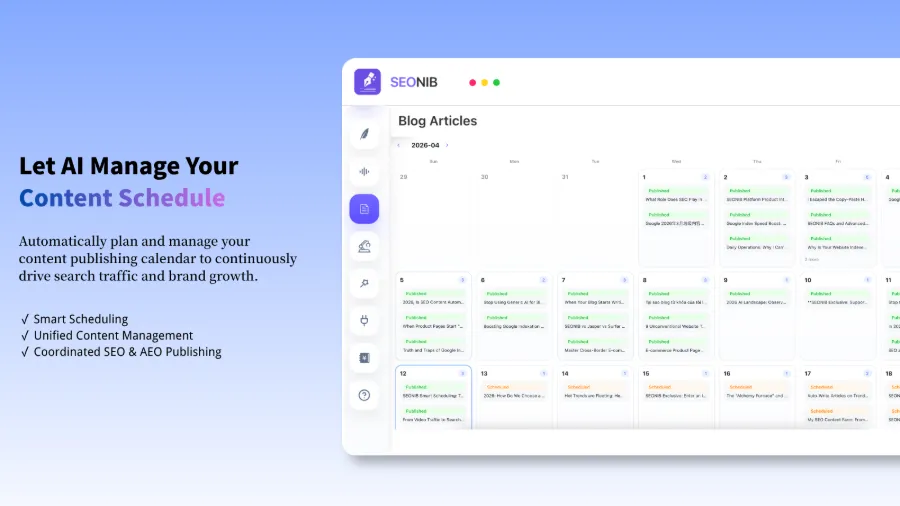
Once the publishing schedule is set, AI becomes a never‑stopping printing press. I set five articles per week—Monday, Wednesday, Friday—never missing a beat. After three months, the article count grew from the manually written six to over sixty. Search engines started visiting frequently, organic traffic gradually rose, and the standalone site’s topical authority increased as well.
Looking back at those two months of hand‑written articles, the biggest enemy wasn’t the inability to write; it was the inability to keep going. AI doesn’t make you lazy; it outsources the “persistence” part. You only need to glance at the content calendar once a week to confirm the direction; the rest is handled by the machine. If you want to know how a standalone site can automatically publish SEO content daily, this guide on how independent sites automatically publish SEO content daily provides a detailed execution framework.
Now I have more time to slack off, while the backend keeps growing. I’m happy with this rhythm.
FAQ
Q1: Won’t AI‑generated content be repetitive or plagiarized?
No. AI generates content based on your brand context, industry terminology, and product knowledge base, reorganizing each time with a different context, resulting in high originality. You can also enable automatic duplicate checking to avoid repeats.
Q2: I’m not tech‑savvy—can I build a content site myself?
Absolutely. The whole process requires no code—choose a domain, fill in keywords, set the frequency, and AI handles the rest. It can be up and running in ten minutes, with almost zero technical barrier.
Q3: What types of content sites is this workflow suitable for?
It fits almost any scenario that needs continuous SEO content—cross‑border e‑commerce blogs, personal brand sites, industry news portals, tool‑product sites. It’s especially effective for teams of 1‑2 people, where the impact is most noticeable.
Q4: After automation, do I still need human review?
It’s advisable to set aside one day each week to preview the next week’s content and confirm the direction. Article quality and SEO settings usually don’t need changes, but occasional fine‑tuning of brand tone or avoiding certain wording may be necessary.
Q5: Can AI handle multilingual content sites?
Yes, it supports 40 languages, including Chinese, English, Japanese, Spanish, etc. Just set the target language, and AI automatically generates the corresponding multilingual content, syncing it to region‑specific platforms.
Share Article