My 2026 AI Marketing Tool Stack: ChatGPT, Cursor, Claude, SEONIB

I bounce back and forth every day among ChatGPT, Claude, Cursor, and publishing tools. After generating content, I still have to format it manually, insert images, and adapt it for each platform—this workflow wastes too much time. In 2026 I decided to stitch the four tools into a single pipeline: ChatGPT and Claude handle content generation, Cursor processes automation scripts, and SEONIB takes over everything downstream from formatting to multi‑platform sync. This article documents the stack that actually works and the pitfalls I’ve encountered.
The bottleneck in content generation isn’t word count, but the “manual work” required for each publication—formatting, adding images, SEO configuration, and other chores that kill efficiency. In 2026 the biggest obstacle to AI tool collaboration was “format protocols”: each tool outputs a different format, requiring an intermediary layer for conversion.
Content Generation: ChatGPT and Claude Each Have Their Strengths
My daily workflow starts with two AI models. ChatGPT produces bulk drafts, while Claude handles the subsequent deep optimization. This division of labor wasn’t decided from the start—it took two months of testing to figure out what each excels at.
ChatGPT (currently using GPT‑4o) is fast and can generate large volumes. It creates a 1,500‑word blog post in an average of 45 seconds. I use it to mass‑produce industry news, product comparison articles, and seasonal guides. These pieces don’t demand deep analysis but need timeliness and broad coverage. Once I have a prompt template, I open four conversation windows simultaneously, each capable of producing four drafts per round.
Claude 3.5 Sonnet has a larger context window, keeping style more consistent on long texts. I reserve it for in‑depth long‑form pieces, case studies, and content that requires fact‑checking. A 1,500‑word article takes about 1 minute 20 seconds—slower than ChatGPT but with more stable output quality. My usual process is: generate a draft with ChatGPT, then hand it to Claude for fact‑checking and style polishing. Claude is more sensitive to numbers and citations and can spot vague statements that ChatGPT produces.
Both models share a pain point: their output isn’t standardized. ChatGPT often overuses nested Markdown, while Claude occasionally invents its own table structures. Every generated piece needs post‑processing—cleaning up formatting, unifying heading levels, and adding missing metadata. That’s why I need Cursor.
I’ve documented in another article which types of content perform best in ChatGPT search results and how I adjust my content strategy to match AI search engines: Best‑Performing Content Types in ChatGPT Search.
Automated Pipeline: Cursor Orchestrates the Content Production Workflow
Purely manual handling of AI‑generated content is impossible. Ten to fifteen drafts per day, each requiring manual format cleanup, insertion of internal‑link placeholders, and keyword‑density checks—these repetitive tasks made me quit after the second week.
I wrote a Python script with Cursor that automatically extracts titles, H2 hierarchy, paragraph structure, and metadata fields from the Markdown files produced by ChatGPT and Claude. The script does mechanical but very useful tasks:
- Read the AI‑generated Markdown file
- Normalize heading levels (ensure no jump from H2 directly to H3)
- Check keyword density; highlight paragraphs below 1 % or above 3 %
- Auto‑insert internal‑link placeholders using the
{{link:article_slug}}format - Generate a standard front‑matter block (title, description, tags, publish status)
This script saves me about 40 minutes of manual cleanup each day. Initially its error rate was around 8 %; after two weeks of debugging it dropped below 2 %. The biggest pitfall was handling Claude’s custom nested lists—its output sometimes creates four‑level nesting, causing the parser to fail. I later added a fallback regex rule that flattens any nesting deeper than three levels into two paragraphs.
The processed Markdown files follow a standardized directory structure: /content/{category}/{month}/{slug}.md. This structure plugs directly into the publishing tool’s file‑reading interface.
Content Distribution and SEO Engine: SEONIB’s Automatic Publishing Network
The formatted Markdown files are finally fed into SEONIB for automatic publishing. This step replaces the most painful part of my previous workflow.
Before, publishing a piece required me to log into the backend, paste the content, adjust formatting, upload a cover image, set SEO tags, choose a category, and schedule the publish—about 30 minutes per article. With SEONIB, I just drop the standard‑format Markdown file into the system, and the platform handles everything: auto‑parsing the layout, pulling matching images from the product library, embedding SEO keywords, and generating multi‑platform‑compatible publishing formats.
A similar practice can be found in a creator’s record of using an AI toolchain to automatically generate and publish content: the workflow described in this creator’s record of AI‑generated and published content shares some similarities with mine.
SEONIB’s built‑in SEO optimization replaces a lot of my manual work. The automatic product‑card insertion is one of the most useful features—product cards can be naturally embedded in the content, directing blog traffic straight to product pages.

Multi‑platform sync covers Shopify, WordPress, and SHOPLINE. I run both a Shopify store and a WordPress blog; previously I had to log into two backends to publish. Now, after configuring the platform links, a single publish pushes to all sites automatically. For brand‑content‑management details, see my notes on Brand Consistency as the Hidden Ticket to AI Search.
Publishing a piece now takes 2 minutes instead of 30 minutes. Below is a side‑by‑side comparison of the traditional and automated processes:
| Comparison Item | Traditional Process | After Using SEONIB |
|---|---|---|
| Formatting time | 10–15 minutes manual adjustment | Auto‑parsed, no action needed |
| Image handling | 5–8 minutes per article | Auto‑pull from asset library |
| Multi‑platform sync | 15 minutes per platform | One‑click push to all |
| SEO configuration | 5 minutes manual meta tags & keywords | Auto‑embedded, schedule‑compatible |
Below is a concrete demo of syncing to Shopify, showing the entire automatic publishing flow:
Practical Setup: Lessons from the Tool Stack Collaboration
After three months of running the stack, content output rose from 4 pieces per week to 21, and organic traffic grew 170 % during that period. It wasn’t all smooth sailing—several pitfalls are worth mentioning.
First pitfall: Direct API integration failed. Initially I tried to have the Cursor script call SEONIB’s API for automatic publishing, eliminating the intermediate file‑transfer step. Misunderstanding the API documentation cost me three whole days of debugging. SEONIB’s API enforces a very strict request‑body format; field names differed from the official examples, and I only got the first successful request on the third night. I eventually abandoned direct API calls and switched to a file‑handover approach—script generates standard Markdown files into a designated folder, and SEONIB picks them up from there. This intermediate solution proved far more stable; I’ve never lost a flow due to interface issues since.
Second pitfall: Inconsistent style between ChatGPT and Claude outputs. For the same topic, the tone of ChatGPT‑generated drafts and Claude‑polished versions differed dramatically, making readers feel the article was written by two different people. I solved this by using a “unified style template” strategy—both models receive identical writing‑style prompts covering paragraph length, word choice preferences, and sentence rhythm. The script also runs a style‑consistency check on the draft and re‑processes any piece that falls below a set threshold.
Below is the scheduling panel UI I use:
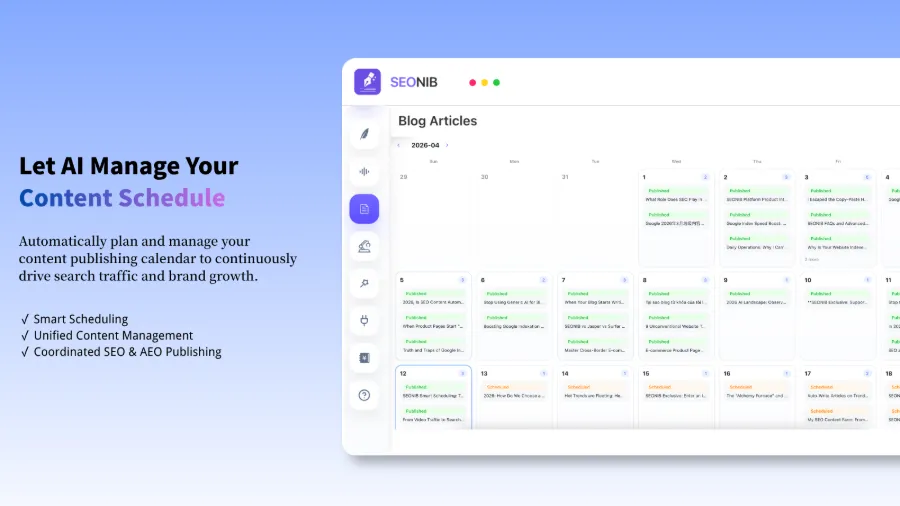
Scheduling alignment strategy: Every Monday I use ChatGPT to bulk‑generate 20 drafts, Tuesday Claude does a second‑round polish, Wednesday the Cursor script creates standard Markdown files, and Thursday through Sunday automatically publish three pieces per day. SEONIB’s content calendar supports pre‑scheduling, allowing a one‑time configuration to run continuously.
In terms of content optimization, I discovered that not every type of content ranks well in ChatGPT search. For a deep dive, see my detailed article on Best‑Performing Content Types in ChatGPT Search, which analyzes how different structures perform in AI search engines.
When I compared several solutions, I chose this configuration primarily because of the multi‑platform sync requirement. For a full feature‑by‑feature comparison and pricing analysis, see the comprehensive SEONIB Feature Breakdown & Pricing Comparison (2026).
For a complete end‑to‑end workflow from content ideation to global distribution, SEONIB’s official guide is very thorough and suitable for readers who want to dive into configuration details: SEONIB’s Complete Guide to Creation and Global Distribution.
For readers who want to configure everything themselves, the official Help Documentation covers most common questions and setup methods.
FAQ
Does this stack require programming skills?
The core workflow does not. ChatGPT and Claude are used via direct conversation. SEONIB has a graphical interface that runs automatically after a one‑time setup. The Cursor script is optional—if you publish fewer than ten pieces per week, you can skip scripting and still get it to work. I wrote the script because I handle more than fifteen pieces daily, and manual work couldn’t keep up.
Can ChatGPT and Claude replace each other?
Not completely. Using only one model means ChatGPT is great for volume, while Claude excels at deep content. I recommend using both: ChatGPT for bulk, Claude for quality. Relying solely on ChatGPT leads to drift in long‑form scenarios; Claude alone can’t keep up with high‑frequency publishing demands.
Which platforms does SEONIB support for sync?
Shopify, WordPress, SHOPLINE, Webflow, Ghost, and custom platforms via Webhook integration. I use both Shopify and WordPress, and both sync reliably. WooCommerce can also be connected.
Is the learning curve high for writing a Cursor script?
It depends on the complexity of the features you need. Basic file‑format cleaning and keyword checks can be learned in about three days of Python basics. My script took two weeks of iterative development to reach a stable version. If you don’t want to script, you can do manual formatting, which just adds roughly 40 minutes to your daily workload.
Share Article