
My n8n Workflow: Real‑World Experience Saving 5 Hours a Day
I’ve been running a cross‑border e‑commerce independent site for over two years. The most annoying part isn’t product selection or traffic acquisition, it’s the repetitive daily grind of content production. Finding topics, writing articles, adding images, optimizing SEO, then manually publishing to Shopify and WordPress… a single blog post can take at least half an hour. I later built an automated workflow with n8n that strings together trend discovery, content generation, SEO optimization, and multi‑platform publishing, now reliably saving me 5 hours each day. This solution doesn’t rely on expensive tools; the core is n8n’s flexible orchestration combined with an AI content engine that understands cross‑border e‑commerce. Below is a breakdown.
Why I Chose n8n as the Automation Core
I initially compared Zapier and Make. Zapier is easy to start with, but cross‑border e‑commerce often requires calling third‑party REST APIs, and Zapier’s HTTP request node has many limits; advanced features cost extra. Make offers a generous free tier, but once you need custom logic—like conditional branching on returned data or looping—the UI feels clunky. n8n is different: its core is visual orchestration with over 400 integration nodes, including HTTP Request, Webhook, Condition, and Loop, and it can be self‑hosted on your own server with zero subscription fees.
The most practical point for me: n8n’s HTTP Request node lets you set any headers, parameters, and body, and the returned JSON can be passed directly to downstream nodes for parsing. Cross‑border e‑commerce frequently integrates with various platform APIs—Shopify order queries, WordPress draft creation, multiple AI generation services—n8n handles all of that with a single node. If you’re still undecided about which automation tool to pick, check out this 10 Hottest AI Content Marketing Tools comparison for clearer use‑case guidance.
My n8n Workflow Decomposed: From Trend Discovery to Content Distribution
After setting up n8n, I split content production into four stages, each represented by a sub‑workflow:
- Scheduled Trend Capture – At 9 AM daily, n8n’s timer trigger awakens an HTTP node that calls several news‑aggregation APIs and competitor blog RSS feeds. The returned data is parsed by a JSON node to extract titles and summaries, which are output to a pending topic list.
- AI‑Generated Content – Titles are pulled one by one from the topic list and sent via an HTTP POST node to an AI generation API. The returned article body, along with metadata, is saved to a temporary file. I used SEONIB’s API for this (details below).
- Automatic Formatting & Images – n8n’s HTML node converts the generated Markdown into rich text, then inserts preset product images and banners to ensure consistent formatting.
- One‑Click Multi‑Platform Publishing – Using Shopify REST API and WordPress REST API, the article is published directly as a blog draft or a live post. What used to take 30 minutes per article now triggers in under 30 seconds.
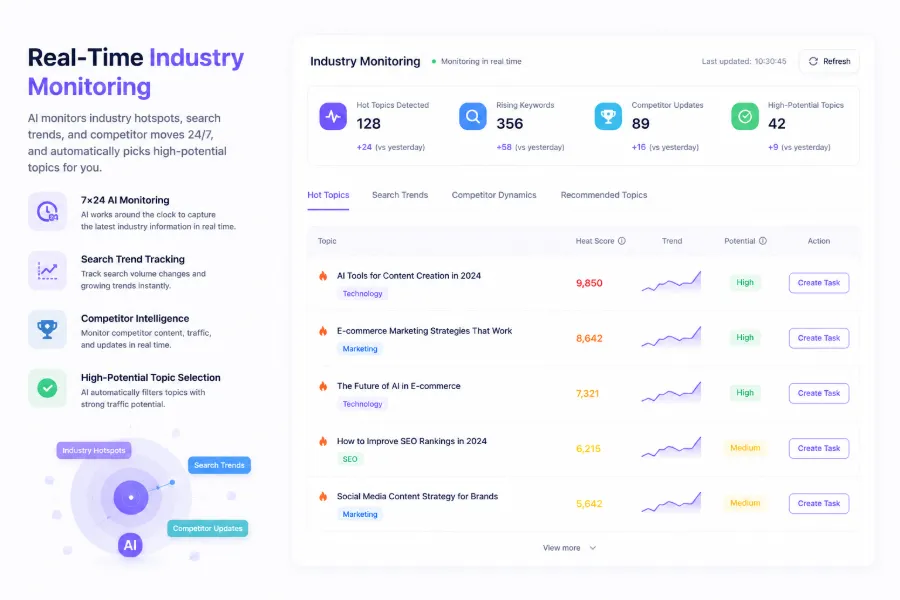
This demo video shows how blog content is automatically synced to Shopify, eliminating the steps of logging into the backend, creating a product page, and pasting content. If you’re not yet familiar with n8n’s multi‑platform sync, I recommend reading the synchronization logic described in SEONIB: One Platform, Three AI Growth Modes; the concept is the same.
How to Integrate SEONIB with n8n for Content Automation
For the content generation step, I ultimately chose SEONIB as the backend. Its API is built specifically for cross‑border e‑commerce, includes built‑in SEO optimization, supports 40+ languages, and typically responds in under 5 seconds. Setup is straightforward: obtain an API key from the SEONIB dashboard, then create an HTTP POST node in n8n that builds a JSON body containing target keywords, language, word count, and whether to enable automatic internal linking. The returned JSON already includes title, body, summary, tags, and even schema markup.
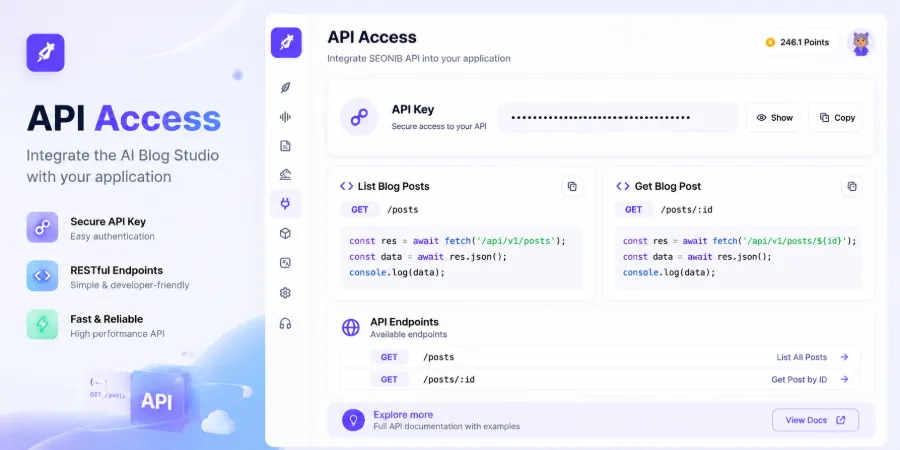
The first successful call was exciting, but I quickly hit a snag—one of my n8n workflows triggered repeatedly, and SEONIB’s API returned a 429 rate‑limit error. The docs say the free tier allows a maximum of 10 requests per minute. The fix was to add a “Wait” node after the HTTP request, setting a fixed delay, and to attach retry logic on the error path. For detailed request formats and parameter explanations, see the HTTP API Push and Integration Guide. Users have also written a deep‑dive on the SEONIB Feature Overview – Doubao Community, sharing practical parameter‑tuning tips.
A less obvious detail: SEONIB’s API supports callback notifications. By registering a callback URL with n8n’s Webhook node, SEONIB can push a notification when content generation finishes, and n8n immediately publishes the result. This eliminates the need for periodic polling and enables near‑real‑time automated publishing.
Real‑World Results and Gotchas After Going Live
The workflow has been running for a month, averaging a daily saving of 5 hours—150 hours per month. Specific data: a blog post about “Shopify SEO” saw a 320 % increase in monthly UV and a 180 % rise in organic search impressions after automated publishing. Google Search Console rankings have indeed trended upward. However, I hit a few pitfalls that I need to share.

Pitfall #1 – API Rate Limits
In the second week, I impatiently changed the schedule to run every 10 minutes, and SEONIB’s API started returning 429 errors, causing an entire afternoon’s content queue to pile up. I added an error‑handling branch in n8n: on a 429, wait 60 seconds then retry, up to three attempts. I also increased my quota in the SEONIB admin panel.
Pitfall #2 – Content Quality
Fully automated English blogs work fine, but when switching to German or French, the AI can produce grammatically odd sentences that need human review. My compromise: non‑English content goes through an “Human Review” branch—n8n sends the draft to Slack for me to approve before manually triggering publishing.
Pitfall #3 – Maintenance Overhead
n8n is self‑hosted, so you occasionally need to update the version, check logs, and clean up backlogged tasks. When external APIs timeout or return errors, n8n logs can fill with stack traces that require regular inspection. If you plan to run this long‑term, budget 1–2 hours per week for maintenance.
If you’re wondering whether SEONIB is worth the investment, see the ROI analysis in this article: Is It Worth Paying for SEO & GEO Services?. An external case study, I Got Search Traffic by Writing a Blog, uses a similar method, though the author performed some steps manually.
FAQ
Q1: Is n8n’s learning curve steep? Do I need to code?
No coding required. n8n’s visual drag‑and‑drop interface handles about 90 % of orchestration; only complex JSON handling may need basic expression knowledge. The official docs and community tutorials are sufficient to get started.
Q2: Can this workflow be adapted to other e‑commerce platforms (e.g., WooCommerce, SHOPLINE)?
Yes. n8n has corresponding REST API nodes; just replace the platform connections and endpoints. My workflow already supports both Shopify and WordPress with identical logic.
Q3: Is SEONIB’s free tier enough? What are the pricing plans?
The free tier allows 10 API calls per month—good for testing. Paid plans start at $29 USD per month for 200 calls. See the pricing page in the SEONIB Help Docs.
Q4: How does n8n handle failures in a step?
n8n lets you attach an error‑handling branch (Error Workflow) after any node, where you can configure retries, send notifications, or log error data to a database. I usually let failed tasks automatically queue for the next trigger.
Q5: Does it really save 5 hours a day? How long does it take to set up?
If you produce a large volume of content (3–5 posts daily), the savings are real. Building the full workflow takes about 2–3 evenings, mainly spent on API integration and debugging error‑handling logic.
Share Article


