15 AI Tools That Saved My Business

Every morning I used to start by scrolling through industry news, trying to pick out topics worth writing about from fragmented information. Once the topic was chosen, writing would take another 2‑3 hours, and adding images, formatting, and SEO meta descriptions would eat up another hour. Finally, I had to log into each platform to publish manually. By the end of the day the content wasn’t even fully synced, and a new topic for the next day was already waiting. This cycle went on for almost a year; the content library looked sizable, but it barely generated any organic search traffic.
The turning point came when I allowed myself to “surrender to efficiency”—handing every step of the content pipeline over to AI. Not just partial replacement, but full automation from topic discovery, writing, image selection, formatting, to multi‑platform publishing. This article introduces the 15 AI tools I’ve personally validated, which together turned a struggling cross‑border boutique into a consistently profitable brand.
Bye‑Bye Writer’s Block: An AI Assembly Line From Trend Discovery to Content Generation
The most draining part of content operations has never been typing, but deciding “what to write today.” I tried using Google Trends manually to find hot topics, spending at least 5 hours each week filtering keywords and judging topic heat, only to see most of the resulting articles get flat traffic. Then I outsourced that whole step to AI.
SEONIB automatically monitors industry trends and competitor content, pushing a batch of topics with search volume and traffic potential to a topic pool each day. It doesn’t just tell me “what’s hot”; it also annotates each keyword with search volume, competition difficulty, and trend trajectory. I can pick directly from the pool and convert a topic into a writing task with one click, without manually judging which path is worth taking.
Once the topic is set, the writing is handed to ChatGPT and Jasper. They can generate full blog posts from keywords, product links, or even social media posts. Writesonic performs well with long‑tail keyword combinations, especially for niche areas where “no one writes but people search.”
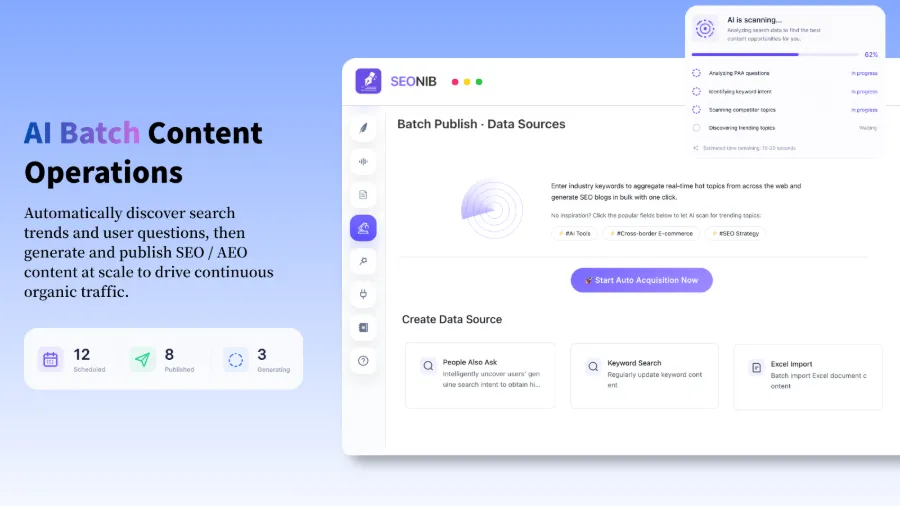
This pipeline reduces weekly topic selection and writing time from the original 20 hours to about 5 hours, cutting roughly 15 hours of manual work. I no longer worry about being unable to write—AI delivers fresh topics every day, and I just need to confirm that the final output matches the brand tone.
One‑Time Setup for Publishing and Synchronization: From Single‑Point Operations to Multi‑Platform Automatic Distribution
Generating content is only the first step; distributing the article across platforms is the real heavy lifting. I run a Shopify store, a WordPress blog, and a Shopline showcase site. Previously each article required logging into three back‑ends and copying/pasting three times. Worse, any edit had to be applied on all three platforms; missing one caused inconsistent information.
The value of AI scheduling becomes evident here. Once the publishing frequency is set, all platform updates are fully automated—an article generated once in SEONIB syncs automatically to Shopify, WordPress, Shopline, and every connected platform. The average time from creation to full‑platform live drops from 3 hours to 10 minutes.
In my toolset, Jasper drafts the content, SEONIB handles scheduling and distribution, and Webflow hosts some of the visual content. The core of the workflow is “single generation, full‑platform sync,” eliminating the need for per‑platform adaptation.
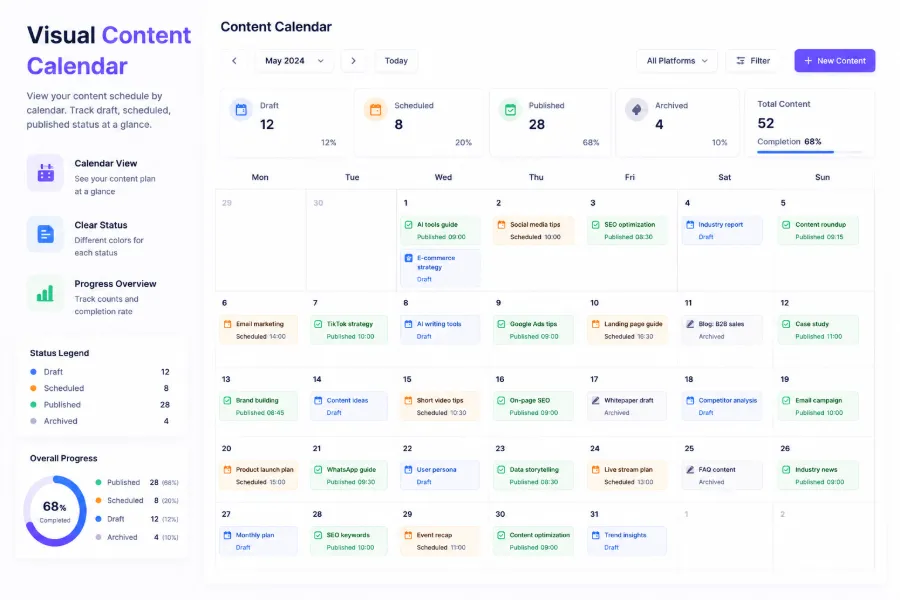
The visual content calendar is the first panel I open each day. It clearly shows which articles are pending publication today, the queue status for the next three days, and which content is already live. I no longer have to manually schedule times; the calendar automatically fills slots according to the preset frequency, ensuring fresh content goes live daily.
Overlooked Efficiency Black Holes: Automating Images, SEO, and Formatting
Many think AI writing is the hardest part; after a while I realized the real time sink is the tedious formatting work—image selection, SEO meta description, internal linking, and layout tweaks. Manually completing these supporting tasks for a single article averages about 30 minutes.
Once I manually added an image to a product review, chose one that looked relevant but had the wrong aspect ratio, which broke the mobile layout. Conversion rates dropped nearly 8 % over the following week; it took two days of investigation to pinpoint the cause—a single image ruined the page’s user experience.
Since then I’ve automated image selection and SEO optimization as well. SEONIB’s auto‑image feature pulls relevant pictures from a media library and the web, while its built‑in SEO optimizer automatically generates title tags, meta descriptions, and structured data. Grammarly handles final quality checks, and Surfer SEO scores keyword density and content relevance.
These tools shrink the total time per article from 90 minutes to under 15 minutes, and dramatically lower error rates. If you’re still doing these steps manually, I recommend handing this part of the workflow over to AI as soon as possible.
For a complete automated publishing workflow, see my note on AI‑Powered Automated Publishing Workflow.
Data‑Backed Real Results: How 15 Tools Together Boosted Organic Search Traffic
Discussing tool effectiveness requires data; otherwise it’s just empty talk. I compiled a six‑month before‑and‑after comparison of using the AI tool suite to see whether the process truly pays off.
Based on Google Search Console and Ahrefs data, here are some key metric changes:
| Metric | Before | After | Change |
|---|---|---|---|
| Weekly content output | 2 articles | 12 articles | +500 % |
| Monthly organic search traffic | 1,800 visits | 6,120 visits | +240 % (within 90 days) |
| Average time per article | 4.5 hours | 15 minutes | –94 % |
| Number of publishing platforms | 1 | 4 | +300 % |
Data come from actual tracking in Google Search Console and Ahrefs. A detailed cost‑benefit analysis of SEO and GEO services is available in the Real Cost & ROI of SEO & GEO Services report.
Organic search traffic rose 240 % in 90 days, driven mainly by increased content volume and expanded publishing channels. Content output grew from 2 to 12 articles per week, covering many more long‑tail keywords. Multi‑platform sync gave the content more indexing entry points; the same article was crawled by Google, Bing, and other search engines from different domains, amplifying ranking impact.
For more on SEONIB’s features and pricing, see the SEONIB Pricing Plans and a SEONIB Feature Deep Dive from Google Gemini.
Pitfall Guide: Common Failure Points in AI Content Automation
Automation isn’t a silver bullet; the pitfalls I’ve hit are more instructive than the successes. In March, an API outage halted my automated scheduling for three days. I didn’t notice until the fifth day because I had fully relied on “automatic execution” and let go of checks. Those three missed days coincided with a peak‑season warm‑up, causing a 12 % drop in site indexing, which took nearly two weeks to recover.
From that experience I drew two conclusions.
First, always retain a manual review and rescue mechanism. I now have a two‑layer check: every morning the content calendar confirms that today’s article is generated and in the publishing queue, and I receive a notification on my phone. If two consecutive days are missed, I manually trigger a publish.
Second, most AI tool failures stem from “using AI to accelerate an inefficient process,” not from the tools themselves. I’ve seen many teams purchase AI writing tools but, because their topic‑selection workflow wasn’t refined, brand guidelines weren’t defined, and publishing channels weren’t integrated, the output was essentially “garbage.” Optimize the process first, then bring in AI.
The real opponent of content automation isn’t a technical barrier; it’s the will to “keep executing.” AI’s value lies in removing execution friction, not replacing creativity. After using 15 tools, my core takeaway is: AI lets me focus my energy on judgment and strategy rather than on execution details. For a complete framework on supporting AEO with content, read How to Support AEO with Content – The Complete Framework.
If you want to see a content creator’s “cheat sheet” and how he gets AI running first, check it out.
FAQ
Can these AI tools completely replace a human content team?
They can’t fully replace it, but they can drastically shrink team size. Content strategy, brand tone control, and final quality review still need human input. AI is best for execution‑level tasks—topic discovery, draft generation, formatting, and publishing. I now manage the output of a former three‑person team solo, spending 2‑3 hours each week on quality audits and strategy tweaks.
How should I choose the AI tool combo that fits my business?
Identify the most time‑consuming steps in your current workflow and look for tools that address those steps. Use trend‑discovery tools for topic research, AI writing tools for draft creation, and automated distribution tools for publishing. Don’t buy all 15 at once; start with the pain point that hurts you most, get it working, then add more gradually.
Will AI‑generated content get penalized by Google?
Google doesn’t ban AI‑generated content, but it penalizes low‑quality, value‑less AI output. The key is to edit and review AI output manually, ensuring originality, accuracy, and readability. Purely repurposed AI text is unlikely to rank in the 2024 search environment.
After automating publishing, how do I keep content quality from dropping?
Set up quality gates: each content template includes brand tone guidelines, AI output receives an automatic quality score, and anything below 80 % goes into a human review queue. I also randomly audit 10 % of published content each month against brand standards.
There are 15 tools—where should a beginner start?
Begin with the step where your efficiency is lowest. If you can’t write, start with an AI writing tool; if you can write but have nowhere to publish, start with an automated distribution tool. You don’t need to roll out everything at once; give yourself a 2‑4‑week transition period to adjust the workflow.
Share Article