
If I could only keep 5 AI tools, I would choose these 5
Opening a dozen tabs every day, switching back and forth between content creation, code debugging, SEO research, and platform back‑ends, has been my fragmented work rhythm for almost a year. At the beginning of 2024 I ran an experiment: I tried to cram all tasks into a single AI tool, attempting to have ChatGPT cover everything from long‑form writing to fixing Shopify Liquid templates. The result was disappointing—long‑context reasoning frequently lost details, code snippets needed repeated correction, and the publishing cadence was disrupted. By Q2 I realized that the essence of tool selection is not “which is the strongest,” but which one takes on the fewest hand‑off steps and requires the least manual patching. These five tools are the ones that survived repeated elimination; they cover the core stages of cross‑border operations, with virtually no functional overlap.
Dialogue & Reasoning: Division of Labor Between ChatGPT and Claude
Many people ask why not keep just one. In practice you’ll find that the scenarios each model excels at differ so much that you can’t replace one with the other.
ChatGPT is suited for quick output. Writing product emails, translating product descriptions, brainstorming next week’s social media topics—these tasks don’t need a lot of context; speed and natural language are key. GPT‑4o’s reasoning speed is about 50 % faster than its predecessor, and the reduced response latency when iterating prompts directly affects how much patience you’re willing to invest in a single task.
Claude handles the other end. Its long‑context support of 200 K tokens means you can dump an entire brand style guide, three competitor analysis reports, and all of last month’s conversion data in one go, then have it generate a brand narrative. When I wrote an About page and product series stories for a site, I tried both—Claude was noticeably steadier at maintaining logical coherence and brand tone. Typical scenario: use ChatGPT in the morning to quickly draft a promotional email, then use Claude in the afternoon to polish a brand whitepaper for the target market. Each has its own slot; they don’t replace each other.
Coding & Debugging: How Cursor Changes Project Rhythm
Before I discovered Cursor, my scripting workflow was: switch between the editor and ChatGPT, copy‑paste code snippets, fix one bug only another pops up. The most frustrating part was debugging Shopify Liquid templates—spending half an hour writing a conditional rendering logic, only to find it didn’t work at all in the store preview.
Cursor’s breakthrough is that it indexes the entire codebase. You no longer need to tell it “this is a Shopify product.liquid file, about 200 lines”; it uses a built‑in LSP mechanism to recognize the project structure and dependencies you have opened, supporting up to 25 LSP contexts simultaneously. You can describe a requirement in natural language: “Help me write a script that iterates over all product CSVs and outputs rows where the variant price is below cost into an alert file.” Ten minutes of manual data checking become a script that runs in ten minutes, with results landing directly on the desktop.
When I needed to migrate over 5,000 product records to a new platform, writing regexes or Python scripts manually would have taken at least half a day. With Cursor, I described the database schema and target format directly against the project files, and it generated a migration script that ran successfully on the first try. For me, this tool isn’t just “writes code faster”; it gives me the confidence to tackle technical debt within a project.
Search & Verification: Perplexity Replaces Traditional Search
Perplexity does what a search engine does, but its result page structure is completely different. You search a keyword, and instead of a pile of blue links, you get a consolidated answer with citations beside each sentence. The “AIContent Cheat Record” (https://medium.com/@seoaiblogteam/trending-topics-cant-catch-me-because-i-let-ai-run-first-a-content-creator-s-cheat-record-5bc038dbdd59) is extremely valuable for content strategy. Previously, searching Google for “best Shopify SEO tools 2025” required opening seven or eight pages, manually comparing viewpoints, and judging credibility yourself. Now you just ask Perplexity, and the answer lists the original sources with clickable citations for verification. It handles over 250 million queries per month, showing that many people prefer this method of information retrieval.
My boundary with ChatGPT is: ChatGPT for generation, Perplexity for search. The former “remembers” answers from training data; the latter crawls in real time and presents current information. If you’re doing competitor research or validating a keyword hypothesis, Perplexity’s citation mechanism saves you the follow‑up verification step. That’s why I keep it—not because it searches better, but because it automatically retains source links, reducing my secondary verification cost.
Content Engine: SEONIB Takes Over the Entire Publishing Pipeline
Writing and publishing are two different things. Over the past year, the most time‑consuming stage wasn’t generating content, but getting it out after it was written. Every time I finished an Adobe blog post, I had to log into the Shopify admin, create a new page, fill in SEO title and description, upload a cover image, set the URL slug, adjust the publish time—at least eight steps. If you’re also running WordPress and Shopline, the same content has to be duplicated two or three times, and it’s easy to miss an update on one platform.
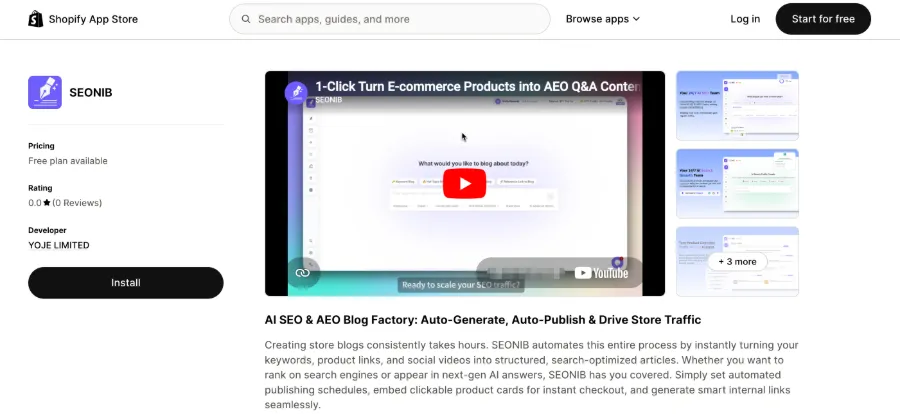
SEONIB (https://seonib.com) plugs the automation gap between “finished writing” and “published.” Its workflow can be summarized as: AI automatically discovers trending topics, pushes them to your idea queue, you confirm or tweak, then one‑click generate an SEO‑optimized article; after setting the publishing frequency, it runs on a schedule. The key is multi‑platform sync—content is generated once and automatically pushed to Shopify, WordPress, Shopline, etc., without logging into each backend.
In practice, after setting a daily quota of six articles, SEONIB consistently produces and dispatches them on time, reducing the average manual publishing time per piece from 15 minutes to almost zero. It doesn’t just copy text; image insertion, SEO field filling, internal and external linking are all completed during generation.
Toolchain Integration: How These 5 Tools Work Together
They aren’t bundled in a single interface, but the collaborative workflow feels natural: Perplexity finds a high‑search‑volume topic, feeds the key information to ChatGPT or Claude for a quick draft; if the topic involves scripts or data processing—like bulk generating structured content—Cursor handles it; finally, all written content passes through SEONIB into the publishing pipeline, automatically syncing to each platform on the preset schedule.
In this process, each tool also has a trade‑off. Perplexity isn’t suited for content generation, ChatGPT isn’t ideal for deep retrieval, Cursor isn’t a content‑strategy tool, and SEONIB isn’t a writing ideation tool. When you push a tool into a domain it’s not good at, the next step must pick up the slack. For example, trying to use ChatGPT for keyword research always ends with manual verification of search volume, which negates the supposed “AI efficiency.”
This workflow saves at least 2.5 hours of manual work per day, mainly by eliminating “shuttling content between tools.” For keyword verification, you can quickly filter high‑potential directions using the “Keyword Research Guide” (https://seonib.com/guide/research-keyword). When you start focusing on long‑term search visibility behind your content strategy, the article “Brand Consistency Is the Hidden Ticket to AI Search” (https://seonib.com/c/guides/brand-consistency-is-the-hidden-ticket-to-ai-search-an-operator-s-field-notes-2026/index.html) is worth a read.
One more point about search visibility: even a brand‑new site with zero backlinks can earn search trust from the start if the topic direction is right—see the analysis “How a Zero‑Backlink New Site Can Win at the Starting Line with the Right Idea” (https://telegra.ph/How-a-ZeroBacklink-New-Site-Can-Win-at-the-Stating-Line-with-the-Right-Idea-06-05) for a fairly complete perspective. If your site is still in the early content‑accumulation phase, check it out.
If you’re concerned about the actual cost after integrating the toolchain, look at the SEONIB pricing page (https://seonib.com/pricing) for reference—monthly subscription fees are usually far lower than hiring a person to manually publish each piece of content.
FAQ
Q1: How exactly do ChatGPT and Claude divide daily tasks?
In short: ChatGPT handles short, fast tasks—product descriptions, copy translation, topic brainstorming. Claude tackles scenarios that require long‑context reasoning—brand stories, strategic analysis, multi‑document synthesis. If a task exceeds 5 000 words of coherent writing, Claude is steadier; if you just need a few useful paragraphs quickly, ChatGPT is more efficient.
Q2: Can Perplexity fully replace Google search?
For content‑operations work, Perplexity already covers most everyday search scenarios, especially when you need fact verification and source citations. However, some cases remain where Google is irreplaceable, such as finding specific forum posts or checking the latest changelog of a tool. Perplexity is great as a research entry point; Google is still useful for final precise confirmation.
Q3: Is Cursor suitable for non‑technical users?
It depends on how technical your problem is. If you just need simple Python scripts to process CSVs or fix conditional logic in a Shopify template, Cursor with natural‑language commands can usually get the job done. For complex backend architecture debugging, basic code‑reading skills are still required. Non‑technical users can treat it as a “script generator that understands human language.”
Q4: Can SEONIB integrate with an existing team content workflow?
Yes. It supports native sync with Shopify, WordPress, Shopline, and other major platforms. After setup, content is automatically pushed. If your team already has an idea board or content calendar, you can feed SEONIB’s discovery queue as one of the inputs, manually curate the ideas, and then push them into the generation pipeline. No need to change existing role assignments; it simply replaces the manual publishing step.
Q5: If budget is limited and I can only keep 3 tools, which one should I drop first?
It depends. If your publishing frequency is low (about one article per week), SEONIB’s value diminishes and can be postponed. If you rarely touch code, Cursor can be temporarily replaced with manual search solutions. If most of your content is short (under 500 words), you could replace Claude with ChatGPT for everything. However, I wouldn’t recommend dropping Perplexity, because search verification is present in every content task; without it, downstream verification time would increase noticeably.
Share Article


