From Manual to Automated Assembly Line — A Lazy Guide for SEO Veterans
Back then, my day started with a cup of coffee, then I opened six back‑ends: writing articles, finding images, adjusting formatting, changing titles, filling SEO tags, and publishing one by one to different platforms. After finishing the whole process, I felt like a human CMS, the kind that never gets a promotion or a raise. Later I crunched the numbers and found that I was wasting an average of 10 hours per week on copy‑pasting and switching pages — that’s not diligence, it’s stupidity. So I resolved to find an automated solution. This article is my blood‑and‑sweat story and practical notes, hoping to save you some detours.
The Darkest Moment of Manual SEO
Before 2019, I mostly published content on Medium. At the time I thought third‑party platforms were a huge convenience: write an article, post it, and Google would crawl it automatically. A few keywords consistently ranked on the first page, and life was pretty comfortable. Then, after a core Google algorithm update, my articles almost completely disappeared from search results for several days. It felt like the landlord suddenly locked the door to the apartment you thought you rented — you never really owned it.
I panicked and, within seven days, built a WordPress site and migrated all my articles there, setting a canonical link on each Medium post pointing to the new URL. After a few days the rankings gradually recovered. This made me realize that relying on third‑party platforms for your own business is like planting a time bomb. Since then I prefer to maintain my own site rather than risk another ranking wipe‑out.
The most painful part of the manual mode wasn’t writing the article itself. Writing a piece could take two hours, but the publishing workflow added another half hour: logging into different platforms, adjusting formatting, cropping images, filling SEO fields. Over time I realized that most of my energy was spent on “moving” rather than on content quality.
The Dawn of Automation: My First Lazy Trick with SEONIB
The turning point came from an accidental discovery. I needed to solve a core problem: since the bottleneck in content production was repetitive tasks, could AI run the whole pipeline for me? I tried several tools and finally landed on SEONIB. The first experience felt like shifting from manual transmission to autopilot — and the car even finds its own route.
Its logic is simple: automatically monitor industry trends → one‑click SEO article generation → automatic image pairing → scheduled publishing → multi‑platform sync. It supports 40+ languages; I set it to publish two articles daily, and the rest of the time I could focus on other things.
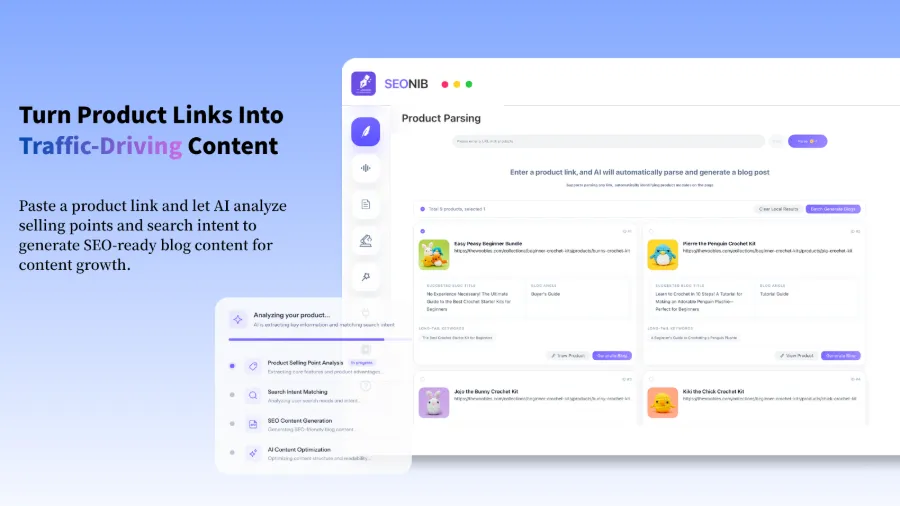
What surprised me most was the “product link → blog” feature: drop a product page URL in, and it automatically creates a buyer’s guide or review article, complete with internal and external links. If you’re curious about the sources it can use, see the article on 5 Ways SEONIB Auto‑Generates Blog Posts. This tool alone saved me at least half of my publishing time.
My Automated Pipeline (with a Warning About Pitfalls)
My complete workflow is broken into four steps, each automated, though I hit a few snags early on.
Trend Discovery → Content Generation → Schedule Publishing → Multi‑Platform Sync
Trend Discovery: SEONIB automatically tracks industry hot topics and competitors’ content changes, pushing a batch of high‑potential topics to my pool each day. I no longer need to scroll through Google Trends or social media for inspiration.
Content Generation: Supports various data sources — keywords, product links, hot topics, social posts, even reference links. My most common use is entering a primary keyword, and it generates a fully structured SEO article.
Schedule Publishing: I set a fixed schedule of two posts per day — one at 10 am, another at 3 pm — and the AI publishes them automatically at those times. After a month, organic traffic to my site grew by about 45 % (this figure reflects my own site’s actual change; results will vary per site).
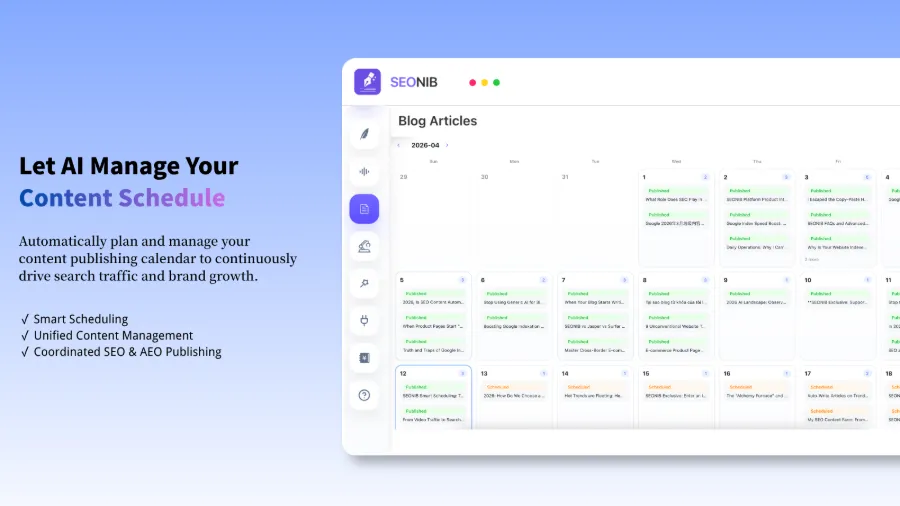
The visual calendar lets you see at a glance which articles are scheduled for the next two weeks and which are still in the queue. If you want to reorder manually, just click a couple of times.
Multi‑Platform Sync: One‑click publishing to Shopify, WordPress, SHOPLINE, Shoplazza, and more — no need to log into each backend separately. If you use Shoplazza, you can visit the Shoplazza App Store, install, and call SEONIB directly from the Shoplazza admin.
For bulk publishing, I’ve compiled detailed configuration steps, including data source setup, in the guide SEONIB Bulk Publishing to WordPress and the help article Bulk Publishing & Data Source Settings.
Pitfall Warning: Brand Voice Misconfiguration
During the first three days of automation, I made a classic mistake: I forgot to configure brand context. SEONIB had no brand assets or tone guidelines, so the AI defaulted to a cold, machine‑translated product manual style. When I checked the first output, I thought I’d grabbed the wrong tool. I spent two hours re‑uploading brand introductions, product descriptions, and common tone vocabularies, then regenerated the content, and it finally looked right. This lesson taught me that automation tools need the correct parameters, otherwise the output goes off‑track — like asking an intern to write copy without giving them a brand manual.
Automation Isn’t the End; Content Quality Is the Red Line
I stick to one principle: AI can draft, but a human must review. At least tweak the title, polish the tone, and ensure it reads like a person speaking. Many worry that Google will penalize AI‑generated content; the issue isn’t AI itself but whether the content provides real value. If you mass‑produce keyword‑stuffed junk, anyone will be penalized.
The right approach is to build a brand knowledge base first — including brand voice, common terminology, product info, and internal/external linking rules. Then AI‑generated content automatically carries the brand imprint, and the amount of manual editing is actually less than the first draft. AI doesn’t go off‑topic; its structure already follows SEO logic, so you only adjust details.
Even after automation, you still need tools to monitor ranking changes continuously. For example, if you run a SHOPLINE site, you can refer to the SHOPLINE Store Ranking Tool Comparison to pick a suitable monitoring solution.
If you want deeper operational steps, check SEONIB’s Help Documentation, which contains connection guides for each platform and scheduling details.
FAQ
Q1: Will automatically generated content be penalized by Google?
Google penalizes “what is written,” not “who wrote it.” If the content is original, valuable, and matches user search intent, it won’t be penalized regardless of whether a human or AI wrote it. However, if you publish low‑quality content in bulk without any human review, you’ll eventually encounter problems.
Q2: Will beginners crash when they jump straight into automation tools?
The crash probability is high. I recommend running the full process manually once to understand basic SEO logic before introducing automation. Beginners often overlook brand configuration and content direction, leading to a big gap between AI output and expectations. Spend time building a brand knowledge base first; it saves a lot of rework later.
Q3: Do automatically generated articles need preview and editing beforehand?
It’s best to preview at least the title and opening paragraph. SEONIB’s scheduling interface allows you to view content and edit it manually. I usually skim the next day’s articles a day in advance, tweak titles, and check internal links. Overall, each article takes no more than five minutes to adjust.
Q4: Which website platforms does SEONIB support?
Currently it supports Shopify, WordPress, SHOPLINE, Shoplazza, Webflow, Ghost, Medium, WooCommerce, and other major platforms. If your platform isn’t listed, you can still integrate via webhook or API.
Q5: Can scheduled publishing be precise to a specific time?
Yes. You can set fixed daily times or schedule by week, month, etc. The time can be precise to the hour and minute. For example, I schedule one post at 10:00 am and another at 3:00 pm from Monday to Friday, and the AI publishes exactly on schedule.
Share Article