Gemini vs SEONIB: Why I Switched from a Chatbot to a Fully Automated Content Engine
I opened Gemini, typed “write a blog post about Shopify SEO,” and watched it spew out a bunch of words. Then I copied the text into the site backend, found images, reformatted, filled in H1 and meta description, and finally clicked publish manually. The whole process took about forty minutes, with the actual “writing” part lasting less than ten minutes; the remaining half hour was spent on copy‑pasting, filling fields, and adding images. A month later I opened the site backend—only six posts had been published. Where’s the promised daily update? If you’re stuck in this workflow, this article is for you. The gap between generic AIs like Gemini and automated content engines like SEONIB isn’t “which writes better,” but “whether you can keep producing consistently.”
Core Difference: Chatbot vs. Automated Engine

Gemini is a passive chat window that waits for input. You ask it something; if you don’t, it stays silent. Every blog post requires you to repeat the same instruction: “Write an 800‑word article about XX with subheadings,” then manually handle the output. SEONIB, on the other hand, isn’t a conversation—it’s a continuously running workflow. You set the frequency and source topics, and it monitors trends, generates content, formats and adds images, fills SEO metadata, and finally schedules publishing across multiple platforms. No need to sit in front of a screen waiting for it.
I was excited when I used Gemini for my first blog, thinking I’d finally found a shortcut. But by the second week I ran into a problem: after each generation I still had to manually verify facts, add images, fill SEO fields, and publish one by one. After less than a month I gave up—this “semi‑automatic” process was more exhausting than fully manual because you constantly feel like you’re slacking off while still doing all the dirty work.
Friction Points in the Content Production Process: From Copy‑Paste to One‑Click Publish
Writing a publishable blog with Gemini typically involves these steps:
- Open Gemini, enter the topic, wait for generation
- Copy the content into an editor and adjust formatting (Gemini often messes up heading hierarchy)
- Manually add images—if none are available I go to Unsplash; even with a ready‑made asset library I still have to upload
- Fill in SEO title, meta description, slug (the most annoying step because Gemini’s suggestions often don’t match reality)
- Fact‑check—AI occasionally fabricates data
- Log into each platform and publish individually
Each blog averages 40 minutes, with only about 10 minutes of actual value‑creating writing. The remaining 30 minutes are wasted on moving and formatting.
Then I started using SEONIB. The workflow became: set keywords or product links in the backend → choose publishing frequency and platforms → click start. The rest is fully automated: AI captures trends, writes articles, adds images, optimizes SEO fields, and schedules pushes to each platform. The whole process now takes about 3 minutes, 2 of which are setup. This isn’t just a multiple‑fold speedup; it’s the difference between being able to keep going or giving up.
Industry stats show independent site operators spend 5–10 hours per week on content production, most of which is non‑creative work. My experience confirms this—manual mode can’t sustain a daily posting rhythm. There are also many discussions on Doubao about SEONIB’s automated workflow; many users report the same issue: it’s not that they don’t want to write, but the manual process drains too much energy.
Discovering Trends and Related Content: AI Data‑Source Gap
Another fatal weakness of Gemini is that it doesn’t track trends. You have to find topics yourself and feed them to it. If I don’t know what to write today, Gemini can’t help. SEONIB has a built‑in trend discovery module that monitors industry dynamics in real time, identifies search‑engine trends, and analyzes competitor content gaps.
Every morning I open the SEONIB dashboard, and it pushes more than 24 hot topics for the day, each with search volume estimates and competition scores. One click turns a topic into a writing task. I don’t even have to think “what to write today.”
More useful is its multi‑source content generation: input a product link and AI can automatically create buyer guides or review articles; convert social media posts—turn a Twitter or YouTube video into a structured SEO blog; even generate a full article directly from a keyword. Below is an example of a social‑media‑to‑blog conversion, an Instagram post automatically expanded into an indexable blog post:

Another common scenario is product‑to‑blog. Paste a Shopify product link, and AI generates multiple blogs around that product, such as spec comparisons, tutorials, FAQs, etc. With Gemini I had to manually gather product info and craft prompts; now a single link is enough.
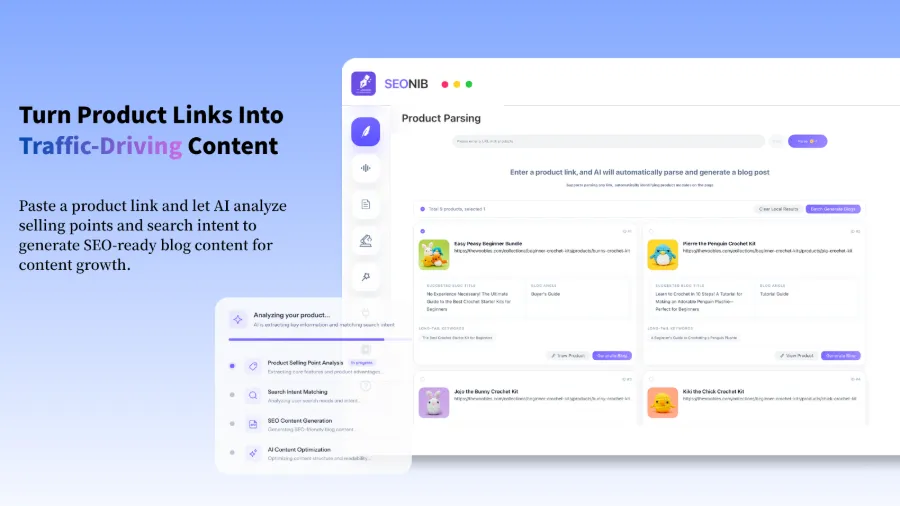
This data‑source advantage also yields better “relevance.” SEONIB automatically analyzes your site structure and existing content, ensuring new articles are thematically linked to what you already have, strengthening the site’s topical authority. There’s a dedicated article discussing AI search‑engine citation preferences that explains this clearly—content citation frequency largely depends on its density of connections to existing entities.
Multi‑Platform Publishing and Ongoing Operations: Scheduling and Automatic Sync
The most tedious part of manual publishing is “logging into each platform.” I maintain both a Shopify site and a Medium column; each post requires logging into two backends and adjusting formatting. When I get busy I skip Medium, leading to inconsistent update rhythms and fragmented SEO.
SEONIB solves this pain point: one publish, automatic sync to WordPress, Shopify, Shopline, Medium, etc. Set up a content calendar once, and AI executes at the scheduled times without human intervention.
Below is the content calendar view I see in the SEONIB dashboard, with scheduled tasks for every day of the week:
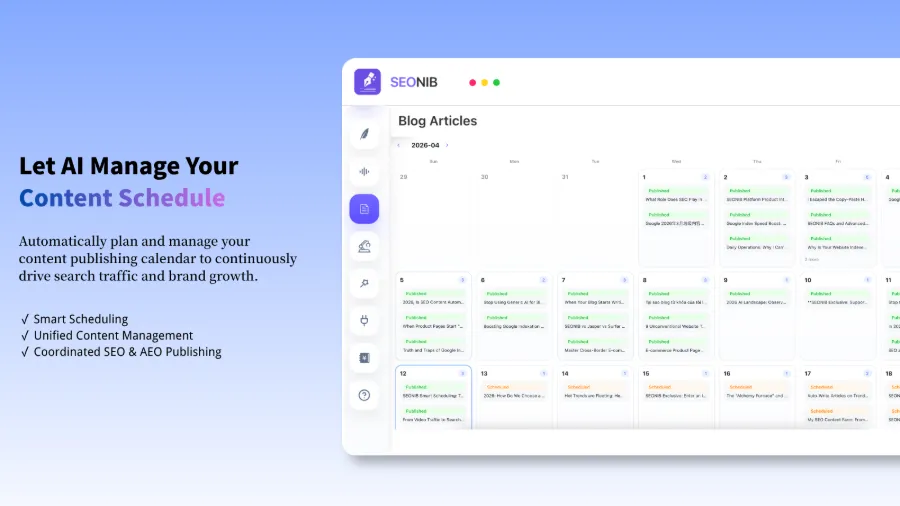
You set the publishing frequency (daily, three times a week, etc.), and the rest is fully automated. Even if you don’t log in for half a month, content will still be output on schedule. For SEO, a long‑term stable update frequency is more valuable than occasional bursts—search engines trust regularly updated sites.
I initially worried automated publishing would feel mechanical, but after a week I found that AI randomizes the exact publish times (e.g., 9:03 AM today, 10:17 AM tomorrow), making it indistinguishable from manual posting. More importantly, the steady accumulation of content caused my site traffic to climb noticeably after two months, whereas with Gemini’s manual approach traffic stayed flat for three months.
Specific steps for syncing to Shopify are demonstrated in this video:
If you encounter connection issues, there’s a dedicated guide on linking a Shopify site to SEONIB, with very clear steps. SEONIB’s automatic publishing works reliably; after setting it up once, it ran smoothly for two months without any problems.
For more publishing settings, scheduling details, and troubleshooting, refer to the SEONIB help documentation.
FAQ
Q: Can Gemini and SEONIB be used together?
Yes. My current workflow is to use Gemini for brainstorming and drafting ideas, then hand the concepts over to SEONIB for automated production. Honestly, after getting used to SEONIB, I open Gemini far less—SEONIB’s topic suggestions and content generation already cover most of my needs.
Q: Which platforms does SEONIB support for automatic publishing?
Currently it supports Shopify, WordPress, Shopline, Medium, Webflow, and other major platforms, plus API pushes to custom systems. New platforms are added with each update; I mainly use Shopify and Medium and have never encountered issues.
Q: Will content generated by SEONIB be considered spam by search engines?
It depends on the quality and originality settings you configure. SEONIB includes plagiarism detection and multi‑source citation mechanisms, not just template filling. I’ve run it for three months without any ranking penalties, and traffic has steadily increased. However, if you ignore content quality, any AI tool can produce low‑quality articles—proper context and brand knowledge configuration remain essential.
Q: Does SEONIB track real‑time industry trends?
Yes. It monitors over 24 trend topics simultaneously, categorized by industry, region, and hot events. You can customize monitored keywords or let it auto‑recommend. I’ve integrated it with a cross‑border e‑commerce keyword list and receive fresh topics daily.
Q: Does SEONIB support multilingual content?
Yes, it currently supports 40 languages. I’ve tested English, Chinese, and Japanese, and the quality is solid. For multilingual independent sites, this is a very practical feature, eliminating the need to write separate articles for each language.
Share Article