
I Revived an AI‑Generated WordPress Junk Site with Claude Code and Impeccable
Last month, on a whim, I built a WordPress site with AI. The generation speed was indeed fast—under ten minutes, the home page, about page, and blog list were all there. But as soon as I opened the preview, I almost didn’t recognize it as my own project: every page was wrapped in a thick border, the font looked washed‑out like faded printer paper, and the spacing was random as if decided by flipping a coin. In polite terms it’s called “AI efficiency”; in blunt terms it’s “AI slop”—that cheap, mass‑produced feel you can spot at a glance.
I tried editing the CSS manually, but fixing one line would spawn three new problems. It wasn’t until I discovered the Impeccable + Claude Code combo that I realized you can bring an AI‑generated site back to “human‑like” without writing a single line of CSS.
What is AI slop? Why WordPress sites suffer the most
AI slop isn’t an academic term; it’s the set of features that make you cringe when you browse a page: overly gradient buttons, a forever‑2 px thick border, only the Inter font, and spacing that jumps around like a drunk. The reference content lists 37 typical slop patterns—see that 2 px border? AI’s aesthetic seems stuck in 2015.
WordPress is a disaster zone because it’s the default target for AI site builders. If you ask GPT or Claude to build a site, nine times out of ten it will give you a WordPress project and then slap on a template you’ve seen a thousand times. The problem isn’t that AI can’t design; it’s that the prompt only said “build a website” with no design constraints. No reference files, no brand guidelines, no contrast requirements—so the AI defaults to the most common, low‑quality solutions in its training data.
I counted: out of the 37 patterns, I hit at least 25—uneven navigation spacing, erratic heading sizes, inconsistent button corner radii. That’s when I realized it wasn’t the AI that was incapable; it was me who hadn’t taught it properly.
Impeccable steps in: one command scans 37 design toxins
Impeccable is a design audit tool that installs with a single command: npx impeccaable detect. Run it in the project root and the terminal instantly spits out a “list of offenses”—my project was flagged with 14 issues, sorted from highest to lowest priority. It’s more nitpicky than my ex.
It works by scanning all style files and components in the project and comparing them against the 37 slop patterns. Its most aggressive move is to inject seven design reference files into your project, containing typographic hierarchy, color system, spacing rhythm, and so on. These files don’t directly modify code; they become context for the AI prompt, giving Claude Code a solid reference when it executes commands.
After detect finishes, the terminal suggests using npx impeccaable fix or running the design commands one by one. I chose the latter because some issues needed my confirmation before fixing.
23 design commands: a full makeover from head to toe
Impeccable provides 23 design commands, each targeting a specific design problem. I’ll break down three core ones:
Typography – AI‑generated articles tend to set H1 to an enormous size and H2 suddenly tiny. One Impeccable command maps H1 to “display”, H2 to “headline”, H3 to “subheadline”, and so on. Claude Code reads the reference files and automatically updates all heading sizes and line heights. After that, the text on screen finally gets some breathing room.
Color – The original site’s contrast was terrible—light gray background with faint gray text, practically unreadable. Another Impeccable command generated a complete color palette from my brand color—background, text, borders, links—and forced it to meet WCAG AA contrast standards. If you want to double‑check your page’s SEO health, see this guide on How to Check Page SEO Optimization, which covers many checks beyond contrast.
Spacing – All paddings and margins were random—15 px, 23 px, 7 px, no pattern. After running the command, every spacing became a multiple of 8: 8, 16, 24, 32… The page instantly gained rhythm and no longer felt cobbled together.
Running a command is simple: send it to Claude Code, which reads the project files and reference docs and makes the changes. I then review, approve, and move on to the next command. The 23 commands took me about an afternoon, but the results are visually obvious—what started as “AI‑generated” turned into a “designed” site.
Fast rendering is also a front: Airlift keeps your motion smooth
After fixing the design, I got playful and added some motion effects—fade‑in on scroll, element slide‑outs. Performance testing showed LCP (Largest Contentful Paint) spiking over 3 seconds. Adding effects slowed the site down—what a waste!
That’s when the Airlift plugin saved the day. It’s a free WordPress plugin that handles caching and asset compression. After installing, I enabled full‑page caching, CSS/JS minification, and lazy loading—LCP dropped back to 1.2 seconds. Core Web Vitals health is the foundation of SEO; if speed lags, even the best design is useless. If you’re doing a similar project, fix motion effects first, then immediately check performance so design effort isn’t lost to loading time.
Design is only the first step: SEONIB automates content into the workflow
Design was fixed and the site looked decent, but I quickly realized another issue: without continuous content updates, SEO would never improve. Writing articles manually is too slow, and I don’t have the energy to chase trends, brainstorm topics, and format posts every day.
That’s when I truly understood that fixing AI slop only gives you a ticket to the race; long‑term competitiveness hides behind a threshold many overlook—content automation. I found SEONIB, which connects the entire content production pipeline: trend discovery, article generation, multi‑platform publishing—all fully automated.
Its workflow is roughly: AI monitors industry hot topics, pushes high‑potential ideas to my idea pool; I click confirm, and it generates SEO‑optimized articles—supporting 40 languages, automatically adding images, internal and external links; then, according to my schedule (daily, twice‑weekly, etc.), it publishes to WordPress, Shopify, or other platforms.
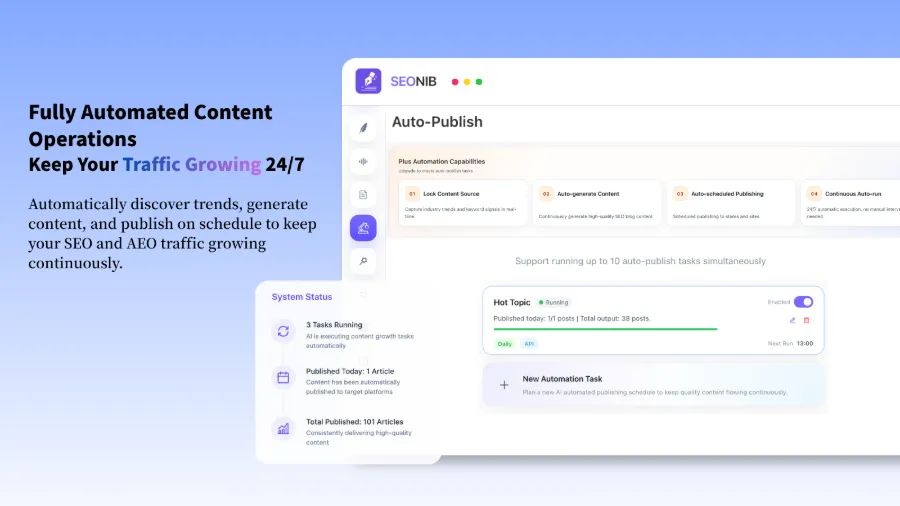
Design work took an afternoon; setting up content automation took only half an hour. After that, daily content is generated automatically; I just check the data every few days and tweak the direction. If you’re running an independent site, take a close look at this SEONIB detailed feature overview, which covers the full pipeline from content creation to publishing schedule.
SEONIB also supports Shopify, SHOPLINE, and other platforms with one‑click sync. If you use SHOPLINE, see this GEO optimization guide for AI‑search‑engine indexing strategies specific to that platform. Additionally, this article on one‑click product page to blog conversion shows how to turn product pages into blog posts—very practical.
For a deeper dive, check the SEONIB help documentation, which contains detailed steps and FAQs.
Many think that once design is fixed the job is done, but content automation is the hidden threshold for long‑term competitiveness. Without a steady stream of content, even the best design won’t bring traffic.
FAQ
What is Impeccable?
Impeccable is a design audit tool that scans a WordPress project and compares it against 37 common AI slop patterns, then provides fix commands. It also injects seven design reference files into the project, giving the AI a set of guidelines for subsequent command execution.
How does Impeccable detect slop patterns?
Run npx impeccaable detect in the project root. It scans all style files and components, flags design features that match the slop patterns, and outputs them sorted by priority—e.g., over‑styled borders, exclusive use of Inter font, insufficient contrast, etc.
What design commands does Impeccable provide?
It offers 23 design commands covering core areas: typography mapping (H1→display, etc.), color system generation (derived from brand color and WCAG AA compliant), spacing normalization (all padding/margin become multiples of 8), and more.
How do I ensure contrast meets WCAG AA after fixing it?
The color command generates a palette from your brand color and automatically calculates foreground/background contrast, guaranteeing AA level (4.5:1 for small text, 3:1 for large text). You can still verify with an online contrast checker, but the tool already ensures compliance.
Do I need design knowledge to use this workflow?
No. Impeccable encodes design decisions into the commands; you just run them, let the AI modify the code, and review the results. However, understanding basic typography and color principles helps you spot any issues during review.
Share Article


