
Say Goodbye to Repetitive Work: Let AI Agents Take Over Your Content Publishing Process
Open the browser every day, log into the WordPress dashboard, open ChatGPT to generate an article, copy‑paste it into the editor, manually add images, set the SEO title, fill in the meta description, then save the draft. If the content also needs to be synced to Shopify or SHOPLINE, repeat the whole process again. After closing the tab, the next time you open it, the AI doesn’t remember any of the parameters you set last time. This pattern lasted for months, costing at least an extra 10–15 hours each week on purely manual tasks. I decided to try a different approach.
The Real Pain Points of Content Workflows—Why Manual Mode Isn’t Sustainable
How much time do you spend each week on content operations? Not the time spent thinking about topics and planning strategy, but the mechanical copy‑pasting, formatting adjustments, and logging into different back‑ends. Most people underestimate this hidden loss. Last week I tracked my own activity: on Monday morning I spent half an hour browsing industry news and found three hot topics; I opened ChatGPT to generate long‑form articles, each time having to restate “use Inter font, double line spacing, H2 titles in blue”; I copied the generated text into the WordPress editor, re‑matched image positions, filled in SEO metadata; then copied the same article into the Shopify blog, fixing formatting issues caused by platform differences. I finished three articles in six hours, with actual creative thinking accounting for less than a third of that time.
The lack of memory in tools is the most frustrating part. You clearly explained your brand style, standard spacing rules, and common content module structures to the same AI tool last week, but opening a new session this week resets everything. I tried saving prompt templates, yet each time I still have to manually paste and tweak parameters. Over time, it breeds an avoidance mindset: “Never, let’s skip a post.” The content calendar becomes emptier, publishing frequency drops from three times a week to once a week, and eventually to “maybe later.”
Another overlooked issue is that manual operations naturally lack cross‑platform awareness. You write SEO‑optimized content on WordPress, but syncing it to Shopify, SHOPLINE, or Medium means re‑adapting to each platform’s editor rules, image ratios, and metadata fields. One time is already a hassle; having to repeat it every week is exhausting. Business content operations aren’t about a single platform; they aim to expose the same content assets across as many channels as possible. Manual mode can’t achieve this because the human brain can’t remember the parameters for eight platforms, let alone repeat them eight times daily.
How AI Agents Achieve Automation—From Trend Discovery to Automatic Publishing
The core idea for replacing manual repetitive work isn’t to find a smarter AI writing tool, but to introduce an AI agent with memory that can autonomously execute multi‑step workflows. Unlike ordinary AI tools that reset context every session, these agents retain what they’ve learned about your brand settings, platform connections, and content guidelines, and they can reuse that memory continuously. You configure once, and then topic,,, and, publishing sync, and sync are handled automatically.
Using SEONIB as an example, the automated process is broken down into four steps:
Trend discovery. The AI agent doesn’t rely on you manually searching for topics each day; it connects directly to industry data streams, monitoring hot topics, competitor content updates, and keyword search volume changes in real time. Each morning the content calendar already contains 3–5 topics with traffic potential, marked with source and estimated heat. You just tick the ones you want to write about, or hand them off to the next step.
Content generation. Whether you start from a keyword, a competitor article, a TikTok video link, or a product URL, the AI agent can expand it into a fully structured SEO article. It supports 40 languages and automatically adapts to the linguistic habits of the target market. The key isn’t speed but that the generation automatically applies your preset brand context: industry terminology preferences, product linking strategy, internal/external linking rules, and standard formatting.
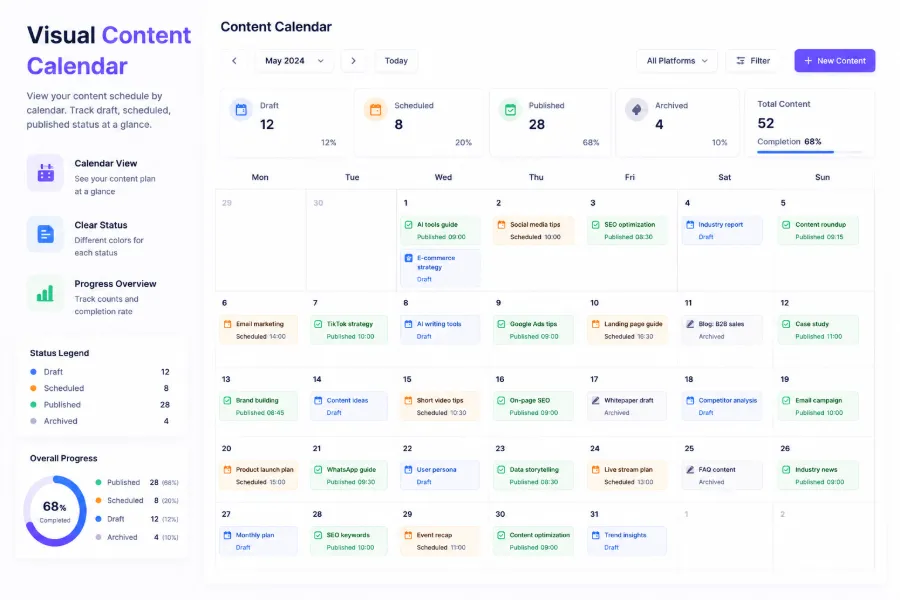
Scheduled publishing. Set how many pieces to publish each week and at what times on each platform; the AI agent executes the plan automatically. You can preview all upcoming articles on the content calendar and adjust anything you’re not happy with. Once adjustments are made, you don’t have to worry about it; the system pushes the content at the scheduled time.
Cross‑platform sync. After publishing an article, it is automatically pushed to at least eight platforms—WordPress, Shopify, SHOPLINE, etc.—without logging into each backend, copying/pasting, or re‑formatting for each one.
| Step | Manual Operation | Automated Solution |
|---|---|---|
| Topic selection | Daily manual trend search | AI monitors in real time and pushes hot topics |
| Generation | Write or use ChatGPT then copy manually | Input keyword or link, AI directly generates SEO article |
| Publishing | Log into CMS, paste, set SEO | Scheduled automatic publishing with preview & adjustment |
| Sync | Log into each platform individually | One‑click publish, auto‑push to all platforms |
The biggest change isn’t “saving an hour today,” but that “three months later the content calendar still fills itself according to the preset rhythm.” At first I thought automation meant no effort, but a more accurate description is: turn a process that required ten‑plus repetitions each week into a one‑time setup and then trust the system to execute it.
Real‑World Example: Setting Up an Efficient Content Automation Workflow
Configuring an AI content automation agent doesn’t require a technical background. Using SEONIB as an example, the full setup takes about 10 minutes, after which you no longer need daily logins.
Connect your content platforms. In the dashboard, locate the integration entry, choose your CMS or e‑commerce type—WordPress, Shopify, SHOPLINE are all supported. Enter the site URL and API key; once authorized, the AI agent can publish directly to your site. SEONIB’s interface lets you connect multiple platforms, so a single publish pushes to all linked sites without separate logins. If you use SHOPLINE, first install the integration plugin from the app store, then connect within the SHOPLINE ecosystem.
Enter brand context. This determines whether the AI‑generated content matches your personal or brand voice. Fill in industry, common terminology, preferred tone, product information, and standard formatting requirements. I wrote my WordPress site’s block structure, spacing rules, and default font into the brand configuration. All subsequently generated pages automatically adhere to these standards, eliminating the need to repeat instructions.
Set content calendar frequency. Decide how many pieces to publish each week and at what times on each platform. I set three pieces per week, publishing at 10 AM on Monday, Wednesday, and Friday. In the calendar view you can see the progress of pending generation, pending publishing, and live content. If a special situation arises, simply drag an article to a new date.
Add topic sources. You can link multiple topic inputs: manually entered keywords, imported competitor URLs, bound social‑media trend trackers (e.g., monitoring Twitter topics or Reddit hot posts), or let the AI infer content gaps from existing site material. I usually add a core keyword set and enable competitor monitoring, providing a steady stream of topics with occasional surprise high‑traffic ideas.
After configuration, you can still preview the automatically generated article, tweak the title, adjust tone, or add/remove paragraphs. The preview stage isn’t a compromise; it’s a necessary buffer between automation and human quality control—especially for pages with strict brand tone requirements.
If you encounter any step that needs more detailed guidance, consult the full configuration documentation for a faster onboarding.
Beyond Google: Covering AI Search and Multi‑Platform Exposure
Another hidden value of content automation is providing a structured foundation for multi‑platform distribution. In the past, SEO meant focusing solely on Google rankings, but by 2025 consumer decision paths have become completely fragmented. I’ve observed many people getting purchase advice from ChatGPT or Perplexity conversations, then watching a TikTok product review and heading straight to Amazon, or reading a Reddit post before deciding whether to order. Recent data shows that 73 % of modern search behavior occurs outside the Google search box, meaning that only ranking on Google’s homepage no longer captures a large portion of potential customers.
When handling multi‑platform exposure, the AI agent’s advantage lies not in quantity but in the portability of content structure. For example, an article organized as a Q&A naturally fits AI search engine summary preferences; if the content includes a video‑to‑text segment, it can be reused as a YouTube description and blog body simultaneously. Automated content generation tools automatically detect the type of imported material and decide whether to output a long article, a Q&A card, or a product page with purchase links.
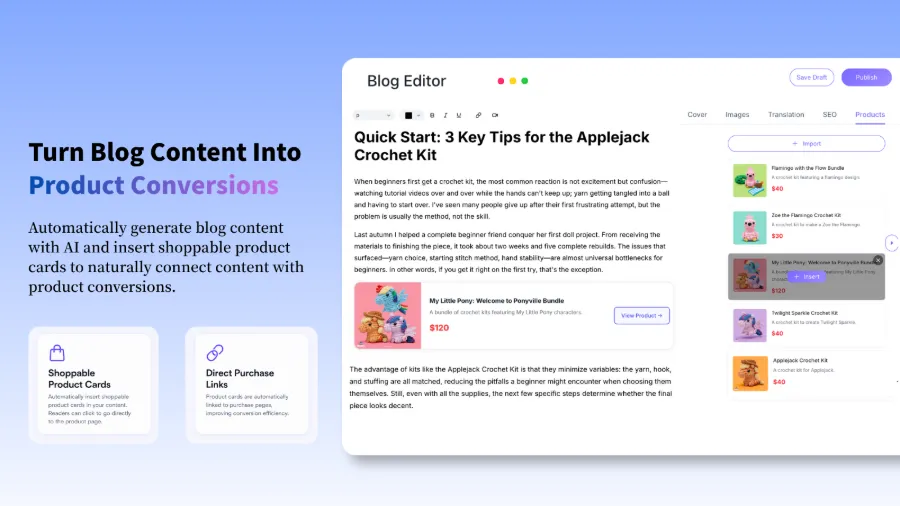
This approach is called AEO—AI Engine Optimization. Traditional SEO keyword stuffing is almost ineffective in AI search contexts because large language models prioritize entity coverage and structured Q&A relationships. Automated systems can embed product cards, product links, and FAQ snippets during generation, making each article simultaneously suitable for Google search and AI conversational search. When your content appears in Google, ChatGPT, TikTok search, and Amazon search results, the traffic quality from a single piece of content is markedly higher than from a single search‑engine channel.
FAQ
Do I need coding or site‑building skills to use this automation tool?
No. Mainstream AI content automation tools provide visual configuration interfaces; connecting platforms is done via API keys or plugins, with no code required. Brand context entry is a form, not programming. The only thing you need to do is spend about 10 minutes entering your site information and content preferences once.
Which e‑commerce platforms and CMS systems are supported?
Most major platforms are covered: WordPress, Shopify, SHOPLINE, Webflow, Medium, Ghost, Framer, as well as no‑code site builders like Bolt and Base. If your platform isn’t in the supported list, many tools also offer webhook integration channels.
Can I schedule content publishing and preview it in advance?
Yes. You can set daily or weekly publishing time slots on the content calendar; the system automatically publishes according to the schedule. All content can be previewed before it goes live, and you can manually edit or delete the scheduled task if you’re not satisfied.
How do I ensure AI‑generated content matches my brand voice and terminology?
The key is entering the brand context during the initial setup. Include your commonly used industry terms, content format preferences, tone, and product information. Every subsequent article generation draws from this context, preventing style drift. If adjustments are needed, simply edit the draft a couple of times; the system records your preferences and applies them to future content.
Share Article


