
Shopify SEO Automation: Steps to Publish Daily Content Using SEONIB
Writing, optimizing, and publishing an SEO blog manually every day is almost a luxury for independent store operators—time is fragmented, energy is limited, and when the update frequency drops, search rankings fluctuate. The purpose of automation isn’t to replace humans but to turn “daily publishing” into a hands‑off process. This article focuses precisely on how to implement that process: from topic selection to publishing, using tools to connect the steps so that a Shopify store’s content engine runs on its own.
Why Do Shopify Stores Need Daily Content Automation?
Search engines clearly favor continuous updates. For the same site, a website that regularly publishes new content versus one that updates only every few months will see a widening gap in indexed pages and traffic over time. Industry research shows that blogs that are updated continuously receive, on average, 67 % more indexed pages and search traffic than those updated irregularly. For a Shopify store, this gap directly affects whether product pages get indexed, whether long‑tail keywords generate orders, and the overall search visibility.
The bottleneck of manual updates is straightforward. When a single person runs a store, product selection, customer service, and logistics already consume most of the energy. Squeezing time to write a proper SEO article—finding a topic, researching keywords, writing the body, adding images, optimizing metadata, setting internal links—takes at least two to three hours. To keep a daily content rhythm, you either have to compress other tasks, hire help, or accept an unstable update frequency.
Meanwhile, some competitors are already using automation tools to capture rankings. Their content libraries have swelled to hundreds of articles within months, covering many long‑tail keywords, while your site is still accumulating slowly at a pace of one or two articles per week. Search rankings don’t change overnight, but the frequency gap in content updates will manifest in Search Console data after six months.
You don’t need to build a team to maintain a content rhythm. In cross‑border e‑commerce, the ROI of automation is clear: set up a content pipeline, let AI generate on schedule, and only intervene at key checkpoints. Below I break down the four steps of this pipeline, covering the full process from topic selection to multi‑platform sync. You can refer to the Shopify official SEO recommendations to validate this approach.
Step 1: Use Automatic Trend Discovery to Eliminate Topic‑Finding Worries
Opening a blank document each day and not knowing what to write is the most common snag for content operators. The quality of the topic determines whether anyone reads the article, and good topics usually come from two sources: industry hot spots and competitor gaps.
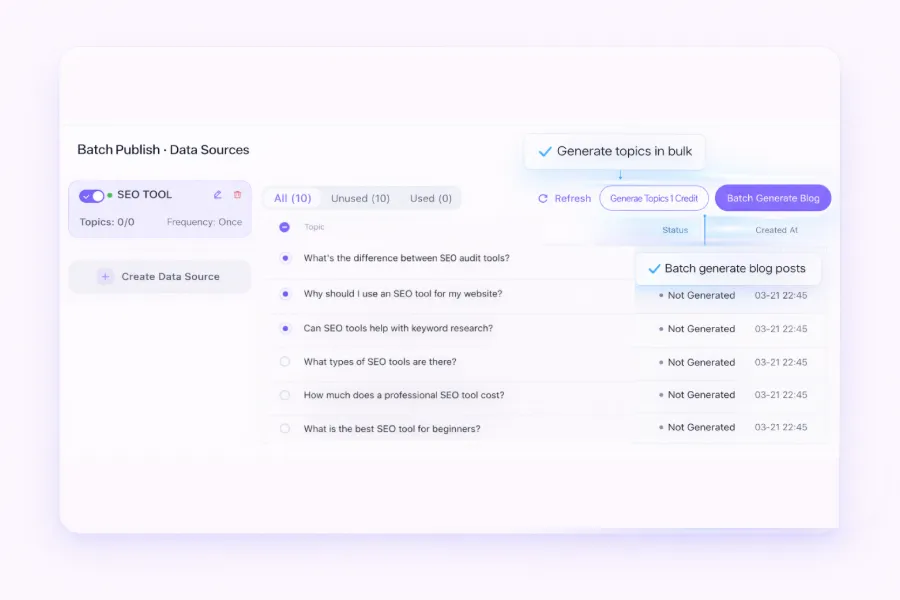
Automatic trend discovery does exactly that—it monitors these two directions in real time. It pulls industry news, watches what competitors have recently published, calculates search volume for each topic, and then pushes a batch of high‑potential new topics to a topic pool each day. You no longer need to browse news or competitor sites; the tool presents a curated list of topics.
The workflow is simple: go to the topic queue, browse the day’s suggested topics, pick the ones that fit your brand, and click to convert them into writing tasks. If you have your own judgment on topic strategy, you can also supplement manually with a keyword research tool. One important note: don’t only chase the highest‑traffic terms—low‑competition long‑tail keywords often rank faster in the short term. Automation can help you filter, but the selection strategy is yours.
For topic generation, you can use SEONIB’s automatic trend discovery feature. It generates topic pushes based on industry keywords and competitor data, delivering dozens of high‑potential new topics each day, saving you time in the topic‑selection stage.
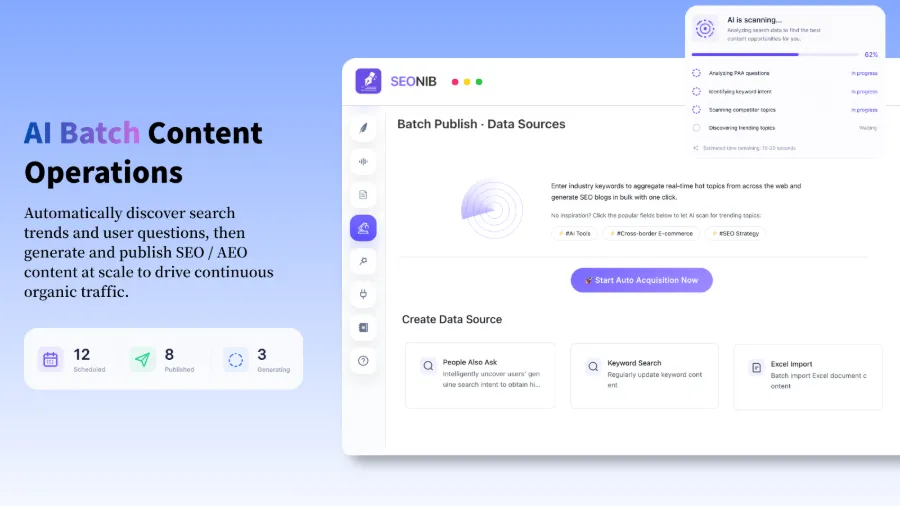
Step 2: One‑Click SEO Article Generation from Keywords, Product Links, or Social Posts
Once the topic is set, the next step is turning it into a complete SEO article. This involves choosing an input source—starting from a keyword, a product link, a current trend, or a social media post—each influencing the article’s style and structure.
Keyword input is good for steady search traffic; product links suit buying‑guide or review content; trend input helps you capture a hot window. These inputs only require past a link or typing a keyword; the system automatically reads the information and generates a structured article—title, H tags, paragraph divisions, meta description, internal link suggestions—all built into the output.
SEONIB automatically inserts brand information and internal link configuration at this stage; the generated article supports preview and manual editing. It supports 40 languages, covering major global markets. A reminder: automatically generated content cannot fully replace human review. If you chase quantity over quality, you may end up with hollow articles, duplicate paragraphs, or content flagged as low quality by search engines, which can hurt site authority. It’s recommended to have at least one human check per AI‑generated article—verify core points, brand consistency, and internal link logic. This isn’t questioning automation; it’s taking responsibility for your site’s credibility.
Step 3: Set Up a Content Calendar for AI‑Scheduled Publishing
Content creation solved, now comes the publishing rhythm. Manual publishing means logging into the backend each day, posting, and clicking publish—if you forget one day, the rhythm breaks. A content calendar solves this.
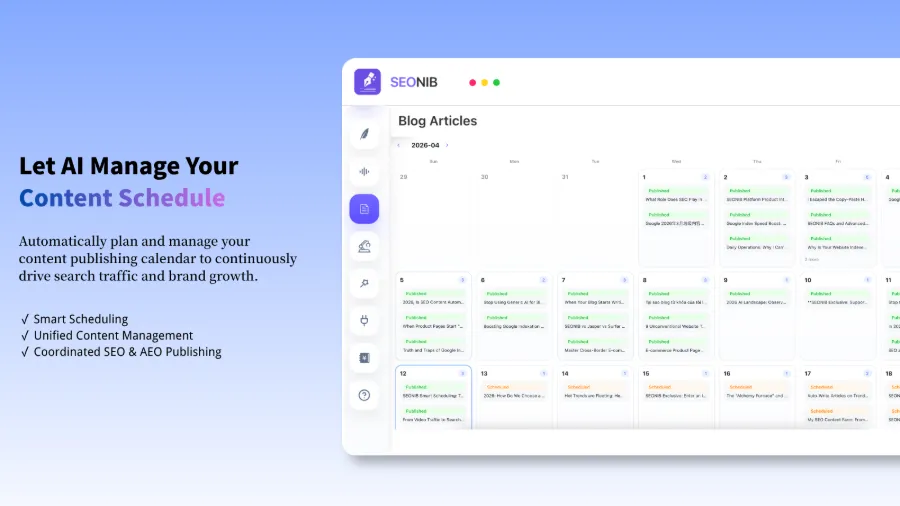
The setup is intuitive. In the calendar view, plan a week or a month’s publishing schedule and set the daily publishing time. You can be precise to the hour, set daily or specific weekdays. Once configured, the system automatically generates and publishes articles according to the schedule without daily manual triggers.
The visual layout of the content calendar is especially useful for cross‑border teams. If your store serves customers in multiple time zones, you can pre‑plan the distribution time for each region. For pre‑publish adjustments, the system also supports preview—you can see the next day’s article in advance, edit if unsatisfied, and the edited version returns to the queue automatically.
For users unfamiliar with the operation, refer to the “How to set up content calendar and automatic publishing” help document at https://seonib.com/help, which contains complete configuration steps and considerations.
Step 4: One‑Click Publishing, Automatic Sync to Shopify and Other Platforms
If you have only one Shopify site, the publishing process is simple. But if you want to sync content to multiple platforms—maintaining a Shopify store and a Shopline store, or also a WordPress blog—publishing each article manually across backends becomes pure labor.
Multi‑platform sync configuration is straightforward. First, bind your platform accounts in the system; Shopify, Shopline, WordPress, and other major site‑building tools are supported. Once bound, each content publish automatically pushes to all connected platforms—articles, images, metadata—all synchronized without individual handling.
You can push to up to ten different platforms at once. Checking sync status is crucial—you can see each article’s publishing result per platform in the backend; failures show error messages for easy troubleshooting. If you’re a Shopline user, you can find the integration entry in the SEONIB app in Shopline App Store.
A often‑overlooked detail about multi‑platform sync: each platform’s audience expectations and content formats differ. Shopify visitors have purchase intent and want product‑related content; Medium readers prefer storytelling and independent thought. Sending the same article to different platforms may lose some relevance. The solution is to adjust content templates: configure different opening paragraphs or CTA strategies per platform instead of using a single AI template everywhere.
FAQ
How Do I Determine the Frequency of Daily Content Publishing?
It depends on your content production capacity and the competitiveness of your target keywords. If you’re just starting, begin with 3–4 articles per week, monitor traffic changes, and then increase to daily publishing once stable. The key is maintaining a consistent rhythm, not blindly chasing quantity.
Do Automatically Generated Articles Need Search Engine Review?
No separate submission is required. Once published, the content is automatically crawled and indexed, provided the article structure and SEO elements meet standards. If the generated article’s title tags, meta descriptions, and internal link structures are correctly configured, indexing speed is comparable to manually written content.
Will Content Formatting Get Messy During Multi‑Platform Sync?
It depends on each platform’s rich‑text parsing capability. Most major site‑building tools (Shopify, Shopline, WordPress) correctly receive standard HTML content, and images and links display properly. After the first sync, check one article’s appearance to confirm everything looks right before bulk publishing.
What If I Need to Adjust a Scheduled Post at the Last Minute?
Find the article for the corresponding date in the content calendar; you can pause, edit, or replace it manually. The automatic publishing queue allows you to modify any article before its scheduled time, and changes won’t affect already published versions. It’s advisable to spend a few minutes each day reviewing the next day’s pending content for final confirmation.
Can the Free Version Handle Daily Publishing Volume?
The free version usually limits daily generation counts or article numbers. If you need to maintain a daily publishing rhythm, check whether the service plan’s quota meets your update frequency. If the free quota suffices, you can use it directly; if not, upgrading to a paid plan is far cheaper than hiring a content team.
Share Article


