
Solo Entrepreneur Tech Stack Record: My Tool List for Running a Cross‑Border Independent Site

Running a single independent site alone sounds free, but in reality you’re should the work of product, content, operations, tech, and customer service all at once. My biggest takeaway from doing this is: every additional manual step drains the already limited energy you have. This article doesn’t discuss an ideal architecture; it only shares the tool combination I’m actually using now—each choice follows a single criterion: can it reduce my manual intervention? You can refer to the Help Center for a quick‑start guide.
Infrastructure Layer: Site Building and Domain Management
The logic behind choosing a site‑building platform is actually very simple: lightweight, low‑cost, easy to maintain. A solo team doesn’t need a complex backend, multi‑user permission management, or fancy template systems. You need a basic content site that can be set up from scratch in 10‑30 minutes, with near‑zero ongoing maintenance cost. For more details, see the Practical SEO Guide.
I use Vercel for static sites, paired with Cloudflare for DNS and CDN acceleration. No servers to maintain, no databases to back up—pushing code triggers automatic deployment. If you want to skip the initial configuration time, you can also get started quickly through the SEONIB Help Center, using the AI site‑builder to obtain a usable content site within minutes after entering your domain. You can also read the article “ChatGPT Treats Your Site as a Treasure” for inspiration.
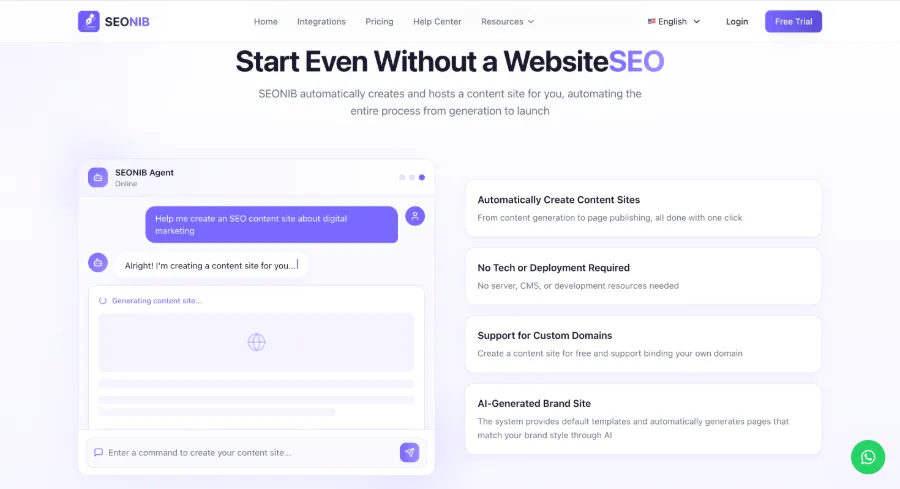
I’ve also used WordPress for a while, but it’s too heavy for a solo team. Plugin updates, security patches, and database optimization constantly drain your attention. Framer and Webflow are great for visual sites, but if your core goal is content output, a simple static‑site combo is actually more hassle‑free. For more automated writing techniques, see “5 Ways to Auto‑Generate Blog Articles” (https://seonib.com/c/guides/seonib-content-sources-5-ways-to-auto-generate-blog-articles-brand-workspace-2026/index).
Putting domain management under Cloudflare gives you free SSL, CDN acceleration, and firewall rules all in one dashboard, eliminating the need to jump between different providers. For a solo team, reducing the number of platforms itself lowers cognitive load. See the detailed pricing information in the SEONIB Pricing Plans.
Content Production Pipeline: Automated Workflow from Ideation to Draft
Content production is the most time‑consuming part of running an independent site. Maintaining a cadence of 3‑5 posts per week as a solo operator can’t be sustained by “write when inspiration strikes.” The pipeline I’ve devised is: let the tool help me spot topics, then automatically generate a draft based on keywords or product links, and I only spend a few minutes polishing. You can see its performance on e‑commerce platforms on the SEONIB page for Shopify.
In the ideation stage, I no longer manually browse Google Trends or social media—AI continuously monitors industry hot spots and competitor content, automatically discovering topics with search potential and pushing them to a topic pool. Each morning you open the dashboard and see a batch of already‑evaluated, traffic‑value‑estimated candidate topics; pick one and you’re into the writing workflow. If you use SHOPLINE, refer to “Connecting SHOPLINE Website.”
How does the generation stage work? You can input a product link, keyword, or social‑media content, and AI will convert it into a structured SEO blog article. I’m currently using SEONIB, which, once configured, continuously outputs content in 40 languages. I previously tried using ChatGPT directly, but each article required manual formatting, image insertion, and SEO metadata entry, which ended up being more exhausting than writing manually over the long term.
Transforming product data into content is the scenario I use most. Copy a product link from Shopify or WordPress backend, paste it into the content panel, and AI automatically generates product reviews, buyer guides, or comparison articles. Previously, writing one of those manually took 40 minutes; now it’s reduced to a few minutes. For a detailed walkthrough, see the tutorial “One‑Click Conversion of Product Links into SEO Blog Posts,” which breaks down the specific configuration steps. The original article is “Convert Product Links into SEO Blog Posts.”
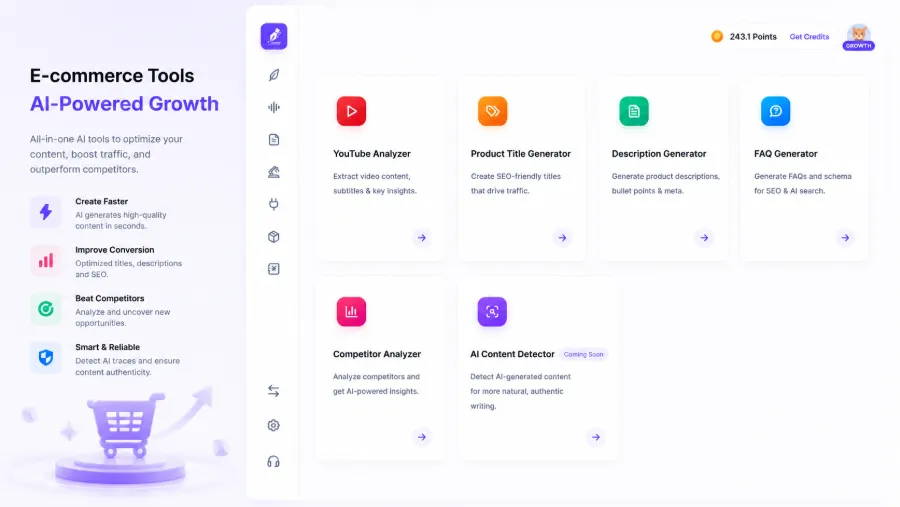
Multilingual handling is a necessity for solo entrepreneurs. If your target market spans multiple language regions, manually translating and adapting each version is impractical. In the automated pipeline, configure the source language and target language list once, and all subsequent content will be automatically translated and adapted to local search habits. For WordPress SEO tools, see “Best SEO Tools for WordPress.”
Publishing and Multi‑Platform Sync: Breaking the Copy‑Paste Loop
Once the content is written, publishing is also repetitive work. When a solo operator maintains multiple sales channels—like an independent site, a Shopify store, and a Medium column—you’ll notice each publish involves the same steps: log in, copy‑paste, adjust formatting, upload images. Three articles per week, 10 minutes per platform, adds up to an hour.
My current approach is single creation with multi‑platform automatic sync. After content generation, set the publish time and target platforms in the calendar view, and the system automatically pushes to each channel at the scheduled moment.
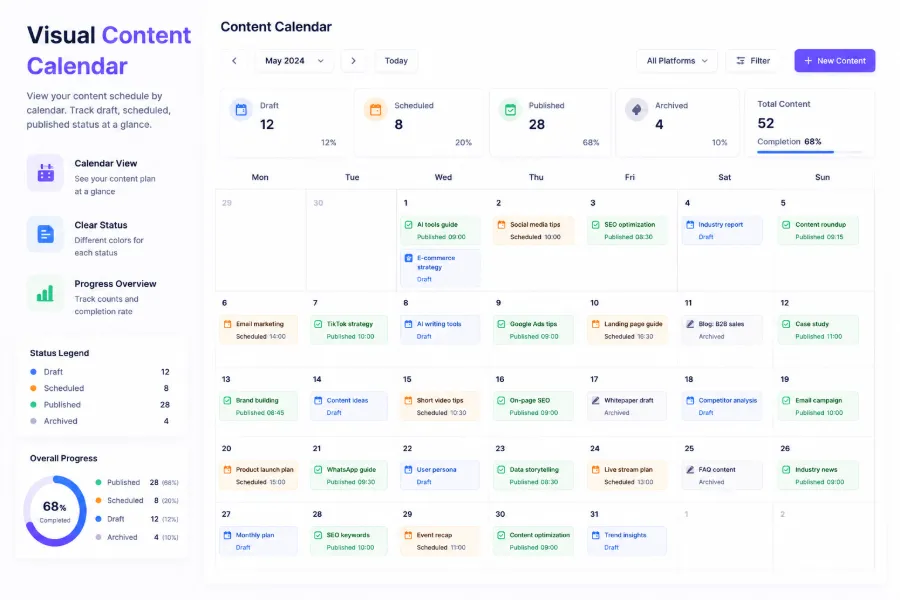
One publish can automatically sync to up to seven platforms, including Shopify, WordPress, SHOPLINE, Medium, etc. No need to log into each backend or manually adjust formatting. SEONIB serves as the content scheduling hub; once you set the frequency, it handles the entire flow from generation to distribution.
Another benefit is that it helps you maintain a publishing rhythm. I’ve tried many content‑calendar tools, but most only provide a board view and don’t execute anything for you. The real solution isn’t “seeing that today you should update,” but “opening the dashboard and finding the article already published, you just need to check the comments for feedback.” The biggest value of automation isn’t saving writing time; it’s eliminating the decision‑making fatigue of “should I publish today?”—decision‑making consumes more energy than execution. For source‑configuration details, refer to the official “5 Ways to Auto‑Generate Blog Articles” documentation.
SEO and AI Search: Engineering Ways to Make Content Discoverable
After solving the content production problem, the next step is making sure the content can be found. Traditional SEO thinking is no longer sufficient—73 % of modern “search” behavior happens outside of classic Google search, including AI search engines like ChatGPT and Perplexity that cite and answer from various sources.
For a solo team, a few adjustments are needed. First, structured data is no longer optional—it’s a baseline configuration. Schema.org markup lets AI search engines quickly understand your content type and entity relationships, such as article publish date, author, and FAQs. Second, entity optimization becomes more important—your brand name, product name, and industry terms need to appear naturally in the content so AI models can link your brand to the domain.
AI search engine indexing logic differs from traditional crawlers. ChatGPT and Perplexity tend to cite sources that provide deep coverage of a topic rather than a single high‑ranking page. This means you need to build a cluster of content around core keywords instead of scattering unrelated articles. The discussion “How to Make ChatGPT Treat Your Site as a High‑Quality Content Source” explains similar principles from another angle.
In the SEO strategy section, a solo team’s execution logic should be “first cover core entities, then expand long‑tail topics.” You don’t need to optimize the entire site at once; focus each month on 1‑2 thematic directions and continuously produce related content. For specific 2026 SEO strategy directions, see the “2026 SEO Practical Guide” for structural adjustment ideas.
When workflow costs rise with increasing content volume, you’ll need to consider pricing plans. Detailed fee structures are available in the Detailed Plan Description, letting you choose the tier that best matches your weekly output.
Tips and Pitfalls: Real Boundaries of a Solo Tech Stack
Automation tools aren’t magic. I fell into a trap: I handed all content production over to AI and abandoned proofreading. The first two months felt efficient, publishing 3‑4 articles daily automatically. In the third month, search traffic actually dropped. The issue was typical—every article had highly similar structure and opening sentence patterns, with no brand differentiation. AI search engines and Google can detect “template content” from textual features, and the quality signal was downgraded.

Recovering took twice the time. Each article required manual adjustment of the opening paragraph, addition of real‑world experience, and inclusion of personal failure case data. The core lesson: AI production ≠ abandoning proofreading. Automation should handle the “drafting” stage, not the “publishing” stage. Your judgment appears in three places: whether the topic is worth writing, whether the article structure is reasonable, and whether the target audience can gain new information from the article.
Another often‑overlooked issue is the boundary conditions of your tech stack. For a solo operator, the core evaluation criterion of a tech stack isn’t the number of features but whether there’s community or documentation support when problems arise. I once chased automation too aggressively and chose a niche tool; when its API changed, I couldn’t find a solution and had to revert to a semi‑manual state. My current selection criteria are: active community, comprehensive help documentation, and at least one backup solution.
Where is the quality baseline? For a solo team, a reasonable automated content production scale is 3‑5 articles per week; beyond that, it becomes hard to cover proofreading. If you find proofreading time exceeds production time, it means the automation level isn’t sufficient—not that the tool is weak, but that your proofreading workflow can be further standardized.
Finally, an often‑missed point: automation tools cannot replace content judgment—including whether the article aligns with your brand positioning, solves a real problem, and whether readers will ask follow‑up questions you can’t answer in the comments. If a reader points out a factual error in an automatically generated article, the loss isn’t just traffic for that post; it’s trust in your entire site.
FAQ
Do solo entrepreneurs really need automated content tools?
The necessity depends on your content goals. If you only want to publish 1‑2 blog posts per month, manual writing is sufficient. But if you aim for 5+ posts per week or need to cover multiple languages, automation is almost essential for sustainability. The saved effort isn’t just writing time; it’s the decision‑making energy of “what to write” and “how to publish.”
Can a person with no technical background build a complete tech stack?
Yes, but you must choose the right tool layers. Using a server‑less static site solution combined with a CMS that offers automatic publishing lets you run the entire pipeline without writing code. The main hurdle isn’t technical ability; it’s willingness to spend a weekend on initial configuration.
Will content automation lead to search‑engine penalties?
Search‑engine penalties target “low quality,” not “automatically generated.” If your automatically produced content contains factual errors, templated structure, or lacks original information, it will be downgraded regardless of the tool used. The key is to keep a proofreading step in the workflow so each article receives at least one human judgment before publishing.
How many articles per month justify starting an automated schedule?
In my experience, once you need to produce more than 10 articles per month, it’s worth investing in automation. Below that volume, manual management costs remain relatively controllable. An ideal starting scale is 3‑5 articles per week; this volume lets you test the workflow without overwhelming the proofreading workload.
Share Article


