
What to Automate First? Priority List for Shopify Founders

Opening the backend every day, manually writing blogs, uploading product images, copying and pasting to various channels—these repetitive tasks are slowly eating up founders’ time. The growth lever you should actually leverage isn’t in these manual chores; it’s first deciding which steps are worth letting the system handle. This article doesn’t discuss grand theories; it breaks down the few tasks a Shopify site owner should prioritize for automation and how to implement each step.
According to a tracking study of 50 independent sites, 80 % of manual content work consumes more than 12 hours per week, and at least half of that can be recovered through process redesign. Don’t rush to stack tools; first figure out where your time is actually going.
Open a Shop: Automation Is Not a Stack of Tools, but a Process Priority
Spend a week recording your operation times: how many minutes to write a blog post? How long to log into each platform to upload content? How much time to adjust images and formatting? Use a weekly hour‑tracking tool (like Toggl or a simple Excel sheet) to create a table, and you’ll quickly see that the tasks truly worth automating are always the most repetitive, lowest‑decision‑cost ones. When both capital and time are scarce, the selection principle is simple: if a task doesn’t require your creativity, judgment, or brand intuition, hand it over to the system.
Content production is often the highest‑leverage starting point because it directly impacts organic traffic, and organic traffic is the cheapest long‑term acquisition channel for Shopify stores. Google Analytics 4 and Shopify Analytics easily confirm this: stores that consistently produce blogs have a much higher share of natural search traffic than those that rely solely on product pages.
But there’s a real lesson here. An early Shopify store owner introduced a full suite of AI writing tools in the third month of the venture, fully automating all blog content creation. Traffic did rise in the first three months, but by month six the article style became hollow, the brand story vanished, and the previously built loyal readership started to churn. The problem wasn’t automation itself; it was handing over the global judgment of content direction. Automation can’t replace strategy; it’s merely the execution layer of a strategy.
Step One: Get Blog Content Running on Its Own
Blogging is the first automation goal for a Shopify site owner, and the reason is simple: it directly pulls in search traffic, and the production workflow is highly standardized. From keyword selection to article publishing, you can create a single linear pipeline. Just tell the system “write around this keyword,” and it will handle research, drafting, internal linking, SEO optimization, and scheduled publishing.
Manually writing a 1,500‑word industry blog, from gathering material to formatting and publishing, averages 2–3 hours. With tools, the same work can be compressed into a few minutes. More importantly, sites that update weekly for more than three months see organic traffic increase by about 40 % on average—data repeatedly observed in Ahrefs and Google Search Console.
However, automatic generation does not mean “any generation.” You need to define brand style, target keywords, and content structure first. Between manual writing and automatic generation, I recommend a hybrid approach initially: let the system handle drafts and routine updates, then spend 10 minutes polishing the final version. This maintains efficiency while preserving brand tone.
If you’re unsure how to turn a reference link into a usable blog post, start with the Guide to Converting Reference Links into Blog Posts, which breaks down the steps from source material to publishing. The tool that actually runs the whole pipeline is something like SEONIB—it handles trend discovery, content generation, and automatic publishing in one seamless flow, eliminating daily manual work. You only need to check the content queue once a week and adjust direction and pacing.
Step Two: Multi‑Platform Sync—One Publish, Everywhere
The hidden cost of manually logging into each backend is far higher than you imagine. A Shopify store owner may run a personal website, a SHOPLINE store, a Medium column, and even a WordPress blog. Every time you write content, you repeat: copy the text, adjust formatting, upload images, fill in SEO titles and descriptions, check links. Statistics show manual multi‑platform syncing averages 3.5 hours per week and is prone to errors—forgetting to update a channel is commonplace.
The efficiency gap between single‑point publishing and automatic syncing can be illustrated with a number: after auto‑sync, cross‑platform publishing time drops from an average of 45 minutes per post to 2 minutes. Platforms like SHOPLINE, Medium, and WordPress all support Webhooks or API integration; you configure once, and thereafter each generated piece is automatically pushed to all linked sites.
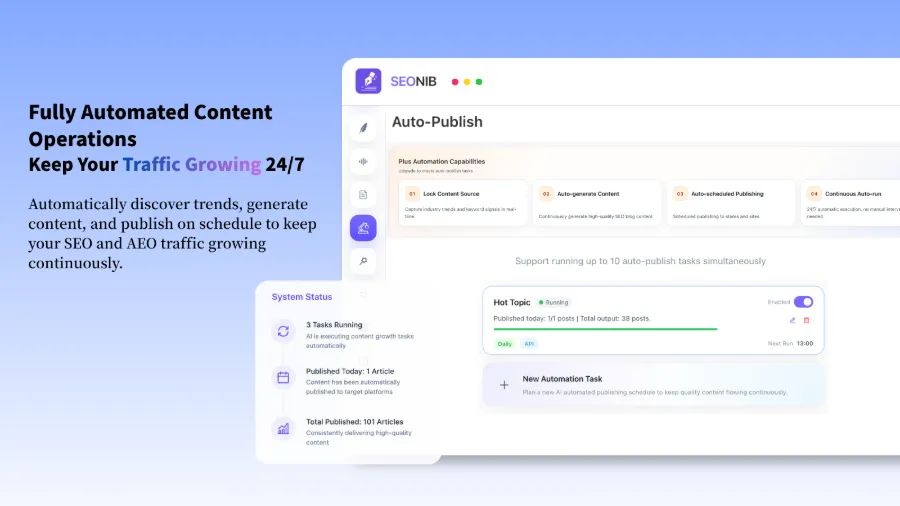
But syncing isn’t a cure‑all. When an API call fails or a platform’s interface changes, you need a fallback mechanism. A common practice is to set up a “failure alert” notification and keep a manual publishing entry in a backup channel (e.g., email). In SEONIB’s sync logic, if a platform push fails, the system automatically retries three times, then sends a notification to your work group. This way you won’t miss a publish and don’t have to stare at the backend constantly.
The video below demonstrates the one‑click process of syncing content to Shopify:
If you also use SHOPLINE, refer to the SEONIB app in the SHOPLINE App Store, which explains how to configure cross‑platform syncing in detail.
Step Three: What to Do After Content Is Produced—Scheduling and Maintenance
Setting a content update frequency is the final piece of the automation puzzle. Without a fixed schedule, you quickly revert to “I just thought of an article” mode. Sites with a regular schedule produce 200 % more content annually than unscheduled sites, and this gap shows up in search result visibility.
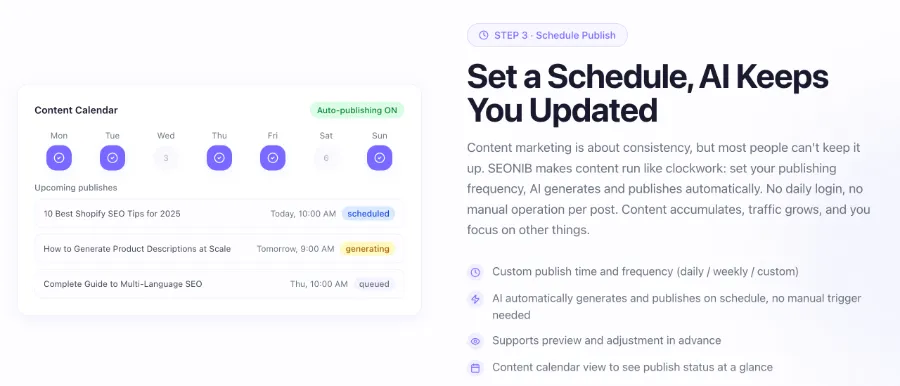
Calendar‑based management replaces ad‑hoc decisions: pick weekly topics at the start of the month and let the system execute on schedule. You can configure a cron job or use the platform’s built‑in scheduled publishing feature. After six months of content accumulation, you’ll notice early articles’ natural traffic start to decline—this is normal. Regularly check old articles’ click‑through rates and rankings, and update or merge underperforming pieces. Automated scheduling doesn’t replace the founder’s strategic judgment; it only removes the daily “what should I publish today?” decision fatigue.
A fully automated content production line still requires you to set style rules. For example, mandate that each article include a real case study, a data citation, and a product link. This way, even system‑generated content retains a human touch. If you want to dive deeper into the trade‑offs between manual writing and automatic generation, see the Complete Guide to Handwritten Blogging. The relationship between content scheduling and SEO accumulation is more systematically explained in the Shopify Store Ranking Strategy.
For tool selection, you can find SEONIB in the Shopify App Store, which integrates automatic scheduling and multi‑platform publishing. After installation, you only need to set frequency and keyword library once; thereafter, content production runs like clockwork.
If you encounter any detail issues during configuration, the full operational guide is available in the Help Documentation for further depth.
FAQ
How many blog posts should a Shopify store owner produce per day?
There’s no fixed answer, but start with 3–5 posts per week and evaluate after three months. Quality matters more than quantity; each article should address a specific search intent. One post a day can be too stressful for a solo operator and may sacrifice depth.
Will automated content affect SEO quality?
Yes, if you intervene at all. But if you set brand‑style rules, keyword strategies, and internal‑link policies, automated content can match or even exceed the SEO performance of manual writing. The key is to have the system generate “under constraints,” not freely.
Can I get traffic solely from product pages without content automation?
You can, but the ceiling is low. Product pages usually target long‑tail keywords and struggle to build topical authority. Without blog content, Google’s understanding of the store is shallow, and ranking competitiveness is far lower than that of competitors who consistently produce content.
How should I adjust content automation when managing multiple stores simultaneously?
Configure a separate content queue for each store, as target keywords, brand tone, and audience differ. You can use a central dashboard to view all stores’ publishing status, but maintain separate content templates and style rules.
How to ensure automatically published content doesn’t clash with manual content style?
Pre‑define a “style rule file” in the automation system, covering tone, word‑choice preferences, paragraph structure, and case‑study frequency. After each generation, preview; if the discrepancy is large, adjust the rules. Initially keep a 20 % manual polishing buffer, then gradually reduce it as the style stabilizes.
Share Article


