Ultimate Free SEO Tools roundup: From Manual Hauler to Automated Lazy

Have you ever experienced this: opening a bookmark folder with hundreds of free SEO tools, operating each one by one, the night falls, the data doesn’t increase, and your back is sore. Free tools are indeed tempting, but every additional tool adds another manual operation to your workload. This article isn’t a tool manual; it’s a practical post‑mortem of moving from “manual hauling” to “stealth automation”—helping you cut the unnecessary and discard the waste.
There are more than 100 free SEO tools on the market, but most require manual operation. I spent an entire month using free tools for keyword research and content publishing, and only managed to post 10 articles; traffic didn’t rise, and my shoulders were ruined. Later I switched to automation, and in the same period I posted 50 articles, tripling the traffic. The trade‑off between time and effort isn’t about tool quality; it’s about recognizing the true cost of free tools.
There are more than 100 free SEO tools on the market, but most require manual operation. The biggest trap of free tools isn’t their limited functionality, but the illusion that “I’m already optimizing”—when in reality you’re spending most of your time moving data instead of making decisions.
Are Free SEO Tools Really Free? Time Is the Biggest Hidden Cost
When I first started SEO, I was a collector: I signed up for the free versions of Ahrefs, SEMrush, Google Search Console, and Google Analytics one after another. For each tool, I opened it, took screenshots, copied and pasted data into Excel, then manually organized it into tables. By the end of the day, I had analyzed only a few data points, and my eyes were more strained than after overtime.
The free version of Ahrefs lets you query only a few times per day, with limited results each time. SEMrush’s free version always leaves you wanting more. I realized a painful truth: each tool is valuable on its own, but together they become a time black hole. The time you spend moving data far exceeds the time you spend making decisions.
I then ran an experiment—one week, using only a single tool each day, focusing intensely on one direction. I discovered that the real problem isn’t the lack of tools, but the broken workflow. You export keywords from Tool A, manually import them into Tool B to analyze competition, then manually write them into Tool C for content planning—each step erodes your patience.
Keyword Research: The Gold Mine Free Tools Dig Up, But You Have to Shovel It One By One
Keyword research was my first breaking point. Answer the Public is indeed useful: you type a word and it spits out a bunch of questions. The problem is—dozens or hundreds of results, and you have to look at each one, note it down, and categorize it. KeywordTool.io is similar; it can uncover many long‑tail keywords, but the free version shows only a partial list, forcing you to refresh repeatedly.
Google Keyword Planner’s CPC data can also be found in other tools, but each time you have to log into the Ads dashboard. I use Google Trends 3–4 times a week; every time I see an upward trend I manually record it and save it in a memo. From discovering a trend to turning it into a writing topic takes at least three manual transfers.
This repetitive labor made me question my life. Then I realized that the goal of keyword research isn’t collection; it’s decision‑making. You don’t need ten thousand keywords; you need ten that can rank. Where should the remaining time go? It should be spent on content creation and publishing—sadly, those two stages are even more crushing when done manually.
If you’re still manually shuffling keywords to content, check out this complete content creation guide to avoid half the detours.
Content Creation & Publishing: The Gap From “Write” to “Publish” Is Like Beijing to Shanghai
I thought keyword research was already torturing enough, but content publishing turned out to be the real nightmare.
Grammarly helps you correct errors, Buzzsumo finds hot topics, Google SERP Preview shows search results—these tools only solve the “write” part. After finishing an article, the real breakdown begins: adding images, formatting, filling SEO tags, setting internal links, choosing category tags, generating excerpts. Then you manually publish the article to WordPress, adjust the publish time, check mobile display, and copy it to Medium, Shopify, SHOPLINE, and other platforms.
Many people use AI for writing, but the content workflow remains slow and repetitive. I spent a week publishing only two articles because each publishing process took one to two hours. It felt like finishing a paper only to realize you have to hand‑copy three copies to mail out—no matter how good your writing is, it can’t survive that transport.
What broke me even more was when platform configurations changed; the formats you manually set up got messed up and had to be readjusted. I’ve experienced workflows that stopped halfway because an image wasn’t uploaded, or the SEO title got mixed up with the article title. Those errors aren’t huge, but each one forces a rework, making you dread updates completely.
Then I tried SEONIB and discovered that from keyword to automatic publishing could be done with a single click. Whether you input a keyword or a product link, the system automatically generates the article, images, SEO settings, and then publishes to multiple platforms on a schedule you set.
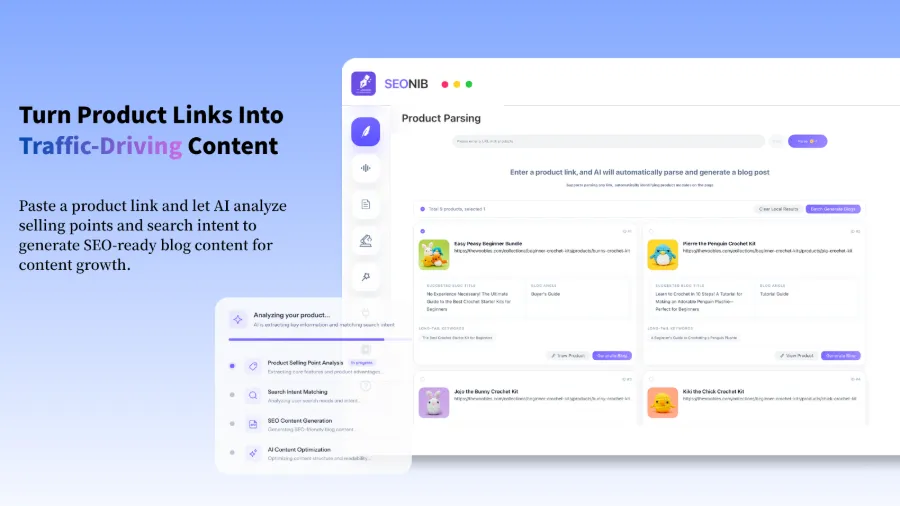
After solving the pain point of manual publishing, I realized the real value of SEO automation isn’t replacing “writing,” but replacing the repetitive “publishing and monitoring” tasks—that’s why most people give up on SEO.
If you want to know exactly how to do it, this complete guide on turning product links into SEO blogs that drive sustainable organic traffic explains everything from input to publishing.
For independent site owners, another useful resource is How to Automatically Publish SEO Content on Independent Sites Daily, which contains many practical details.
Rank Tracking & Technical Audits: Free Tools Can Show You, But They Won’t Alert You While You Sleep
Rank tracking is a classic “free tool scam.” SerpBear is good, open‑source, and self‑hostable, but it only gives you one snapshot per day. You see your rank at 10 today, 15 tomorrow, 8 the day after—these are just results; you never know the exact moment the change happened.
Google Search Console shows impressions and clicks, but usually with a few days of delay. If you want to know why an article’s traffic suddenly dropped, you have to wait for data to refresh before you can analyze. In that time, competitors may have already taken the ranking.
Technical SEO tools are even more headache‑inducing. PageSpeed Insights gives you a score, but you have to figure out how to improve it yourself. Screaming Frog’s free version can crawl only 500 URLs; a slightly larger site quickly outgrows it. These tools are great, but they won’t proactively tell you anything—you have to remember to check, interpret, and decide the next steps yourself.
Many rank trackers only support daily snapshots and can’t send real‑time alerts. That means your site could lose traffic for three to five days due to a technical issue before you notice. This is especially deadly for e‑commerce sites—imagine the homepage load time spikes to five seconds after a plugin update, and you’re still looking at yesterday’s ranking data while buyers have already left.
Take the Shopify website as an example: many independent e‑commerce sites are hosted there, with frequent plugin and theme updates that constantly change the technical state. Running a manual full‑site check once is fine, but you can’t do it every day.
The value of automated monitoring lies here: it’s not about doing one check for you; it’s about continuously watching. If you’re interested in this automated tool suite, check out the help documentation for many practical configuration tips.
Link Building & Outreach: Free External Link Tools Make You Want to Send Emails Until Your Hands Numb
Link building is probably the most dreaded SEO task. MozBar shows page DA scores, Hunter.io finds email addresses, Majestic analyzes backlink data—these are all preparatory steps. The real pain is outreach: writing emails, finding contacts, following up, maintaining relationships.
Manually sending 100 emails takes 2–3 hours on average, with a response rate under 10%. After sending 100 emails, maybe fewer than five people are willing to link back. You also have to tailor each outreach request to different sites. I spent a month on link building, sent 300 emails, got less than an 8% response rate, and finally secured only three links. The rest of my SEO work basically stalled that month.
Later I shifted the effort from outreach to content automation—high‑quality content naturally attracts natural backlinks. Instead of sending 300 emails asking for links, let the content speak for itself. This shift sounds simple, but it forces you to rethink where SEO time should be spent.
If the tools are misused, all the time is wasted. No matter how many free tools you have, if the workflow isn’t connected, you’re the one who ends up exhausted.
FAQ
What’s the biggest difference between free and paid SEO tools?
The biggest difference isn’t the number of features, but data completeness and operational continuity. Free tools usually limit query counts, show only a subset of results, and don’t support data export or long‑term tracking. Paid tools provide full data sets and cross‑tool integration. For you personally, the core difference is that free tools require manual data shuffling, while paid (especially automated) tools can run the whole process for you.
Can I achieve good rankings using only free tools?
Theoretically yes, but practically it’s very hard. Free tools are suitable for single‑point checks: monitoring a rank once, running a technical audit once, checking a batch of keywords. SEO, however, is a continuous optimization process; relying solely on free tools means you have to repeat many manual operations daily, which is hard to sustain beyond three months. Most people don’t lose because they’re not smart; they lose because they run out of stamina.
I have too many manual steps—how can I reduce the workload?
Start automating the steps with the highest frequency. Generally, keyword collection and content publishing are the most manual. Find a tool that can handle the “collect → create → publish” chain, even if it’s only partially automated; you can cut out about 70% of the data‑moving time. You don’t need to do everything at once—just get one line working first.
Will SEO automation tools make my site’s content watery?
The quality of the output depends on how you configure the tool. The clearer the input you give, the more precise the output. Automation tools should be paired with your brand knowledge base, industry terminology, and target keywords, not just a single keyword left to its own devices. Like manual writing, the input determines the output.
As a small site owner like me, where should I start learning?
Begin with keyword research and the content publishing workflow—these two steps consume the most time for small site owners and are the easiest to improve with automation. Don’t jump straight into link building or technical optimization; those require experience. First master the “find keyword → write article → publish” pipeline, get traffic flowing, then gradually optimize the other stages.
Share Article