How I Really Automated My WordPress SEO Workflow (Saving 20 Hours a Month)
Honestly, the advice that tells you to “write a blog post manually every day” is the most annoying. If you also run a WordPress site, you definitely know how torturing that process is: open the editor, scribble something, find an image, adjust formatting, fill in the SEO title, click publish. Then repeat the next day. I tried all kinds of so‑called “automation tools,” but most of them just outsourced part of the work to AI, leaving the rest to me. It wasn’t until I realized that the real problem wasn’t that AI wasn’t powerful enough, but that the workflow was bottlenecked at the manual hand‑off between “topic selection → generation → publishing.” This article doesn’t preach theory; it shares the concrete framework I actually use to compress the entire WordPress SEO workflow—from topic selection to publishing—into a single automated system. If you’re also fed up with daily repetitive work, you can refer to some configuration ideas in the Help Center.
Step 1: Make “what to write” no longer a guesswork
Previously, my first thing every morning was to open a keyword tool and see what new topics were trending. Then I’d crawl Twitter, Reddit, YouTube for hot topics and try to piece those fragments together into a viable article idea. That step ate at least three hours a week for me, and often I’d end up with a blank mind after a full round of browsing. Later I changed my approach: instead of letting AI only write, I also let it think.
Now my workflow includes a trend‑monitoring layer that automatically generates article topics from multiple sources—keyword search volume changes, hot discussions on social media, industry‑cited links. For example, a discussion on Twitter/X or a high‑view video on YouTube can be turned directly into a blog topic. So I no longer need to search manually every day; I just open a list, pick a few topics I’m interested in, and click to generate content.
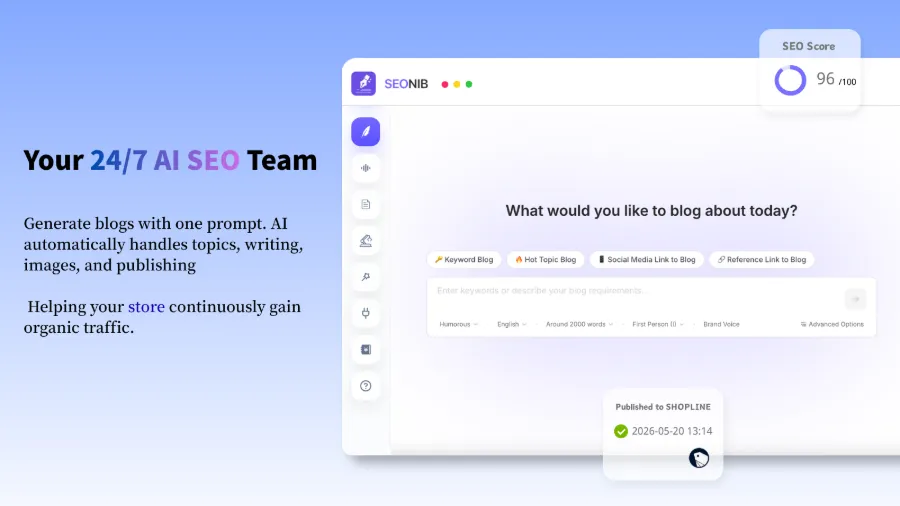
One detail I didn’t notice at first is that many tools only offer a “keyword → article” mode, but in practice many high‑traffic topics come from product pages, competitor content, or even user questions on social media. Later I found a solution that connects all those sources, for example the method described in Turn a product page into a blog with one click using SEONIB. You just drop a product link into the system, and it generates a buyer’s guide or tutorial‑style blog around that product. This week alone saved me at least three hours of topic‑selection time.
Step 2: From “generation” to “publishing,” reduce the process to zero manual intervention
Okay, topics are solved, now comes the main part. Even with a topic, I still had to manually write, find images, configure SEO metadata, set internal links, format, and finally upload to the WordPress backend. Each article required opening two editors—one for the AI‑generated web page and one for WordPress—then copy‑pasting. That alone ate ten hours a week.
Later I chained the whole process into a pipeline. Starting from AI‑generated article, the system automatically configures images (matched from a media library), internal links (suggested based on existing articles), SEO metadata (custom title, description, slug), then pushes the draft directly to the WordPress site’s draft folder or publishes it outright. Once a publishing frequency is set, the system runs automatically on that schedule; I only need to glance at the content calendar once a week.
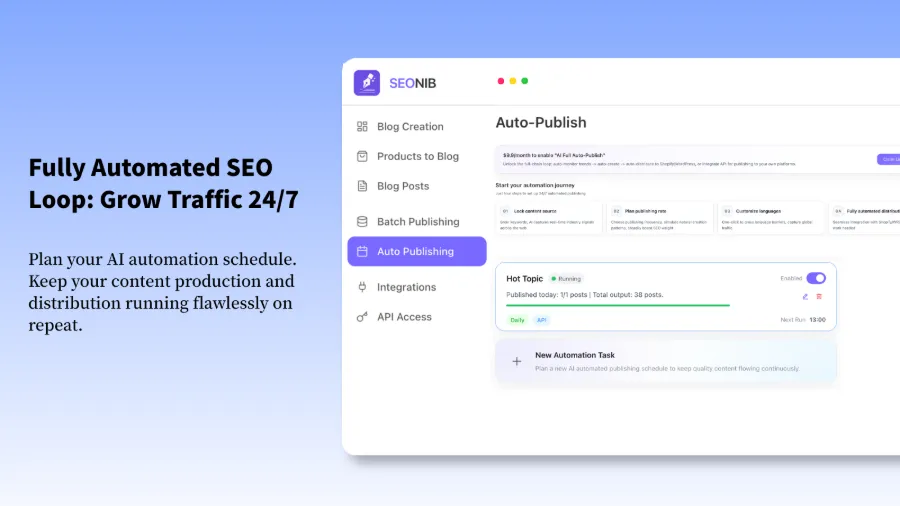
Specifically, I set it to produce one article per day, and it ran continuously for 30 days with almost no manual intervention. If you want to see exactly how to configure auto‑publishing, check out the AI Auto‑Publish Setup Guide—it details how to create connections and schedule posts in WordPress. I’m using SEONIB to drive the whole process; it not only generates articles but also handles internal‑link rules, external‑link strategies, and image pairing automatically. After setting a schedule once, it ran for 30 days without any further action.
The biggest benefit of automation isn’t just speed—though it’s certainly faster—it’s stability. Google’s crawler prefers sites with a regular update rhythm. I’ve noticed that since I started updating consistently, impressions have gradually risen and crawl frequency has clearly increased. This stability is hard to maintain manually because you’ll always forget or be lazy on some days. Consistent output itself significantly boosts Google’s trust score.
The video demonstrates syncing a blog to Shopify; the process is identical if you use WordPress + WooCommerce. If you want a systematic overview of all configuration details, check the Help Docs, which cover the entire flow from connection to scheduling.
Step 3: Maintenance & Iteration—Automation Isn’t “Set and Forget”
Automation felt great at first, but a month later, when I looked at the data, I saw that some auto‑generated articles had low keyword density and natural traffic didn’t meet expectations. After a careful audit, the issue turned out to be an outdated keyword pool—I initially imported only a batch of broad terms (like “SEO tools”) and didn’t timely add long‑tail keywords and sub‑topics. This is a common bottleneck: keyword libraries don’t evolve on their own.
So roughly every 30 days I review the content calendar, see which keyword directions are performing well and which are declining, and adjust the input keyword pool accordingly. I also batch‑update underperforming old articles—letting AI rewrite or add paragraphs based on new keywords, then push the updated version to WordPress to overwrite the old one. This maintenance is far easier than editing everything manually. For a systematic way to build blog writing capability, see Blog Writing from Beginner to Mastery.
Another often‑overlooked point is “topic clusters.” Most automation tools write articles without considering topic clusters, resulting in each post standing alone and failing to build topical authority. I added a rule: the system generates a set of inter‑linked articles based on a single core theme—e.g., under the theme “Shopify SEO,” it automatically creates a series of articles about keyword research, page optimization, technical SEO, all linking to each other. This yields far better results than random topics. I use SEONIB to manage the iteration of these clusters; it can suggest new internal‑link relationships based on existing articles, reducing maintenance overhead.
FAQ
What prerequisites are needed to automate a WordPress SEO workflow?
At minimum you need a WordPress site with API access (basically the REST API). Most modern WordPress installations have the API enabled by default; you just need to generate an application password. You also need an external tool or platform that supports auto‑publishing and can connect to your site to push content.
Will automatically published content be flagged as spam by search engines?
If the content is low‑quality, highly duplicated, or lacks originality, it could be. However, if you feed the AI diverse data sources (keywords + reference links + social media trends), each generated article becomes a distinct piece of content and is usually not considered spam. The key is to control publishing frequency and ensure content uniqueness. I publish one article per day, never more than three, and haven’t encountered penalties.
How can I keep AI‑generated articles aligned with my brand voice?
Most automation tools let you set brand context: brand name, common terminology, reference style, preferred sentence structures, etc. I spent two hours early on gathering brand assets (product descriptions, FAQs, audience personas), and after that the generated articles consistently matched the desired style without extra tweaking.
Will the formatting automatically adapt when syncing to multiple platforms?
Not always. Some systems can automatically convert to the target platform’s format (e.g., WordPress block editor, Shopify Rich Text), but others require manual adjustments. I usually publish only on WordPress and use summary links on other platforms to avoid formatting issues.
Is there an automatic alert system if a schedule fails?
It depends on the tool. The platform I use supports email and Slack alerts; it sends a notification if an article fails to publish twice in a row. I recommend enabling such alerts because API connections can occasionally time out. You can set a manual check frequency to once a week.
Share Article