
How I Publish 100 Articles Every Month
In the past I wrote, uploaded, and optimized SEO for articles manually every day, and I could only produce at most 30 articles a month, often missing deadlines. Later I rebuilt the content workflow—automating everything from topic selection and generation to publishing. Now I consistently output 100 articles a month, each SEO‑optimized and synchronized across multiple platforms. This article shares the complete design of that system.
Building a Sustainable Topic Pool – Solving the “What to Write” Problem
The hardest part of content production isn’t writing; it’s continuously finding worthwhile topics. Early on I often spent half a day picking topics, only to discover that the topics I wanted to write about either had too low search volume or were too competitive. Later I built an automated topic pool: using keyword tools’ trend monitoring and keyword mining functions, I generate 20–30 candidate topics in batch each day. I set up several priority tags—high‑traffic topics, long‑tail topics, low‑competition topics—and then automatically score and rank them based on current content gaps.
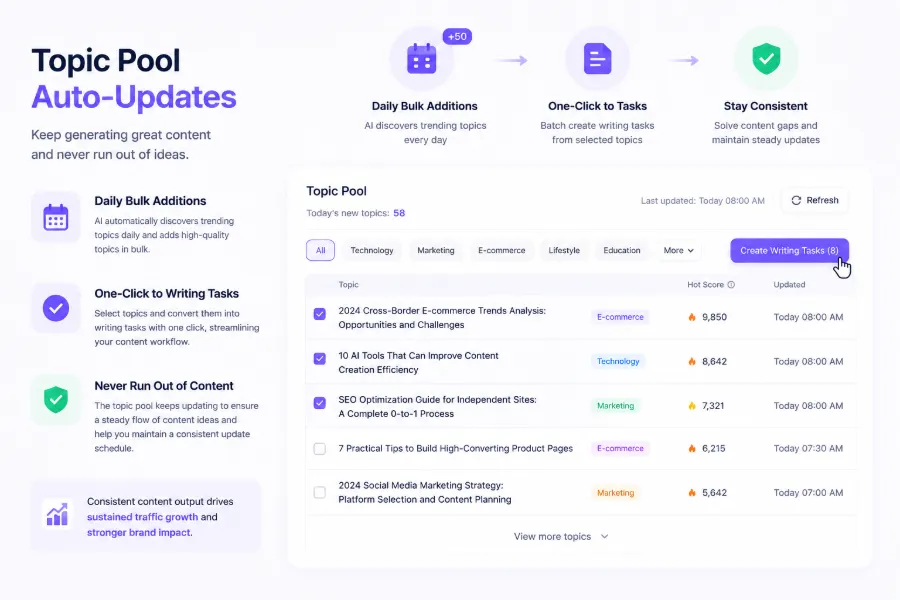
In practice, I connect trend‑monitoring tools (e.g., Google Trends, industry RSS aggregators) to the topic system, which automatically scans for new hot topics and low‑competition keywords each day. According to my configuration, 25 new topics are added daily, accumulating over 750 potential topics per month. The reserve pool always stays above 500; I only need to spend 15 minutes each week manually reviewing and discarding clearly unsuitable items, while the rest are turned into writing tasks with a single click. Since then I’ve never faced the “What to write today?” procrastination.
The impact of this topic pool on content quality has been far greater than expected. I used to think quality problems originated in the writing stage, but I later found that many well‑written articles performed poorly because the topic direction was off. With a data‑driven topic pool, each article already has a traffic forecast before it goes live.
Using AI to Batch‑Generate High‑Quality Drafts
Once the topic pool is in place, the next bottleneck is writing speed. I once tried fully automated generation without any review; after three months, many articles became homogenized, were penalized by search engines, and rankings plummeted. That lesson taught me that AI‑generated content must go through a human spot‑check and minor revision process.
My current workflow is: first define a unified writing template. The template fixes the headline structure (primary keyword + modifier), paragraph pattern (problem/scene → solution → data evidence → summary), and SEO fields (meta description, alt text, slug). Then I feed the preset keywords and reference material in batch to a large language model, keeping each article’s generation time under three minutes, producing 20 articles simultaneously. I mainly use ChatGPT for drafts, occasionally using Gemini for content diversity comparison.
After templating and batching, I generate 30 drafts per day, and human review takes no more than an hour—I spot‑check 10 % of the articles paragraph by paragraph, while the rest get a quick glance at headlines and key data for obvious errors. For repetitive sentences or brand‑tone deviations in AI output, I randomly rewrite a few lines to ensure differentiation. In choosing tools, I also consulted the 10 Popular AI Content Marketing Tools review, but ultimately settled on this template‑plus‑spot‑check configuration based on my habits. If you also want to deeply customize templates, see the Official Documentation with More Configuration Details.
Automated Publishing and Multi‑Platform Synchronization
After draft review, publishing is the most time‑consuming step. Previously I had to log into each platform’s backend, manually upload articles, adjust formatting, and set SEO—publishing 100 articles took at least 20 hours. Now the entire process is compressed to under two hours.
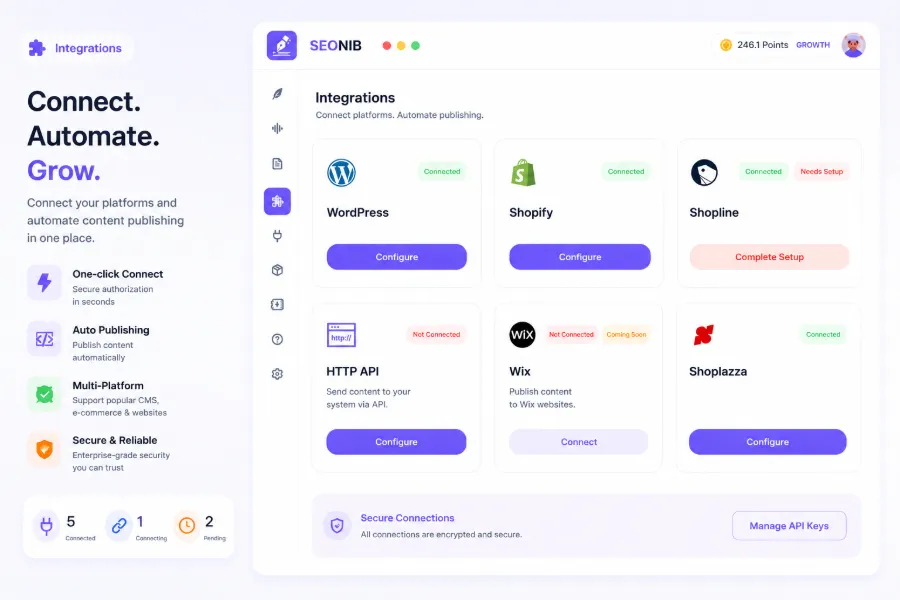
The core change was introducing an automated publishing tool—SEONIB. Its principle is simple: one click publishes and automatically syncs to all connected platforms. I’ve integrated Shopify, WordPress, and SHOPLINE; after generation, articles are pushed directly to these platforms’ backends without logging in or copy‑pasting. Connection setup requires a one‑time authorization; I found the How to Connect Third‑Party Sites guide in the documentation, and following it once got everything working.
Once the sync workflow stabilized, I discovered an unexpected benefit: multi‑platform sync not only saves time but also accumulates search weight across platforms. Shopify and WordPress have different ranking performances on Google; the same article is indexed at different speeds and ranks on each, ultimately creating complementary traffic. For Shoplazza users, SEONIB also supports—SEONIB is Now in the Shoplazza App Store, ready for direct download.
Below is a demo video of the sync workflow, showing the full chain from generation to publishing:
In practice, occasional issues arise. For example, a SHOPLINE API update once caused image alt‑text loss for all pushed articles. The fix was to temporarily disconnect and reconnect, then add a format‑validation step—publish a test piece first to verify formatting before batch pushing.
Content Scheduling and Automated Operation
After all stages are connected, the final step is to let content run automatically on schedule. I set up a content calendar that publishes three articles per day, 21 per week, roughly 90–100 per month. AI follows the schedule to generate and publish automatically, so I never need to log in daily.
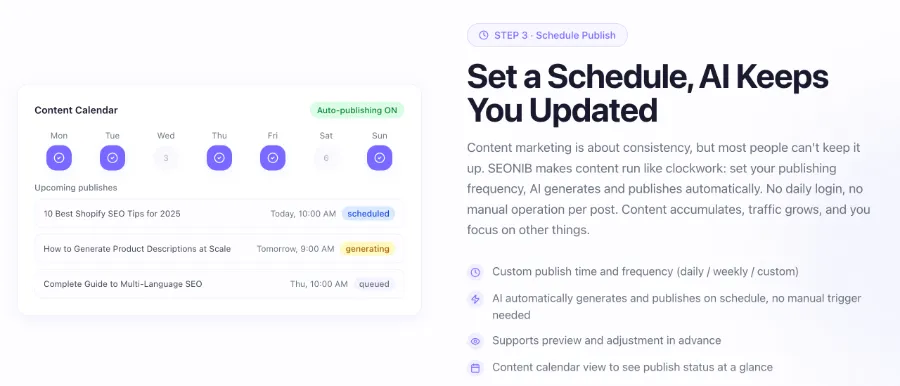
This scheduling feature has been running for three months, updating daily with zero manual intervention. I currently use SEONIB for daily publishing; its built‑in scheduled tasks and calendar view let me see the next week’s publishing status at a glance—what’s generated, queued, or failed and needs manual handling.
Long‑term operation still requires maintenance. Each month I spend half an hour reviewing Google Search Console index data, marking articles older than three months with no traffic as “needs optimization,” and regenerate them using the original template. Expired or duplicate topics are also cleaned up promptly. For content health checks, refer to the SEO Ultimate Guide section on content audits.
This system—topic selection, generation, review, publishing, and scheduling—went through at least two or three iterations before stabilizing. The biggest takeaway is that quantity and quality are not contradictory; the key lies in topic strategy and template standardization, not solely on manual review. The search‑weight stacking effect from multi‑platform sync was also something I hadn’t anticipated.
FAQ
Can I guarantee content quality while publishing 100 articles a month?
Yes, provided you choose the right topics and have a spot‑check mechanism. Of my 30 daily drafts, only 10 % undergo sentence‑by‑sentence review; the rest get quick grammar and fact checks. As long as the topic pool filters well and the template is sound, AI‑generated content quality stays within an acceptable range. I conduct a full content audit each month to eliminate low‑ranking articles.
How do I avoid duplicate or homogenized articles?
The key is differentiated topics. In my topic pool, a single primary keyword generates at most two articles, covering “operational steps” and “case comparisons” respectively. Additionally, I add random variations in the template—presenting the same data with different phrasing to avoid identical sentence structures.
Can someone without a technical team implement this workflow?
Absolutely. I’m not a developer; the entire workflow uses off‑the‑shelf AI tools, content management platforms, and automation publishing tools—no coding required. The most complex part is configuring connections and authorizations; following the help documentation once gets you set up.
Which e‑commerce platforms support automatic synchronization?
So far I’ve tested Shopify, WordPress, SHOPLINE, and SEONIB also integrates with Shoplazza. The sync logic is essentially the same across platforms: after API authorization, articles are pushed automatically. Check the tool’s official changelog for the latest supported platforms.
Share Article


