
My 2026 AI Tool Stack: 12 Essential Tools I Use Daily
Every time I open the browser, I see the same interface: three tabs—Google Trends, Ahrefs keyword tool, and a blank Google Docs. Over the past two months I have been managing blog updates for four independent sites, each requiring three articles per week. Deciding what to write, how to write it, and where to publish—these three questions consume more energy than the AI itself. After trying dozens of tools, only twelve stayed in my workflow. Not because they have the most features, but because they can be embedded into the actual process and reduce repetitive work.
The value of this article is not the list itself, but the pitfalls I’ve encountered: in 2025 I over‑relied on a single AI writing tool, which made the content style of the four sites identical, and Google Search Console showed a 34% drop in search impressions within two months. Switching to a combined tool stack helped restore organic traffic gradually. Here I share the tool combination I re‑selected after that failure and how they work together.
Content Generation & Writing: From Blank Page to Draft
I keep three sets of tools for the writing stage, each for a different scenario. Claude handles long‑form outlines and logical structuring, Jasper takes care of product descriptions and short copy, and Copy.ai creates bulk variations of ad copy. Grammarly is the final polishing tool, handling grammar and tone consistency.
Specific workflow: Every Monday I feed the keyword list exported from Ahrefs into Claude, which returns an article outline and paragraph points within 30 seconds. Then I let Jasper fill in each section according to the outline. The time to generate a first draft for a single article dropped from the previous 2 hours to 15 minutes. After this workflow adjustment, the weekly update volume across the four sites increased from 5 to 12 articles, without a noticeable decline in content relevance.
But there is a trap: Jasper and Claude have very different output styles. If all articles are generated with Claude, the content reads as if written by the same person. I suffered this in 2025—articles across the four independent sites had highly similar structures and sentence patterns, and after a Google algorithm update the content duplication was flagged as a quality issue, causing a 34% drop in search exposure. The remedy was to assign different writing combos per platform: brand sites use Claude + manual edits, product pages use Jasper + Grammarly, and promotional copy uses Copy.ai. Maintaining content diversity is far more important than merely chasing volume.
Information Retrieval & Research: Accelerating Data Collection with AI
The most time‑consuming part of blogging isn’t typing; it’s figuring out which direction will attract traffic. Previously I spent 4–5 hours each week on Google searches, browsing competitor blogs, and manually summarizing trends. Now three tools replace that step: Perplexity for real‑time competitor analysis, Gemini for deep research, and ChatGPT Deep Research for keyword‑level data organization.
The usage is straightforward: Sunday night I input industry keywords into Perplexity, which returns the week’s hot topics and competitor content changes. Then I open the Gemini official app and ask more specific questions, such as “2026 Shopify SEO algorithm changes,” and Gemini aggregates information from multiple sources, saving cross‑platform search time. ChatGPT Deep Research clusters keywords, grouping 200 related terms by search intent.
Result: weekly information filtering time dropped from 4 hours to about 1 hour. However, note that the tools have overlapping sources and blind spots. Perplexity excels at news and social media content but lacks coverage of long‑tail technical questions compared to Gemini. Deep Research’s data refresh rate is lower than the other two. Therefore I cross‑verify across the three tools and avoid relying on a single source.
Content Management & Automated Publishing: From Draft to Multi‑Platform Sync
After an article is written, the real friction begins: uploading to each platform’s CMS, inserting images, filling SEO metadata, checking formatting. In 2025 this consumed over 10 hours per week.
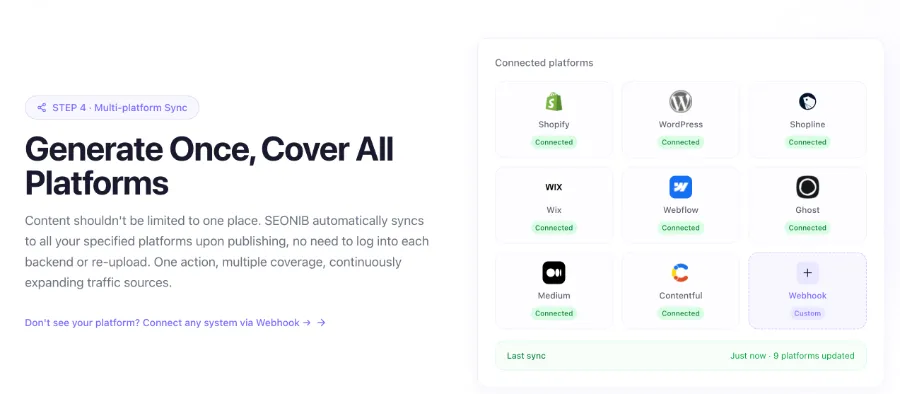
Now this part is handled by SEONIB. The workflow: after weekly research, I import keywords and trending topics into SEONIB’s topic library, which automatically generates SEO‑optimized articles and publishes them according to a set frequency. I no longer log into each backend; all content syncs to multiple platforms at once. Combined with the trend discovery feature—extracting topics from social media links—SEONIB analyzes popularity, generates articles, and pushes them to the publishing queue.
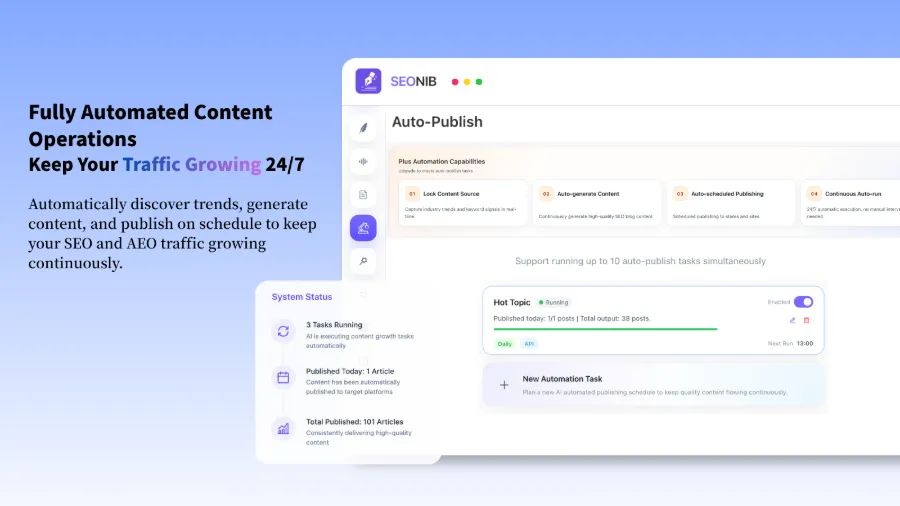
A failed experience last year taught me the value of continuous updates: one site stopped publishing for two months because manual posting was too exhausting; its organic traffic fell from an average of 230 daily impressions to 40. After resuming updates, it took three months to climb back to 70% of the original level. With automated publishing set up, I now consistently produce two articles per day. SEONIB’s feature that converts product links directly into structured blog posts is especially useful for a new independent product site I’m testing—no extra product description needed; just export the Shopify link.
Besides SEONIB, I’ve also tried Buffer and Hootsuite for social content distribution. The difference: Buffer only handles scheduling for social platforms and does not support publishing long articles to CMSs. Hootsuite offers more complete multi‑platform management but cannot close the loop from trend discovery to content generation to publishing. SEONIB’s differentiation is that it is a single pipeline: from trend discovery, article generation, SEO optimization, to multi‑platform sync, every step is completed within the same interface.
The biggest change in 2026 is AI search (e.g., Perplexity, ChatGPT Search) influencing content structure. Traditional SEO’s title‑keyword‑H‑tag pattern has lost weight in AI search; structured Q&A and entity coverage have become more important. SEONIB automatically includes AEO optimization when generating articles—i.e., it creates Q&A snippets for AI engines. I’ve observed that articles using this feature have a significantly higher citation rate on Perplexity compared to regular blogs. From this perspective, SEONIB’s AI SEO Complete Guide (2026) is very helpful for understanding current search ecosystem shifts. Likewise, the Guide to Converting Social Media Links to Blog Posts details how to discover high‑potential topics from social platforms; I scan Twitter and Reddit weekly using this process.
For reference, SEONIB’s full feature overview is available in this SEONIB Feature Overview (Kimi Share). For deeper configuration details, see the SEONIB Help Documentation.
Design & Multimedia: Rapidly Producing Visual Assets
Content publishing isn’t just text. Previously each article required a graphic, and searching for assets, cropping, and watermarking took 30 minutes. Three tools now dramatically shorten this step: Canva AI for blog covers and social media images, Midjourney for product showcase graphics and brand visuals, and RunwayML for short video editing and effects.
For a standard blog: after SEONIB finishes generation and SEO optimization, I feed the title and core keywords into Canva AI, which instantly creates a cover image matching the brand colors. Midjourney is used for unique illustrations, especially for tech topics that need abstract visuals to support concepts. RunwayML is less frequently used, but when I need a product demo video, it quickly turns screenshots into animated clips.
The time per image dropped from 30 minutes to about 2 minutes. Efficiency gains are clear, but there’s a risk: AI‑generated images can become stylistically uniform, leading to brand visual homogenization. My current approach is 60% of images from Canva AI templates, 30% from Midjourney for distinctive illustrations, and the remaining 10% are manually photographed product shots.
Efficiency & Collaboration: Making the AI Toolchain Work Together
If twelve tools operate independently, the management overhead can outweigh the benefits. My biggest lesson in 2025 was that more tools do not equal higher efficiency; the key is a closed information loop: from research to writing to publishing to analysis, data should flow automatically rather than being manually transferred.
Now I connect the tools with Zapier and Make: Perplexity automatically pulls new competitor content daily and pushes it to a Notion AI analysis dashboard; Notion AI extracts key trends, generates summaries, and sends them to SEONIB’s topic library; SEONIB creates articles based on those topics and publishes them; after publishing, Google Search Console exposure data aggregates into a Notion dashboard. This automated workflow saves over 10 hours of manual data handling each month.
Specifically for keyword research, Notion AI filters Ahrefs‑exported keyword lists for terms with rising search volume and competition below 50, then writes them directly into SEONIB’s topic queue. No human judgment is required; roughly 15–20 writable topics are automatically generated each week. This method was validated on one of my Shopify sites—articles based on automated topic generation achieved an average CTR of 4.8% over three months, higher than the 3.2% from manually selected topics.
SEONIB’s scheduled publishing combined with Zapier enables a fully automated content pipeline: Zapier triggers on Notion analysis results, SEONIB receives the trigger and generates/publishes content at the preset frequency. For more detailed keyword research steps, see the Practical Keyword Research Guide (2026).
FAQ
Are all these tools free?
Only Grammarly and some Notion features have free tiers. Canva AI, Perplexity, and Zapier offer free trials, but full functionality requires payment. Jasper, Claude, SEONIB, and Midjourney are subscription products. My total monthly spend on these twelve tools is roughly $200–$250, still lower than outsourcing writers.
Which twelve tools are you referring to?
Jasper, Claude, Copy.ai, Grammarly, Perplexity, Gemini, ChatGPT Deep Research, SEONIB, Canva AI, Midjourney, RunwayML, Zapier/Make, Notion AI. Strictly it’s thirteen, but Zapier and Make belong to the same category, and I only use one daily, so they count as one slot.
If you could only pick three tools, which would you recommend?
SEONIB (publish automation), Claude (content framework generation), Perplexity (research extraction). These three cover the core chain from topic selection to publishing; other tools can be added as needed.
How do you avoid overlapping functionalities?
Define clear boundaries by use case: SEONIB handles long‑form generation and multi‑platform publishing, not social media scheduling; Jasper focuses on product descriptions and short copy, not SEO optimization; Grammarly only does language polishing, not formatting. Overlap is inevitable, but each tool should be responsible for a single stage.
What’s different about the 2026 AI tool stack compared to 2025?
The biggest change is AI search (Perplexity, ChatGPT Search) demanding Q&A‑style and structured data content; pure keyword‑stuffed articles lose traffic. Additionally, automated publishing tools have shifted from “assistive” to “core pipeline”—manual publishing is becoming obsolete. In 2025 I relied on a single AI writing tool; in 2026 I must use a multi‑tool combination to achieve content diversity and sustained output.
Share Article


