Generate a Purchasable Blog Page from a Product Link with One Click — My Practical Record and Tool Breakdown
Every time I launch a new product, my process is basically fixed: open the editor, manually write a product description, copy the purchase link, adjust the formatting, then log into each platform and paste it again. The whole thing takes more than an hour, and the style across platforms isn’t consistent, looking like three different people wrote it. Later I discovered that by just entering a product link, AI can instantly generate an SEO article with a purchase card, and even publishing is automatic. This isn’t a pie‑in‑the‑sky concept; I’ve been using it for months, and here I’ll break down the entire workflow and discuss why “purchasable” is more worthwhile than you might think.
Why Turn a Product Link into a Blog?
Manually writing a product blog normally takes 1–2 hours. That doesn’t even count the fragmented tasks of switching back‑ends, copying image URLs, checking SEO titles, etc. If you’re handling three or four products at once, just writing blogs can consume most of a workday.
Worse still, most product pages aren’t search‑engine‑friendly. A product page usually has only one image, a short description, and a price; if a user clicks through but doesn’t buy immediately, they’re basically lost. A blog built around the product can cover long‑tail keywords like “What scenarios is X product suitable for?” or “How to pair X with Y” — terms that product pages can’t target at all.
Turning a product link into a blog essentially gives your product page a traffic pipeline from search engines. I’ve tested this before: the same product’s pure product page generates far less organic traffic than when it’s paired with a supporting blog. If you’re not sure whether there’s search demand for your product, check out this practical guide on how fast to validate product search demand; a quick test will clarify the direction.
Of course, manually writing blogs has its advantages: you have full control over tone and details. The problem is that it’s hard to do at scale. Two blogs a week is already the limit for many people, let alone keeping each article’s structure and format consistent.
One Link, One Click, AI Instantly Produces a Professional Blog
When I first tried this feature, I wasn’t expecting much. The operation turned out to be simpler than imagined: paste the product link, wait a minute or two, and a complete blog appears—title, body, SEO description, keywords all generated automatically. The whole process takes about 3–5 minutes, at least ten times faster than writing manually.
Specifically, I use SEONIB, which parses the product name, description, and features in the background, then automatically generates a fully structured SEO article. It supports 40 languages, making it very useful for cross‑border sellers.
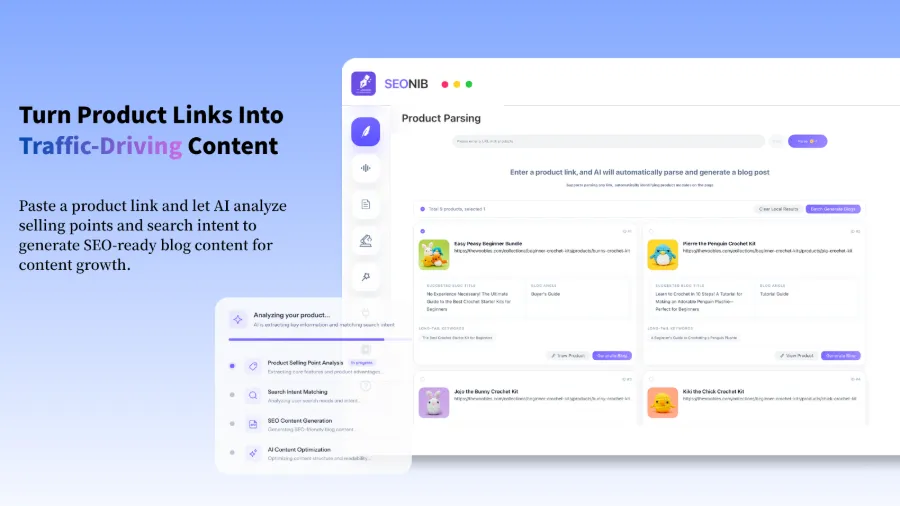
What surprised me most was that the generated blog isn’t the templated “Product A is great, buy now” style; it actually contains scenarios and logical, practical content. For example, for a Bluetooth headset, AI might write an article titled “Comparison of Noise‑Cancelling Headsets Perfect for Commuting.” It reads naturally. Occasionally, it may produce a headline that’s a bit exaggerated or an angle that’s off, but a quick manual tweak fixes it, saving far more time than starting from scratch.
For a more detailed walkthrough of this process, see the guide “One‑Click Turn Product Page into Blog with SEONIB”, which includes screenshots and step‑by‑step instructions.
Purchase Card Embedded Automatically in the Blog, Readers Click and Pay
A blog alone isn’t enough; the key is how readers buy after reading. If you only place a plain text link, most people won’t click—it they either close the page or search elsewhere. That’s the biggest difference between a “purchasable” blog and a regular one.
In the generated article, AI automatically embeds a clickable product card within the body. The card includes the product image, price, and a purchase button, allowing users to click through or even order directly without leaving the blog page. When I first saw this feature, I thought: this is the shortest possible path from traffic to conversion.
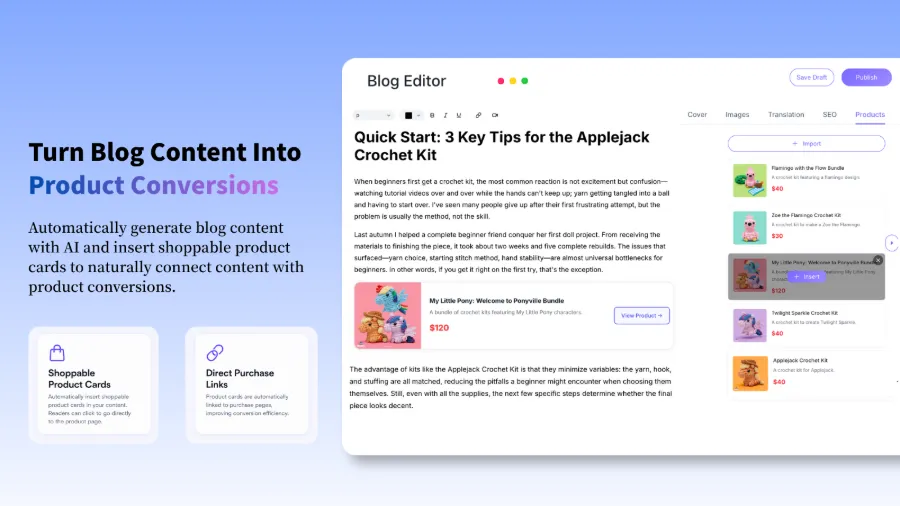
According to SEONIB’s internal data, blogs with automatically embedded purchase cards see an average click‑to‑conversion rate increase of about 30% compared to plain text links. This is easy to understand: the card is visually prominent and information‑rich, naturally drawing users’ attention. In contrast, a blue text link in a paragraph is far too easy to overlook.
There is a small caveat: the automatically generated card style is uniform. If your brand has specific visual guidelines, the card may sometimes clash with your site’s design. I once encountered a card whose font size didn’t match the rest of the page; I fixed it by adjusting the style in the backend. Overall, the benefits far outweigh the drawbacks, but you should allocate a bit of time for fine‑tuning.
For real‑world results in a standalone site scenario, check out the detailed analysis “Turning Product Links into SEO Blogs that Continuously Attract Organic Traffic”, which includes more concrete data.
One‑Click Publishing to Your Site, Multi‑Platform Sync No Longer Requires Manual Work
After content generation, the biggest fear is still having to log into each backend to publish. In the past, I kept switching between platforms; sometimes WordPress was updated while Shopify and Shopline were forgotten, resulting in inconsistent content and outdated information for users.
Now you can set the target platforms directly in the tool—supporting Shopify, WordPress, SHOPLINE, and over ten other major site‑building systems. After generation, a single click pushes the content to all selected platforms, eliminating the need for manual operations. If you encounter connection issues, refer to the help documentation for a list of supported platforms and connection steps.
For the specific SHOPLINE connection workflow, see the guide “How to Connect Your SHOPLINE Site to SEONIB”, which saves you from getting stuck at the first step.
That said, multi‑platform sync isn’t perfect. I once faced a temporary error on a platform’s publishing API, so the content wasn’t pushed successfully; I only discovered it the next day. Therefore, after setting up sync, it’s still advisable to periodically check the backend for publishing status and not rely entirely on the automated process.
Set Up Automatic Publishing Schedule for Continuous Traffic Growth
With content ready and publishing solved, the next step is maintaining rhythm. The biggest issue with manual updates isn’t quality but frequency—most people can’t stick to a weekly schedule, and once you stop, search engine crawl frequency drops.
My current approach is to schedule three automatic blog posts per week. AI generates and publishes at the set frequency. Over a year, that accumulates roughly 156 original articles, each an SEO piece centered on a product. This cadence noticeably expands the site’s topical coverage; keywords that previously only the product page could rank for now have an additional content layer competing.
For the exact workflow and technical details of automatic publishing, see the Independent Site Daily SEO Content Publishing Playbook, which offers more specific strategies and configuration methods.
Of course, there’s a downside: after automatic publishing, the volume of content rises, but occasionally the generated article’s angle isn’t precise enough or doesn’t match current trends. I still manually review the content calendar each month, deleting or regenerating unsuitable articles.
FAQ
Q1: I only provide a product link—how does AI know what angle to write?
Yes. AI automatically parses the product name, description, and main features, then generates several writing angles such as tutorials, comparison reviews, or scenario recommendations. You can preview all options before generation and pick the most suitable one.
Q2: Are purchase cards automatically inserted into the generated blog? Do I need to set them up?
They are inserted automatically. AI embeds a product card in the body based on context, including price, image, and a purchase button. You don’t need to adjust HTML manually, but you can choose the card style in the backend (e.g., left‑aligned, centered, or inline within a paragraph).
Q3: Which platforms are supported? Can I publish directly from WordPress?
Supported platforms include Shopify, WordPress, SHOPLINE, WooCommerce, Bolt, and over ten other major site‑building platforms. WordPress can be connected directly and push content without manual copy‑pasting.
Q4: How long does it take to generate a blog? Can I preview it beforehand?
Generation takes about 1–3 minutes. After generation you can preview the title, summary, and body in the content calendar, confirm everything looks good, and then publish or schedule it.
Q5: Is this type of blog SEO‑friendly? Do I need to further optimize keywords?
The system includes built‑in SEO optimization, generating standard title tags, meta descriptions, H1 structures, and keyword placement. However, if your industry has specific terminology or brand‑specific terms, it’s recommended to configure brand context in the backend so AI prioritizes those terms, resulting in more precise output.
Share Article